

Linux · Sound & Video
PiTiVi
PiTiVi is a free, open-source, non-linear video editor for Linux built on GStreamer with a clean GNOME-integrated interface.
- Lizenz
- LGPL-2.0+
- Aktuelle Version
- 2023.03 (26. März 2023)
- Entwickler
- The Pitivi Team
- Installationen
- 1,958 (Flathub, 30 Tage)
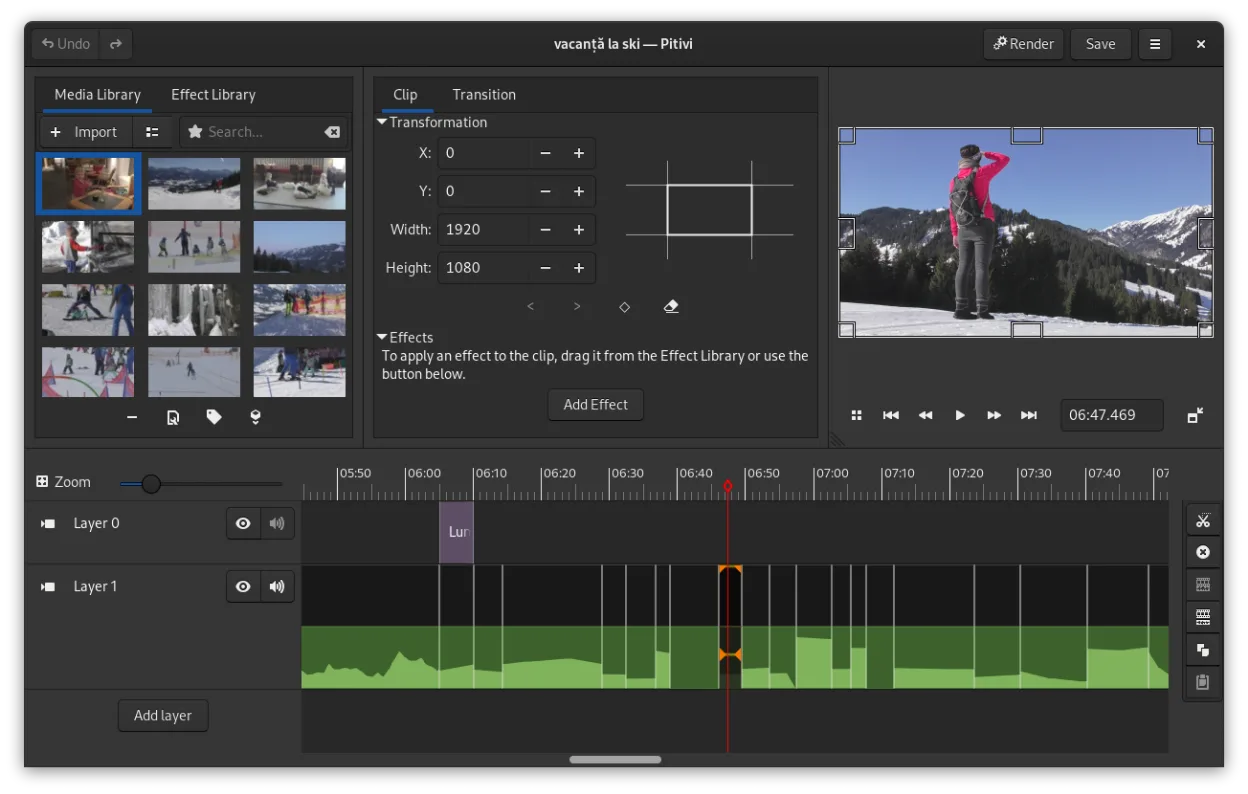
Was ist PiTiVi?
PiTiVi is a non-linear video editor for Linux that leverages the GStreamer framework to support a wide range of formats. Developed with support from the GNOME project and Collabora, it has evolved since the late 2000s into a stable, well-integrated desktop application. Though not as feature-rich as professional NLEs, it's actively maintained and benefits from solid multimedia backend support.
It’s best suited for hobbyists, educators, and semi-professionals who want a lightweight, intuitive editor without complex workflows. The interface is designed around usability and efficiency, making it accessible for beginners while still offering timeline precision and keyframe animation for more advanced users. It integrates well with GNOME but runs fine on other desktops.
Compared to Adobe Premiere or Sony Vegas, PiTiVi feels simpler and less customizable, but it’s faster for basic to mid-level edits. Unlike Pinnacle or Ulead tools, it doesn’t rely on wizards or templates. Its non-modal workflow and playhead-centric timeline offer a different, more precise experience than Windows Movie Maker, though power users may miss advanced color grading or multicam support.
Ideal für: Users who want a fast, simple video editor for basic to intermediate projects on GNOME-based Linux systems.
Wichtige Funktionen von PiTiVi
- Non-linear editing with a framerate-independent timeline
- Supports any format handled by GStreamer
- Keyframe animation for effects and filters
- Ripple and roll editing for efficient timeline adjustments
- Custom aspect ratios, framerates, and render presets
- Crossfades and SMPTE-standard transitions
- Detachable UI panels for multi-monitor setups
- Non-modal editing workflow with playhead-centric design
Vorteile
- Lightweight and fast startup
- Clean, intuitive GNOME-style interface
- No import step — works directly with media files
- Stable performance with minimal crashes
- Good for quick cuts, trimming, and simple effects
Nachteile
- Limited effects and transitions compared to professional NLEs
- No multicam or advanced color correction tools
- Smaller community and fewer tutorials
- Occasional rendering issues with complex projects
Windows-Programme, die PiTiVi ersetzt
 Avid Liquid
 Pinnacle Studio
 Sony Vegas
 Windows Movie Maker
 Ulead VideoStudio
 Adobe Premiere
PiTiVi unter Linux installieren
flatpak install flathub org.pitivi.Pitivisudo apt install pitivisudo apt install pitivisudo dnf install pitivisudo pacman -S pitivisudo zypper install pitiviTipps für Windows-Umsteiger
Coming from Premiere or Vegas, expect fewer effects and no project bin import — PiTiVi uses a file browser instead. Most common keyboard shortcuts (like J/K/L for playback) aren't supported; use space for play/pause and arrow keys for frame-by-frame navigation. The ripple edit tool saves time when adjusting clips. Work in stages: edit first, then render. Avoid very large projects until you're familiar with its limits.
Neueste Versionen
- 2023.03 —
This release adds the following features: - Resurrect the autoaligner which allows aligning two or more clips based on their audio, at the click of a button. - More precise audio waveforms, when you look at them. - Seek automatically to the start of the…
- 2022.06 —
This release adds the following features: - Object tracking and blurring. - Beat detection and snapping clips to detected beats. - Title clip text border and shadow. - Allow maintaining aspect-ratio when resizing clips. - Added Source blending mode. - Easier…
- 2021.05 —
This release adds the following features: - Clips in the Media Library can be tagged. - Drag a keyframe vertically or horizontally by pressing Ctrl. - Keyboard shortcuts to seek to the previous/next marker.
- 2021.01 —
This release adds the following features: - The Render dialog has been further simplified. - Lots of bugfixes.
PiTiVi: häufige Fragen
Does PiTiVi support MP4 and MOV files?
Yes, PiTiVi supports MP4, MOV, and most common formats through GStreamer. If your system has the right codecs installed, it will play and edit them without conversion.
Can I install PiTiVi on Ubuntu or Fedora?
Yes, PiTiVi is available in the official repositories for Ubuntu, Fedora, Debian, openSUSE, and Arch. You can also install it via Flatpak from Flathub for the latest version.
Is PiTiVi good for YouTube editing?
Yes, for basic to moderate YouTube content like vlogs, tutorials, or gameplay highlights. It handles HD export and crossfades well, but lacks auto-captioning or advanced audio tools.
Does PiTiVi have keyframe support?
Yes, you can keyframe properties like opacity, scale, and position. It supports animation of effects and filters, though the interface is simpler than in Premiere or Vegas.
Aktualisiert am