

Windows · Science & Education
Die besten Linux-Alternativen zu SPSS
IBM SPSS is a commercial suite for social science statistics, data management, and advanced analytics, widely used in academic research.
Aktualisiert am
3 Linux-Alternativen zu SPSS
-

IBM SPSS Statistics is a commercial statistical analysis suite that runs on Linux workstations and servers.
-

PSPP is a free, open-source statistical analysis tool designed as a replacement for SPSS, offering similar features without cost or restrictions.
PSPP is a solid replacement for SPSS if you rely on core statistical functions and want to avoid licensing costs. It handles descriptive statistics, t-tests, ANOVA, regression, and factor analysis reliably, and its SPSS-compatible syntax means existing scripts often run with minimal changes…
Funktionsabdeckung75% -
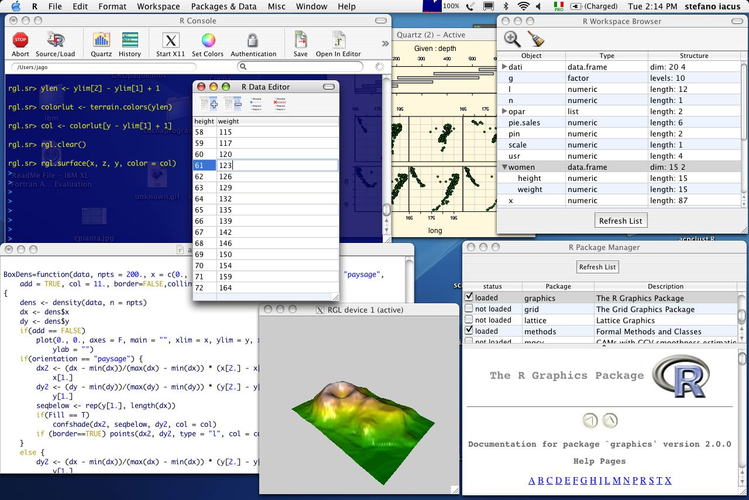
RKWard is a free graphical front‑end for the R statistical language, offering a point‑and‑click interface for data analysis.
RKWard is a reasonable replacement for SPSS if you're comfortable using R under the hood and prefer open-source tools. It covers basic to intermediate statistics—descriptive analysis, t-tests, ANOVA, and linear regression—through point-and-click menus, which helps ease the transition from SPSS…
Funktionsabdeckung65%


Was ist SPSS?
SPSS Statistics is a comprehensive suite for data management, advanced analytics, and multivariate analysis. It is the standard tool in social sciences, psychology, and market research. Researchers use it to clean datasets, run regression models, and generate publication-ready tables and charts for their studies.
The software is commercial and owned by IBM. It operates on a subscription or perpetual license model. Prices vary significantly based on the number of users and the specific modules required, such as data preparation, advanced statistics, or data mining. It is generally expensive for individual students or small research groups.
Many users seek Linux alternatives due to cost or institutional policies. Academic licenses can be hard to obtain or renew. Additionally, some researchers prefer open-source tools that avoid vendor lock-in. A native Linux solution ensures stability and allows for script-based automation without relying on Windows virtualization.
Was ein Ersatz für SPSS können muss
- Data management and cleaning
- Descriptive and inferential statistics
- Multivariate analysis (ANOVA, regression)
- Graphical output for reports
- Syntax/scripting support
- Import/Export of common data formats
Läuft SPSS unter Linux?
IBM SPSS Statistics does not have a native Linux version. It is a Windows-only application. While it might run under Wine or Proton, success is not guaranteed and can be unstable for complex statistical operations. There is no official web-based version for full functionality, though some cloud services may offer limited access. Most users stick to Windows or Mac for the official product.
Welche Alternative passt zu Ihnen?
PSPP is the closest direct alternative, as it supports the SPSS syntax and file formats, making it ideal for users who need to read existing .sav files. RKWard is a better choice if you prefer a visual, R-based environment for statistical analysis and plotting, but it does not read SPSS files directly. SPSS is listed for reference, but it is not a Linux-native solution.
Dateien und Gewohnheiten aus SPSS mitnehmen
Migrating from SPSS to PSPP is straightforward because PSPP reads and writes the native .sav file format. You can open your existing SPSS datasets in PSPP without conversion. If moving to RKWard, you will need to export your data from SPSS to a standard format like CSV or R data, then import it into RKWard. Syntax files (.sps) may need minor adjustments when moving to PSPP, as some commands differ slightly.
Direkter Vergleich
SPSS: häufige Fragen
Can PSPP replace SPSS for my thesis?
Yes, for most standard statistical tests. PSPP covers the core needs of social science research. However, verify that the specific advanced modules you use are supported, as PSPP is not a 100% feature-for-feature clone.
Is RKWard harder to learn than SPSS?
RKWard has a graphical interface, so it is not purely code-based. However, it is built on R, so you will eventually need to understand basic R scripting for complex tasks. It has a steeper learning curve than SPSS's point-and-click menus.
Will my SPSS graphs look the same in PSPP?
Not exactly. The plotting engines are different. The statistical values will be identical, but the visual style, fonts, and layout of the charts will differ. You may need to adjust settings to match your publication requirements.
Do I need to pay for PSPP?
No. PSPP is free and open-source software. You can download it from your Linux distribution's package manager or the official website without any cost or license fees.
Wie wichtig ist Ihnen SPSS?
Kennen Sie eine bessere Alternative? Alternative vorschlagen