
 NetBeansLinux
vs
Visual StudioWindows
NetBeansLinux
vs
Visual StudioWindows
NetBeans als Linux-Alternative zu Visual Studio
Aktualisiert am
Unser Fazit
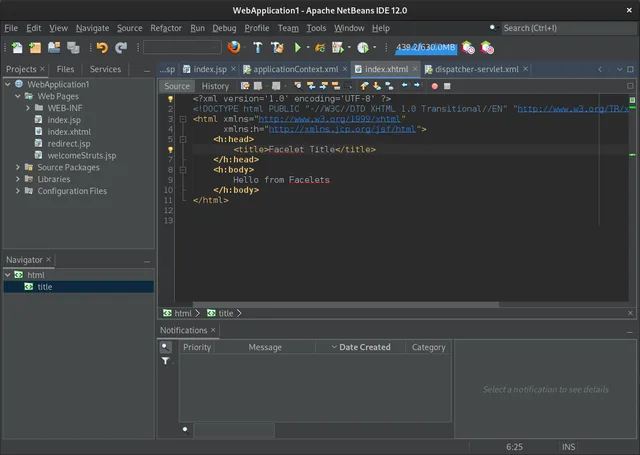
NetBeans is a solid, mature IDE for Java, JavaScript, and C/C++ development on Linux, but it is not a direct replacement for Visual Studio if your primary focus is .NET or C# development. While it offers excellent debugging, refactoring, and Git integration, it lacks native support for the .NET ecosystem. For developers working with Java, PHP, or C/C++, it is a capable, free alternative. However, C# developers should look toward Rider or Visual Studio Code with extensions, as NetBeans does not handle .NET projects natively. Choose NetBeans only if your workflow centers on its supported languages.
- Lizenz
- Apache-2.0
- Preis
- Kostenlos
- Aktuelle Version
- 31 (12. August 2026)
- Bewertung
- —
Was gleich funktioniert
- Integrated debugger and static code analysis tools
- Native Git version control integration
- Modular plugin architecture for extending functionality
- Built-in project management and build tool support (Maven, Ant, etc.)
- Customizable UI layout and keyboard shortcuts
Was anders ist
- No native support for .NET, C#, or Visual Basic
- Lacks the vast Visual Studio Marketplace extension ecosystem
- No integrated Windows Forms or WPF designers
- Different build system defaults (Maven/Ant vs. MSBuild)
- Smaller community focus compared to the massive VS user base
Ihre Visual Studio-Dateien öffnen
NetBeans cannot natively open or build Visual Studio solution (.sln) or project (.csproj) files intended for .NET or C# development. If you are working on C/C++ projects, you may be able to import source code and create a new NetBeans project, but build configurations and dependencies will need to be manually reconfigured. There is no direct file format compatibility for the core .NET workflow.
Von Visual Studio zu NetBeans wechseln – Schritt für Schritt
- Install NetBeans via your package manager or Flathub
- Create a new project in NetBeans matching your target language
- Import your source code files into the new project structure
- Configure your Git repository settings and remote origins
- Set up your build tools (Maven, Ant, or CMake) as required
- Adjust keyboard shortcuts and UI layout to match your preferences
Wichtige Funktionen von NetBeans
- Modulares Plug‑in‑System für Java, JavaScript, PHP, C\/C++
- Integrierter Profiler und Debugger
- Maven, Gradle und Ant Projektunterstützung
- JavaFX‑ und Swing‑GUI‑Builder
- Versionskontroll‑Integration (Git, SVN, Mercurial)
- Code‑Vervollständigung, Refactoring und statische Analyse
- Plattformübergreifende UI
- Umfangreiche Community‑Dokumentation
NetBeans unter Linux installieren
flatpak install flathub org.apache.netbeanssudo apt install netbeanssudo apt install netbeanssudo pacman -S netbeansHäufige Fragen
Can I use NetBeans for C# development?
No, NetBeans does not have native support for C# or the .NET framework. You will need a different IDE like Rider or Visual Studio Code with C# extensions.
Does NetBeans support Windows Forms?
No, it does not. NetBeans provides GUI builders for JavaFX and Swing, but not for Windows-specific UI frameworks like WinForms or WPF.
Is NetBeans free to use?
Yes, NetBeans is open-source software licensed under Apache-2.0 and is free to download and use.
5 weitere Alternativen zu Visual Studio
 Visual Studio CodeEin leichter, erweiterbarer Code-Editor, der Debugging, Git und viele Sprachen unterstützt.KostenlosFlatpakVisual Studio Code vs. Visual StudioMonoDevelopMonoDevelop ist eine Open‑Source‑IDE für .NET‑ und C#‑Entwicklung unter Linux.Open SourceKostenlosMonoDevelop vs. Visual Studio
 EclipseEclipse ist eine kostenlose, Java-zentrierte integrierte Entwicklungsumgebung, die nativ auf Linux läuft.Open SourceKostenlosFlatpakEclipse vs. Visual Studio
 KDevelopKDevelop ist eine kostenlose, pluginbasierte IDE für KDE, die C++, Python, PHP und weitere Sprachen mit…Open SourceKostenlosFlatpakKDevelop vs. Visual Studio
 GeanyGeany ist eine leichte, schnelle IDE, die von Haus aus viele Sprachen und Plugins unterstützt.Open SourceKostenlosFlatpakGeany vs. Visual Studio