
 NotepadqqLinux
vs
UltraEditWindows
Notepadqq als Linux-Alternative zu UltraEdit
Aktualisiert am
Unser Fazit
Notepadqq is a solid free alternative for basic to intermediate editing, but it is not a direct functional match for UltraEdit. It handles large files and offers extensive syntax highlighting, which covers core needs. However, it lacks native hex editing and the robust macro system found in UltraEdit. If you rely heavily on hex manipulation or complex scripted macros, Notepadqq will feel limiting. For users primarily needing a fast, scriptable text editor with good language support on Linux, it is a capable choice, but expect to lose some advanced power-user features.
- Lizenz
- GPL-3.0
- Preis
- Kostenlos
- Aktuelle Version
- 2.1.1 (4. Juli 2026)
- Bewertung
- —
Was gleich funktioniert
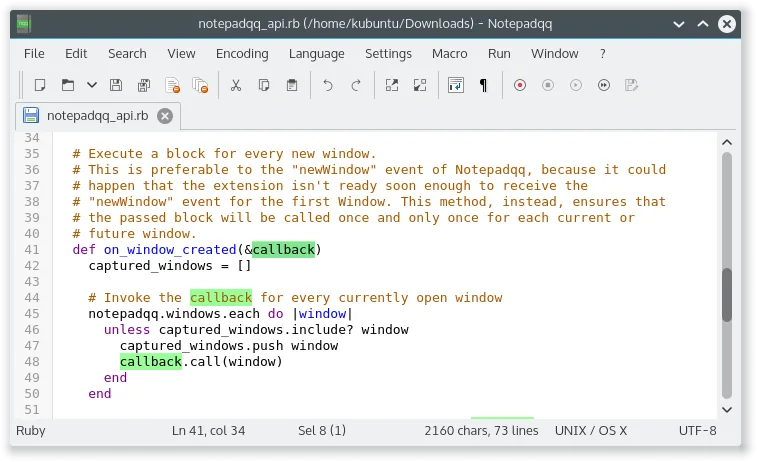
- Supports syntax highlighting for over 100 programming languages
- Handles large text files efficiently
- Includes regular expression search and replace capabilities
- Offers multi-cursor editing for faster text manipulation
- Supports multiple character encodings including UTF-8
Was anders ist
- No built-in hex editor mode, a core feature of UltraEdit
- Lacks a dedicated, powerful macro recording and execution system
- Extensibility is limited to Python scripts rather than a broader plugin ecosystem
- Notepadqq is free and open-source, while UltraEdit is commercial
- UltraEdit has a longer history of enterprise-grade stability and support
Ihre UltraEdit-Dateien öffnen
Notepadqq opens standard text files (.txt, .c, .py, etc.) without issue, which covers the vast majority of UltraEdit usage. Since UltraEdit primarily works with plain text and source code, there is no proprietary format barrier. If you have saved specific UltraEdit workspace or session files, Notepadqq will not read them, but your actual code and data files will open directly. Hex files can be opened as text, but you lose the binary view and editing capabilities.
Von UltraEdit zu Notepadqq wechseln – Schritt für Schritt
- Install Notepadqq from your Linux distribution's package manager or Flathub
- Copy your existing text and source code files to your Linux environment
- Configure syntax highlighting profiles for your primary programming languages
- Set up custom keyboard shortcuts to match your previous muscle memory
- Test Python script extensibility if you need to automate repetitive tasks
- Verify that large file performance meets your specific workflow requirements
Wichtige Funktionen von Notepadqq
- Real‑time syntax highlighting for 100+ languages
- Regex search and replace
- Multi‑cursor editing
- Customizable keybindings
- Integrated find‑and‑replace dialog
- Support for .txt, .cpp, .py, .conf and many more
Notepadqq unter Linux installieren
flatpak install flathub com.notepadqq.Notepadqqsudo apt install notepadqqsudo apt install notepadqqsudo zypper install notepadqqHäufige Fragen
Can Notepadqq edit binary files like UltraEdit?
Notepadqq is a text editor. It can open binary files, but it does not provide a dedicated hex view or safe binary editing tools. For hex work, you need a separate tool like HexEdit.
Is there a macro system in Notepadqq?
Notepadqq does not have a built-in macro recorder. It supports Python scripts for extensibility, which can automate tasks, but this requires coding knowledge rather than simple recording.
Does Notepadqq support plugins?
It uses a plugin-style extensibility model via Python scripts. It is not as extensive or user-friendly as some commercial plugin ecosystems, but it allows for custom functionality.
4 weitere Alternativen zu UltraEdit
 Visual Studio CodeEin leichter, erweiterbarer Code-Editor, der Debugging, Git und viele Sprachen unterstützt.KostenlosFlatpakVisual Studio Code vs. UltraEdit
 KateKate ist ein funktionsreicher, auf Programmierer ausgerichteter Texteditor von KDE mit Unterstützung für über…Open SourceKostenlosFlatpakKate vs. UltraEdit
 GeanyGeany ist eine leichte, schnelle IDE, die von Haus aus viele Sprachen und Plugins unterstützt.Open SourceKostenlosFlatpakGeany vs. UltraEdit
 geditgedit ist der leichte, universelle Texteditor von GNOME, geeignet für Notizen, Dokumente und einfaches…Open SourceKostenlosFlatpakgedit vs. UltraEdit