

Linux · Programmierung
Notepadqq
Notepadqq is a free, advanced Linux text editor with syntax highlighting, regex search, and multi‑cursor editing.
- Lizenz
- GPL-3.0
- Aktuelle Version
- 2.1.1 (4. Juli 2026)
- Entwickler
- The Notepadqq Team
- Installationen
- 1,920 (Flathub, 30 Tage)
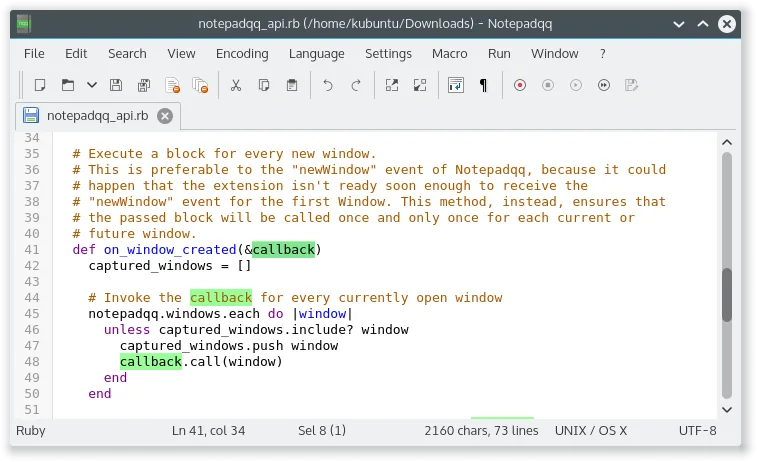
Was ist Notepadqq?
Notepadqq began as a fork of Notepad++ to give Linux users a familiar Windows‑style editor. Over time it added real‑time syntax highlighting for more than a hundred languages, a robust regex engine, and flexible multi‑cursor support. The editor is aimed at developers, sysadmins, and power users who need a lightweight yet feature‑rich tool for coding, scripting, and configuration files. Compared with UltraEdit, Notepadqq feels more integrated into the Linux ecosystem, uses native GTK widgets, and lacks some of UltraEdit’s commercial‑grade features, but it delivers a solid, free alternative.
Ideal für: Developers and power users who need a lightweight, free editor with syntax highlighting and multi‑cursor editing on Linux.
Wichtige Funktionen von Notepadqq
- Real‑time syntax highlighting for 100+ languages
- Regex search and replace
- Multi‑cursor editing
- Customizable keybindings
- Integrated find‑and‑replace dialog
- Support for .txt, .cpp, .py, .conf and many more
Vorteile
- Free and open source
- Cross‑platform packaging (deb, rpm, flatpak)
- Lightweight and fast
- Good keyboard shortcut support
- Regular expression power
Nachteile
- No built‑in FTP/SFTP support
- Limited plugin ecosystem
- No native Windows‑style UI themes
- Older release (2018) with no recent updates
Windows-Programme, die Notepadqq ersetzt
Notepadqq unter Linux installieren
flatpak install flathub com.notepadqq.Notepadqqsudo apt install notepadqqsudo apt install notepadqqsudo zypper install notepadqqTipps für Windows-Umsteiger
If you’re moving from UltraEdit, most of the file formats (.txt, .cpp, .py, .conf) will open without issue. Keyboard shortcuts are similar: Ctrl+S to save, Ctrl+F to find, Ctrl+H for replace, and Ctrl+Shift+L for multi‑cursor. The workflow is straightforward, but remember that Notepadqq does not support external file synchronization; you’ll need to use a separate tool for that.
Neueste Versionen
- 2.1.1 —
- 2.1.0 —
- 2.0.0~beta —
- 1.4.8 —
Notepadqq: häufige Fragen
Is Notepadqq still maintained?
The last official release was 1.4.8 in May 2018. The project is still available in Debian, Ubuntu and openSUSE repositories, but there are no recent updates.
Can I install it via Flatpak?
Yes, it is available on Flathub as an advanced text editor.
Does it support plugins?
The plugin system is limited; most extensions are built‑in rather than third‑party.
Is it suitable for large files?
It handles medium‑sized files well, but performance may degrade with very large files compared to dedicated editors like UltraEdit.
Aktualisiert am