
 Qalculate! (GTK UI)Linux
vs
Microsoft Math SolverWindows
Qalculate! (GTK UI) als Linux-Alternative zu Microsoft Math Solver
Aktualisiert am
Unser Fazit
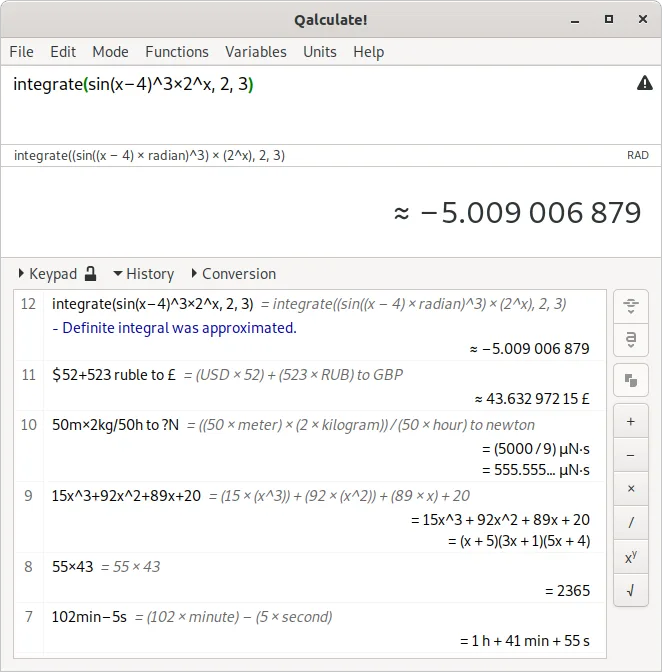
Qalculate! is a strong alternative for users who need symbolic math, unit conversion, and high-precision calculations on Linux. It handles algebra, calculus, and plotting effectively, covering the core computational needs of Microsoft Math Solver. However, it lacks the specific camera-based input and the guided, pedagogical step-by-step breakdowns that make Math Solver popular for students. If you primarily need to solve equations and see results with clear logic, Qalculate! works well. If you rely heavily on scanning handwritten work or need simplified explanations for learning, you will miss that specific workflow.
- Lizenz
- GPL-2.0+
- Preis
- Kostenlos
- Aktuelle Version
- 5.13.0 (5. Oktober 2026)
- Bewertung
- —
Was gleich funktioniert
- Solves algebraic equations and calculus problems symbolically
- Provides clear, structured output for mathematical results
- Supports plotting of functions and geometric concepts
- Handles a wide range of mathematical domains including geometry
Was anders ist
- No built-in camera or OCR input for scanning handwritten problems
- Lacks the specific 'step-by-step' pedagogical explanation mode found in Math Solver
- Interface is a traditional calculator layout rather than a problem-solving workspace
- Focus is on calculation precision and unit conversion rather than educational guidance
Ihre Microsoft Math Solver-Dateien öffnen
Microsoft Math Solver does not use a standard, widely documented file format for saving complex problem sessions that Qalculate! can natively open. Qalculate! primarily works with text input and its own internal state. If you have saved problems in Math Solver, you will likely need to manually re-enter the equations into Qalculate! or export them as plain text images/PDFs from Math Solver and reference them alongside your Qalculate! session. There is no direct import mechanism for Math Solver project files.
Von Microsoft Math Solver zu Qalculate! (GTK UI) wechseln – Schritt für Schritt
- Install Qalculate! via your distribution's package manager or Flathub
- Familiarize yourself with the symbolic calculation syntax in the input field
- Re-enter your common algebraic and calculus problems to test the output format
- Configure the precision settings if you need specific decimal or fraction outputs
- Use the built-in plotting tool to visualize functions instead of external graphing tools
Wichtige Funktionen von Qalculate! (GTK UI)
- Symbolic calculations including integrals and equations
- Extensive unit calculations and conversion library
- Arbitrary precision and uncertainty propagation
- Interval arithmetic support
- Built-in plotting capabilities
- Large library of customizable functions
- Physical constants database
- Cross-platform compatibility
Qalculate! (GTK UI) unter Linux installieren
flatpak install flathub io.github.QalculateHäufige Fragen
Can Qalculate! take a photo of a math problem and solve it?
No, Qalculate! does not have built-in camera or OCR capabilities. You must type the equation manually into the input field.
Does Qalculate! show the steps to solve an equation?
It provides the final symbolic solution and can evaluate intermediate steps if you break the problem down, but it does not generate a guided, educational step-by-step tutorial like Microsoft Math Solver.
Is Qalculate! good for geometry problems?
Yes, it handles geometric calculations and can plot 2D and 3D functions, making it suitable for visualizing geometric relationships and solving related equations.
3 weitere Alternativen zu Microsoft Math Solver
 GeoGebraDynamische Mathematiksoftware zum Lösen von Gleichungen, Graphen von Funktionen und zur Erkundung von 2D- und…KostenlosFlatpakGeoGebra vs. Microsoft Math SolverSageMathAn open-source computer algebra system (CAS) that combines Python, SageMath, and many other mathematics…Open SourceKostenlosSageMath vs. Microsoft Math Solver
 GNU OctaveGNU Octave ist eine kostenlose, quelloffene Umgebung für numerische Berechnungen, die weitgehend mit der…Open SourceKostenlosFlatpakGNU Octave vs. Microsoft Math Solver