

Windows · Science & Education
Die besten Linux-Alternativen zu SigmaPlot
SigmaPlot is a commercial Windows program for scientific graphing and data analysis.
Aktualisiert am
Kurz gesagt
Die beste Linux-Alternative zu SigmaPlot ist QtiPlot.
1 Linux-Alternativen zu SigmaPlot
-
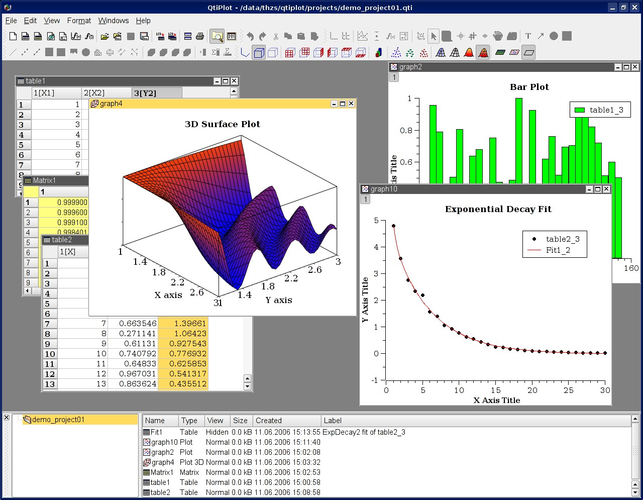
QtiPlot is a cross‑platform scientific graphing and data analysis tool similar to Origin or SigmaPlot.

Was ist SigmaPlot?
SigmaPlot is used by researchers, engineers, and students to create high‑quality plots and perform basic statistical analysis on experimental data. It is a closed‑source, commercial product that typically requires a paid license per user, with optional upgrades for new versions.
Because it only runs on Windows, many Linux users who need comparable graphing capabilities look for a native alternative that can be installed on their systems without resorting to emulation. Switching to Linux also avoids the extra cost and maintenance of a Windows license.
Finding a Linux replacement means you can keep your workflow on the same platform as the rest of your tools, benefit from open‑source development, and often get similar export options for publications.
Was ein Ersatz für SigmaPlot können muss
- Create publication‑ready 2‑D and 3‑D graphs
- Perform basic statistical tests (t‑test, ANOVA, regression)
- Import data from CSV, Excel, or plain text
- Export figures in vector formats (EPS, PDF, SVG)
- Customize plot appearance (fonts, colors, markers)
- Batch processing or scripting support
- Cross‑platform compatibility
Läuft SigmaPlot unter Linux?
SigmaPlot has no native Linux version and there is no official web client. It can be run under Wine, and some users report acceptable results, but performance and full feature support are not guaranteed. No Proton or Bottles packages are officially maintained.
Welche Alternative passt zu Ihnen?
QtiPlot is the only listed Linux alternative; it targets users who need a familiar spreadsheet‑style interface with decent plotting and basic analysis tools, making it a reasonable drop‑in for most SigmaPlot workflows.
Dateien und Gewohnheiten aus SigmaPlot mitnehmen
SigmaPlot can export data tables as CSV or plain text, and figures as EPS, PDF, or SVG, which QtiPlot can import directly. Save your work in these formats before switching, then re‑create any custom templates in QtiPlot as needed.
SigmaPlot: häufige Fragen
Can I run SigmaPlot on Linux without Wine?
No, there is no native Linux version; Wine is the only practical option.
Is QtiPlot free?
QtiPlot is open source and available at no cost.
Will my SigmaPlot scripts work in QtiPlot?
QtiPlot does not support SigmaPlot’s proprietary scripting language, so scripts must be rewritten.
What file formats does QtiPlot export?
QtiPlot can export to common vector formats like PDF, EPS, SVG, as well as raster PNG and JPEG.
Wie wichtig ist Ihnen SigmaPlot?
Kennen Sie eine bessere Alternative? Alternative vorschlagen