
 SpeedCrunchLinux
vs
Microsoft CalculatorWindows
SpeedCrunch als Linux-Alternative zu Microsoft Calculator
Aktualisiert am
Unser Fazit
SpeedCrunch is a strong replacement for Microsoft Calculator if you primarily use scientific, programmer, or basic arithmetic modes and prefer keyboard input. It excels in precision, real-time feedback, and expression clarity with syntax highlighting. However, it lacks graphing and date calculation features, so users relying on those will need supplementary tools. Its unit conversion is functional but not as extensive as some expect. If you value speed, accuracy, and a clean keyboard-driven interface, SpeedCrunch is excellent—especially for power users and developers.
- Lizenz
- GPL-2.0+
- Preis
- Kostenlos
- Aktuelle Version
- 1.2.0 (17. November 2026)
- Bewertung
- —
Was gleich funktioniert
- Both support standard and scientific modes with trigonometry and exponents
- Programmer mode available with hex, binary, and octal support
- Unit conversion is built-in and usable via keyboard
- Fully functional without requiring a mouse
- Real-time evaluation feedback during input
Was anders ist
- SpeedCrunch has no graphing mode
- Date calculations are not supported
- Microsoft Calculator has a simpler, more visual interface
- SpeedCrunch supports user-defined functions and complex numbers, which Microsoft Calculator does not
- SpeedCrunch offers scrollable history and syntax highlighting, not present in Microsoft Calculator
Ihre Microsoft Calculator-Dateien öffnen
SpeedCrunch does not import or export files in Microsoft Calculator format. Microsoft Calculator typically doesn’t save calculation sessions, and when it does (e.g., in graphing mode), it uses proprietary formats. SpeedCrunch saves no session files by default but maintains a scrollable history in memory. There is no direct file compatibility, but both are session-based, so manual transcription is unnecessary for typical use.
Von Microsoft Calculator zu SpeedCrunch wechseln – Schritt für Schritt
- Install SpeedCrunch via your package manager (e.g., sudo apt install speedcrunch on Ubuntu)
- Launch it and start typing expressions—results update in real time
- Use Ctrl+Space for autocompletion of functions and variables
- Browse the history with up/down arrows or click the sidebar
- Customize unit conversions or define your own functions in Settings > Functions or Units
Wichtige Funktionen von SpeedCrunch
- Berechnungen mit hoher Präzision (bis zu 50 Dezimalstellen)
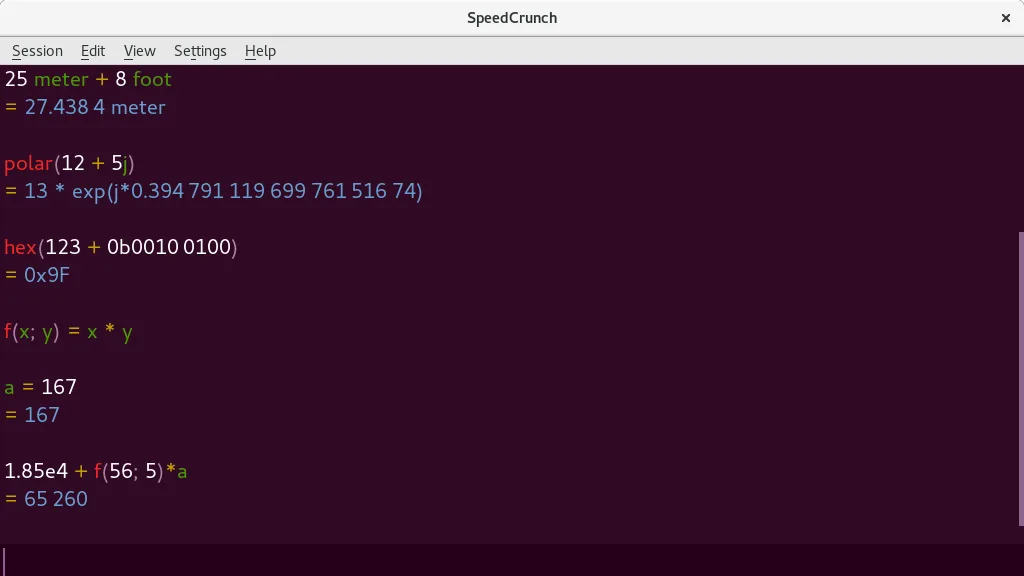
- Eingabe-Anzeige mit Syntax-Hervorhebung und Echtzeit-Vorschau
- Vollständige Tastaturnavigation und Hotkey-Unterstützung
- Eingebaute Konstanten und über 80 mathematische Funktionen
- Unterstützung für komplexe Zahlen und Einheitenkonvertierung
- Benutzerdefinierte Variablen und Funktionen
- Scrollbare Berechnungshistorie
- Autovervollständigung für Funktionen und Syntaxprüfung
SpeedCrunch unter Linux installieren
flatpak install flathub org.speedcrunch.SpeedCrunchsudo apt install speedcrunchsudo dnf install speedcrunchsudo pacman -S speedcrunchsudo zypper install speedcrunchHäufige Fragen
Can SpeedCrunch graph functions like Microsoft Calculator?
No, SpeedCrunch does not have graphing capabilities. You’ll need a separate tool like gnuplot, Qalculate!, or KAlgebra for plotting.
Is SpeedCrunch safe to use on Linux?
Yes. It’s open-source (GPL-2.0+), actively maintained, and packaged in major distros. Binaries from official repos are trustworthy.
Can I use it without a mouse?
Yes. SpeedCrunch is designed for full keyboard use—typing expressions, navigation, and history recall all work without a mouse.
4 weitere Alternativen zu Microsoft Calculator
 KCalcKCalc ist der wissenschaftliche Taschenrechner von KDE mit trigonometrischen Funktionen, logischen…Open SourceKostenlosFlatpakKCalc vs. Microsoft Calculator
 Qalculate! (GTK UI)A powerful, multi-purpose desktop calculator with symbolic math, unit conversion, and arbitrary precision…Open SourceKostenlosFlatpakQalculate! (GTK UI) vs. Microsoft CalculatorGalculatorGalculator is a lightweight, GTK‑based calculator for Linux that supports basic, scientific, and programming…Open SourceKostenlosGalculator vs. Microsoft Calculator