
 ZimLinux
vs
Google KeepWindows
Zim als Linux-Alternative zu Google Keep
Aktualisiert am
Unser Fazit
Zim is a decent replacement for Google Keep if you prioritize local control, plain-text organization, and hierarchical note management over real-time sync and collaboration. It works well for users who take structured, text-heavy notes and want full offline access. However, it lacks cloud sync, mobile apps, and sharing features, making it less suitable for users who rely on reminders, cross-device availability, or team note-sharing. If your workflow centers on personal, desktop-based note-taking with tagging and linking, Zim excels. For active Google Keep users needing mobility and sync, it's not a direct substitute.
- Lizenz
- GPL-2.0+
- Preis
- Kostenlos
- Aktuelle Version
- 0.77.2 (26. Juli 2026)
- Bewertung
- —
Was gleich funktioniert
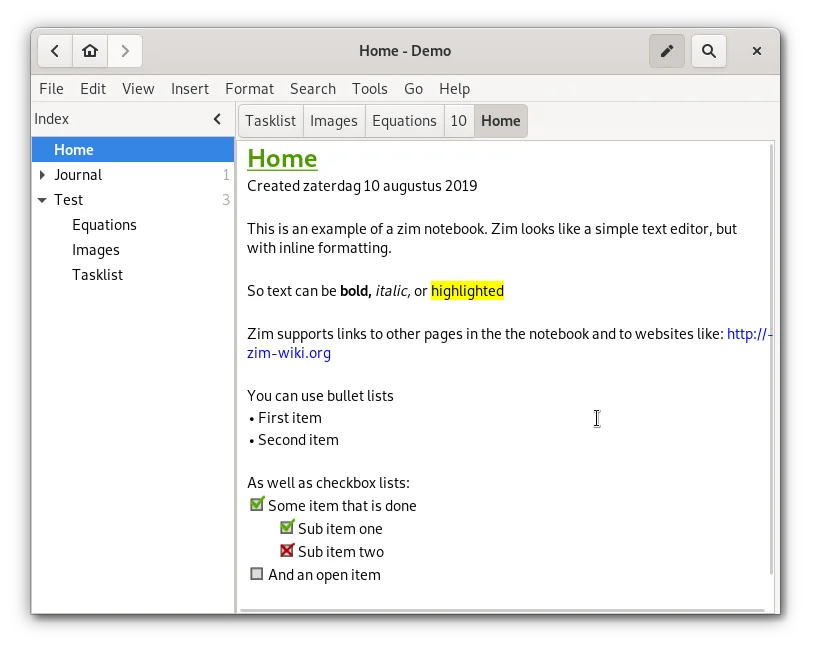
- Supports text notes and to-do lists with basic formatting
- Allows tagging and color-coding of notes for organization
- Enables attaching images to notes
- Supports pinning important pages via sidebar or naming
- Hierarchical organization through notebook structure
Was anders ist
- No built-in sync or encryption across devices
- No mobile app or web access, desktop-only
- No real-time collaboration or sharing
- No OCR text extraction from images
- No time-based reminders or location triggers
Ihre Google Keep-Dateien öffnen
Google Keep doesn't export data in a standard plain-text or wiki format, so direct file import into Zim isn't possible. You can export Keep notes as text files manually and then import them into Zim by creating new pages. Formatting and structure must be adjusted manually. OCR-extracted text from Keep images won't transfer automatically. There’s no tool to convert Keep’s JSON exports into Zim’s wiki markup, so migration is largely manual.
Von Google Keep zu Zim wechseln – Schritt für Schritt
- Export your Google Keep notes via Google Takeout
- Extract the archive and convert notes to plain text or HTML
- Create new pages in Zim for each note or group of related notes
- Manually add tags, colors, and links using Zim's markup
- Attach exported images where needed
- Organize pages in the sidebar tree by topic or notebook
Wichtige Funktionen von Zim
- Hierarchische Seitenleiste mit Baumstruktur zur Organisation von Seiten
- Automatische Speicherung als reine Textdatei mit Wiki-Markup
- Verknüpfung zwischen Seiten und Anhängen
- Plugins für Aufgaben, Gleichungen, Symbol in der Statusleiste und VCS
- Plattformübergreifende Tastaturkürzel
- Export nach HTML, PDF und reinem Text
Zim unter Linux installieren
flatpak install flathub org.zim_wiki.Zimsudo apt install zimsudo apt install zimsudo dnf install Zimsudo pacman -S zimsudo zypper install zimHäufige Fragen
Can I sync Zim notes across devices like Google Keep?
Not directly. You can sync the Zim notebook folder using tools like Syncthing, Nextcloud, or Dropbox, but conflicts may occur. Manual syncing or version control (like Git) is possible but requires care.
Does Zim support reminders like Google Keep?
No, Zim has no built-in reminder system. You can mark tasks with tags like @due or use a separate calendar app alongside Zim.
Can I use Zim on Android?
No native Android app exists. You can access Zim files via file sync and edit them in a text editor, but the full interface and linking features are desktop-only.
5 weitere Alternativen zu Google Keep
 JoplinJoplin ist eine quelloffene, plattformübergreifende Notiz- und To-do-App, die Daten in Markdown speichert.Open SourceKostenlosFlatpakJoplin vs. Google Keep
 Standard NotesStandard Notes ist eine plattformübergreifende, Ende-zu-Ende-verschlüsselte Notiz-App, die Ihre Daten sicher…Open SourceKostenlosFlatpakStandard Notes vs. Google Keep
 CherryTreeCherryTree ist eine hierarchische Notiz-App mit Rich-Text, Code-Hervorhebung und Optionen zum Exportieren von…Open SourceKostenlosFlatpakCherryTree vs. Google Keep
 ObsidianObsidian ist eine auf Markdown basierende Wissensdatenbank-App, die Notizen als reine Textdateien in einem…FlatpakObsidian vs. Google KeepNotejotNotejot ist eine leichte KDE-Sticky-Note-Anwendung, die Notizen auf Ihrem Desktop anheftet, um schnelle…Open SourceKostenlosNotejot vs. Google Keep