
 ZulipLinux
vs
Microsoft Teams (legacy)Windows
ZulipLinux
vs
Microsoft Teams (legacy)Windows
Zulip als Linux-Alternative zu Microsoft Teams (legacy)
Aktualisiert am
Unser Fazit
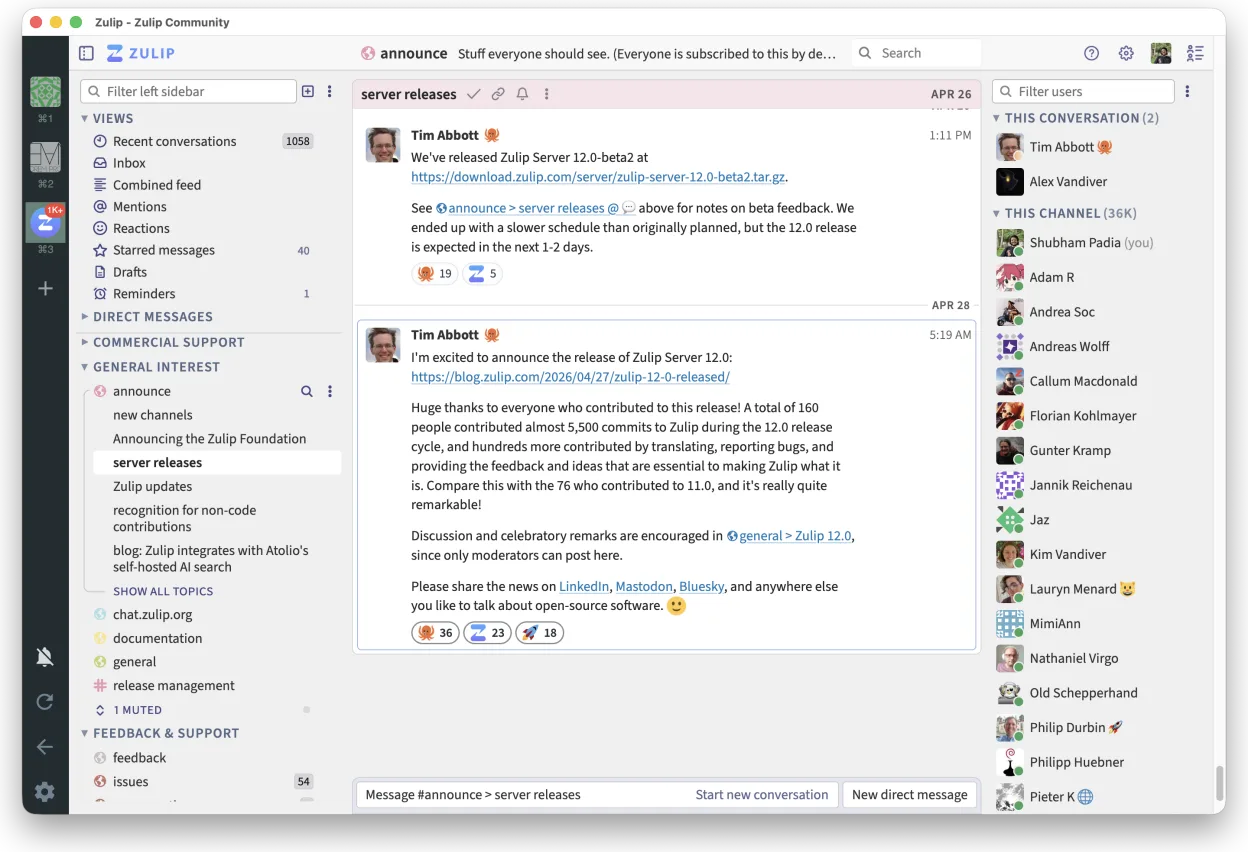
Zulip is a solid replacement for Microsoft Teams (legacy) for teams that prioritize organized, high-volume communication and self-hosting. Its threaded conversation model excels in clarity over time, making it ideal for technical or open-source teams. Audio and video conferencing are supported via integrations like Jitsi, but native calling is limited. It covers core chat, file sharing, and team organization well, but lacks deep calendar and contact list integration. Best for organizations valuing transparency, control, and structured discussion over out-of-the-box enterprise tooling.
- Lizenz
- Apache-2.0
- Preis
- Kostenlos
- Aktuelle Version
- 5.13.2 (21. September 2026)
- Bewertung
- —
Was gleich funktioniert
- Persistent, topic-based chat channels for team collaboration
- Real-time messaging with support for large groups
- File sharing with version tracking and history
- Cross-platform clients including Linux, Windows, and mobile
- Strong search and message filtering across chat history
Was anders ist
- Zulip uses threaded conversations by default, unlike Teams' linear flow
- No native calendar integration; relies on external tools
- Video conferencing requires third-party services like Jitsi
- Contact list sync with corporate directories is limited
- Self-hosting is possible, unlike Microsoft Teams
Ihre Microsoft Teams (legacy)-Dateien öffnen
Zulip supports file uploads and preserves version history, but cannot directly open Microsoft Teams-specific formats or exported chat logs. Files shared in Teams (e.g., Word, PDF) can be re-uploaded to Zulip without issue. Migration of historical content requires custom scripting; there is no built-in import tool for Teams data. File compatibility depends on the application used to open them, not Zulip itself.
Von Microsoft Teams (legacy) zu Zulip wechseln – Schritt für Schritt
- Set up a self-hosted Zulip server or sign up for hosted service
- Import users via CSV or LDAP if supported by your setup
- Create organization structure using realms, streams, and topics
- Migrate important files manually or via script from Teams exports
- Train team on Zulip's threading model and search features
Wichtige Funktionen von Zulip
- Diskussionsbasierte Gespräche für strukturierte Diskussionen
- Open Source und für das Selbst-Hosting geeignet
- Erhältlich als nativer Linux-Desktop-Client
- Unterstützt große Gruppen und hohes Nachrichtenaufkommen
- Plattformübergreifende Kompatibilität
- Leistungsstarke Suchfunktion im gesamten Nachrichtenverlauf
Zulip unter Linux installieren
flatpak install flathub org.zulip.ZulipHäufige Fragen
Can Zulip do video meetings like Microsoft Teams?
Zulip supports video conferencing through integrations with Jitsi and other external tools, but does not have built-in calling. Meetings are initiated via links in chat, not native UI controls.
Is Zulip available on mobile and desktop?
Yes, Zulip offers native Linux, Windows, macOS, iOS, and Android apps. The Linux desktop client is available via Flathub and supports full functionality.
Can I self-host Zulip for more control?
Yes, Zulip is open-source and designed to be self-hosted. It's actively maintained and provides detailed documentation for deployment on your own infrastructure.
5 weitere Alternativen zu Microsoft Teams (legacy)
 SlackSlack ist eine proprietäre Team-Kommunikations-App für Linux, die Gespräche, Tools und Arbeitsabläufe für die…FlatpakSlack vs. Microsoft Teams (legacy)
 MattermostMattermost ist eine Open-Source, selbst gehostete Kollaborationsplattform für Entwicklerteams, die eine…Open SourceKostenlosFlatpakMattermost vs. Microsoft Teams (legacy)
 Rocket.ChatOpen-Source-Plattform für Teamkommunikation mit Chat, Video und Kollaboration, häufig als Alternative zu…Open SourceKostenlosFlatpakRocket.Chat vs. Microsoft Teams (legacy)
 ElementElement ist ein Open‑Source, matrixbasierter Chat- und Videokonferenz-Client für Linux.Open SourceKostenlosFlatpakElement vs. Microsoft Teams (legacy)
 Jitsi MeetJitsi Meet ist ein quelloffener Videokonferenz-Client, der eine Verbindung zu jedem Jitsi-Server ermöglicht…Open SourceKostenlosFlatpakJitsi Meet vs. Microsoft Teams (legacy)