
 AcetoneISOLinux
vs
UltraISOWindows
AcetoneISO como alternativa Linux a UltraISO
Actualizado el
Nuestra opinión
AcetoneISO is a strong, free replacement for UltraISO's core functions. It handles creating, editing, and converting ISO, BIN, and IMG files effectively. The interface is simple and intuitive, avoiding the clutter of commercial software. It covers essential tasks like burning discs and managing virtual drives. However, it lacks some advanced editing features found in UltraISO, such as complex bootable USB creation tools. For most users who need to manage disk images without paying for licenses, AcetoneISO is a reliable and capable choice.
- Licencia
- GPL-3.0
- Precio
- Gratis
- Última versión
- 2.4_7
- Valoración
- 5/5 (1)
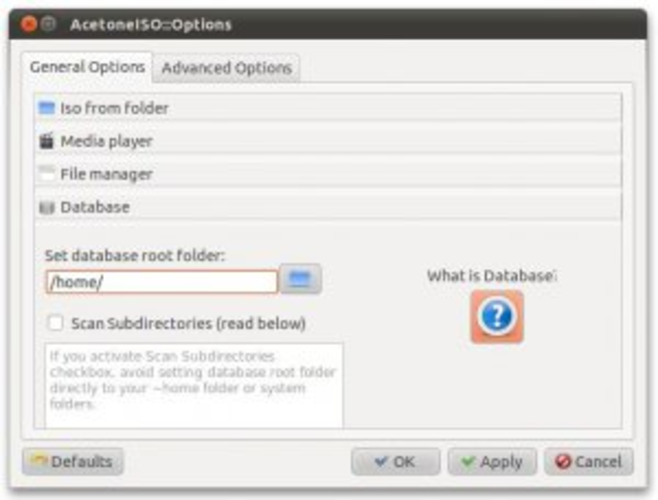
Lo que funciona igual
- Creates ISO images from folders or physical discs
- Converts between ISO, BIN, IMG, and other formats
- Burns image files to CD/DVD/BD media
- Extracts files from image archives
- Supports ISO 9660 and UDF file systems
Lo que cambia
- No direct USB bootable image creation tool (requires external tools like dd)
- Does not emulate copy protection when mounting
- Interface is simpler with fewer advanced editing options
- Lack of integrated multi-track CD authoring beyond basic burning
- No cross-platform compatibility (Linux only)
Abrir tus archivos de UltraISO
AcetoneISO natively opens and edits standard ISO, BIN, IMG, MDF, and NRG files. It can read images created by UltraISO without issues, as these are standard formats. You can open an UltraISO-edited ISO in AcetoneISO, modify its contents, and save it back as an ISO or convert it to other supported formats. There are no proprietary file format barriers between the two tools.
Pasar de UltraISO a AcetoneISO, paso a paso
- Install AcetoneISO via your package manager (e.g., apt install acetoneiso).
- Open AcetoneISO and add a new virtual drive if needed.
- Use 'Create New Image' to build ISOs from folders or discs.
- Use 'Convert' to change file formats like ISO to IMG.
- Use 'Burn' to write images to physical media.
- Extract files directly from images using the file manager integration.
Funciones clave de AcetoneISO
- Montar formatos de imagen ISO, BIN, IMG, MDF, NRG y otros
- Crear imágenes ISO desde carpetas o discos físicos
- Convertir entre formatos de imagen compatibles
- Grabar imágenes en medios CD/DVD/BD
- Gestionar unidades virtuales (añadir/quitar) mediante la interfaz gráfica
- Extraer archivos de imágenes sin montarlas
- Soporte de línea de comandos mediante acetoneiso-cli
- Integración con los menús de contexto del gestor de archivos
Cómo instalar AcetoneISO en Linux
sudo apt install acetoneisosudo apt install acetoneisoPreguntas frecuentes
Can AcetoneISO create bootable USB drives?
AcetoneISO can burn images to USB media, but it does not have a dedicated 'Bootable USB' wizard like UltraISO. For complex bootable USB creation, you may need to use command-line tools like dd or Rufus on Windows.
Does AcetoneISO support copy-protected discs?
No, AcetoneISO does not emulate copy protection. It is designed for standard data and audio discs. If you need to bypass DRM, this tool is not suitable.
Is AcetoneISO free?
Yes, AcetoneISO is free and open-source software under the GPL-3.0 license. There are no licensing costs or feature restrictions.
Otras 5 alternativas a UltraISO
 BraseroBrasero es una herramienta sencilla de GNOME para crear, copiar y grabar CDs y DVDs de datos y audio.Código abiertoGratisFlatpakBrasero vs UltraISO
 K3bK3b es la herramienta integral de KDE para grabar CDs, DVDs y Blu‑ray en Linux.Código abiertoGratisK3b vs UltraISOXfburnXfburn es una aplicación ligera de grabación de CD/DVD/BD para Linux basada en GTK+.Código abiertoGratisXfburn vs UltraISOISO MasterISO Master es una herramienta ligera con interfaz gráfica para crear, editar y convertir imágenes ISO en…Código abiertoGratisISO Master vs UltraISOGNOME Disk UtilityGNOME Disk Utility is a native Linux tool for managing disks, partitions, and creating ISO images.Código abiertoGratisGNOME Disk Utility vs UltraISO