
 EpiphanyLinux
vs
EpiphanyLinux
vs
 OperaWindows
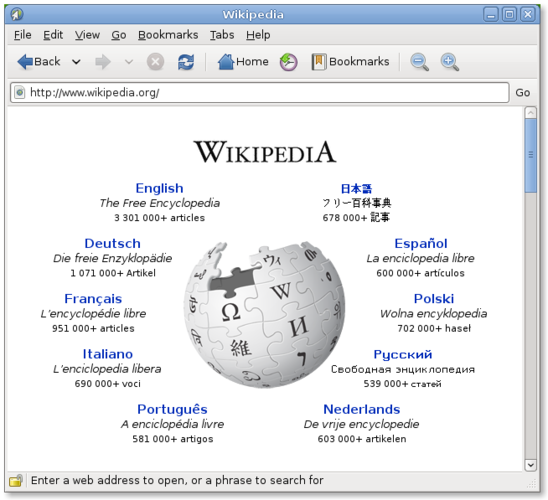
Epiphany como alternativa Linux a Opera
Actualizado el
Nuestra opinión
Epiphany can replace Opera for users who value speed, tight GNOME integration, and a minimal interface, but it falls short for those who rely on Opera's built‑in VPN, extensive ad‑blocking, and large extension ecosystem. If you mainly browse standard sites, need basic privacy features, and prefer a lightweight browser, Epiphany works well. Power users who depend on the VPN, custom UI tweaks, or a wide range of third‑party add‑ons will likely miss those capabilities and may need to keep Opera or choose a more feature‑rich Linux browser.
- Licencia
- GPL-3.0
- Precio
- Gratis
- Última versión
- —
- Valoración
- —
Lo que funciona igual
- Both are web browsers rendering modern HTML5/CSS3/JS
- Support private/incognito browsing
- Offer tabbed navigation
- Provide password storage integration (Opera via its vault, Epiphany via GNOME Keyring)
- Regular security updates from their respective projects
Lo que cambia
- Opera includes a built‑in VPN and ad blocker; Epiphany does not
- Opera has a large extension store; Epiphany only supports WebKit extensions and has very few
- Opera allows extensive UI customization; Epiphany follows GNOME's default layout
- Opera offers built‑in sync across devices; Epiphany lacks native sync
- Epiphany is lightweight and GNOME‑centric, while Opera is a full‑featured cross‑platform browser
Abrir tus archivos de Opera
Opera does not use proprietary file formats beyond standard bookmarks (HTML) and session data. Epiphany can import bookmarks exported from Opera as an HTML file, but there is no direct way to open Opera's session or VPN configuration files. Export your bookmarks from Opera (Settings → Bookmarks → Export) and then import them in Epiphany via the Bookmarks menu.
Pasar de Opera a Epiphany, paso a paso
- Export bookmarks from Opera as an HTML file.
- Install Epiphany from your distribution's repository (e.g., sudo apt install epiphany-browser).
- Import the exported bookmarks in Epiphany (Bookmarks → Import).
- Set Epiphany as the default browser (System Settings → Default Applications).
- If you need a VPN, install a separate Linux VPN client or use a browser extension.
Funciones clave de Epiphany
- Motor de renderizado WebKit
- Integración con GNOME (menús, modo oscuro)
- Gestión sencilla de pestañas
- Modo de lectura integrado
- Soporte para HTML5, CSS3, JavaScript
- Ventana de navegación privada
- Integración con el gestor de contraseñas de GNOME Keyring
Preguntas frecuentes
Can I use Opera extensions in Epiphany?
No. Epiphany only supports WebKit extensions, which are not compatible with Opera's Chrome‑based extension format.
Does Epiphany have a built‑in ad blocker?
It does not. You can add a content‑blocking extension like uBlock Origin if you need one.
Will my saved passwords move automatically?
Passwords stored in Opera's vault are not transferred. Export them manually or re‑enter them; Epiphany will save new passwords in GNOME Keyring.
Otras 8 alternativas a Opera
 SeaMonkeySeaMonkey es una suite de internet gratuita con navegador, cliente de correo y editor HTML, basada en la…Código abiertoGratisSeaMonkey vs Opera
 Mozilla FirefoxMozilla Firefox es un navegador web de código abierto que funciona de forma nativa en Linux, ofreciendo una…Código abiertoGratisMozilla Firefox vs Opera
 KonquerorKonqueror es un navegador web y administrador de archivos de KDE con soporte para sistemas de archivos…Código abiertoGratisKonqueror vs Opera
 OperaOpera GX es un navegador propietario para Linux creado para gamers, que ofrece controles de rendimiento…GratisFlatpakOpera vs Opera
 FirefoxFirefox es un navegador web rápido y privado desarrollado por Mozilla.Código abiertoGratisFlatpakFirefox vs Opera
 Google ChromeGoogle Chrome es el navegador web propietario de Google basado en Chromium, disponible para Linux.GratisFlatpakGoogle Chrome vs Opera
 BraveBrave es un navegador web rápido y centrado en la privacidad que bloquea anuncios y rastreadores por defecto…Código abiertoGratisFlatpakBrave vs Opera
 ChromiumChromium es el proyecto de navegador de código abierto detrás de Chrome y Edge, que ofrece una experiencia…Código abiertoGratisFlatpakChromium vs Opera