
 FSearchLinux
vs
PowerToys RunWindows
FSearchLinux
vs
PowerToys RunWindows
FSearch como alternativa Linux a PowerToys Run
Actualizado el
Nuestra opinión
FSearch can replace PowerToys Run for users who mainly need a quick file search and launch from a keyboard shortcut, but it lacks the full launcher features such as running arbitrary commands, calculating expressions, or integrating with the desktop environment. It is suitable for Linux users who want a fast, GTK‑based file finder and are comfortable using a separate launcher for applications, whereas PowerToys Run users who rely on its command‑execution and calculation shortcuts will find FSearch insufficient.
- Licencia
- GPL-2.0-or-later
- Precio
- Gratis
- Última versión
- 0.3.2 (20 de septiembre de 2026)
- Valoración
- —
Lo que funciona igual
- Both can be opened with a keyboard shortcut
- Both provide instant search results as you type
- Both support fuzzy or case‑insensitive matching
- Both allow launching files or applications from the results
Lo que cambia
- FSearch does not support launching arbitrary commands or scripts
- It cannot perform calculations like PowerToys Run
- It lacks desktop‑environment integration for quick app launching
- FSearch is limited to file and folder search, not a general application launcher
- It cannot export or import PowerToys Run configuration files
Abrir tus archivos de PowerToys Run
PowerToys Run does not use external configuration files that can be directly opened by FSearch; there is no known method to import or export settings between the two applications.
Pasar de PowerToys Run a FSearch, paso a paso
- 1. Install FSearch from your distribution’s package manager or Flathub.
- 2. Set a global keyboard shortcut (e.g., Alt+Space) to launch FSearch via your desktop environment’s keyboard settings.
- 3. Use the search box to locate the application you want to run and double‑click or press Enter to launch it.
- 4. For custom commands, create a script in a folder that is in your PATH and search for the script name in FSearch.
- 5. If you need calculation support, use a separate calculator application or the terminal.
Funciones clave de FSearch
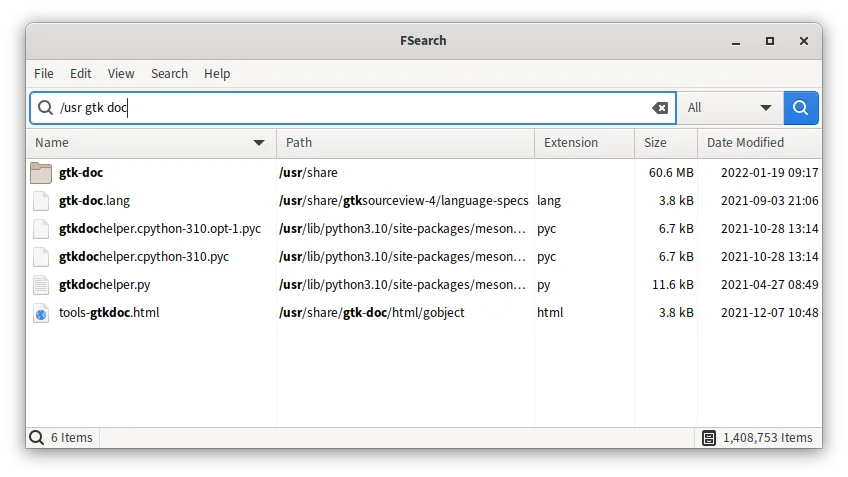
- Resultados de búsqueda instantáneos mientras escribes
- Coincidencia que no distingue mayúsculas y minúsculas
- Soporte para expresiones regulares
- Opciones de comodín y filtros (por ejemplo, solo audio)
- Excluir carpetas o patrones específicos
- Columnas ordenables: nombre, ruta, tamaño, fecha, extensión
- Interfaz basada en GTK con temas oscuro/claro
Cómo instalar FSearch en Linux
flatpak install flathub io.github.cboxdoerfer.FSearchsudo apt install fsearchsudo pacman -S fsearchPreguntas frecuentes
Can I run a script directly from FSearch?
Yes, if the script is executable and in a directory listed in your PATH, you can type its name in FSearch and press Enter to execute it.
Does FSearch support launching applications from the menu?
FSearch can open application files (.desktop) if they are located in the search path; double‑clicking the entry will launch the application.
Is there a way to add PowerToys Run custom shortcuts to FSearch?
FSearch does not manage custom shortcuts; you need to create separate keyboard shortcuts in your desktop environment to launch scripts or applications.