
 K-3DLinux
vs
K-3DLinux
vs
 3D Studio MaxWindows
K-3D como alternativa Linux a 3D Studio Max
Actualizado el
Nuestra opinión
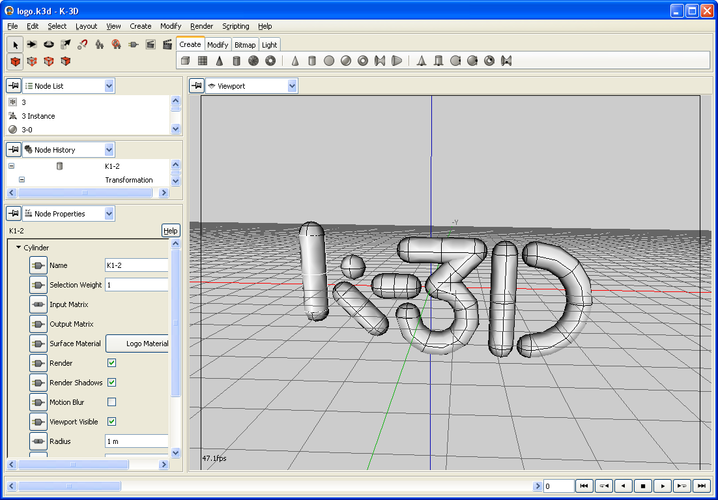
K-3D is not a practical replacement for 3ds Max. While it handles basic polygonal modeling and animation, it lacks the professional rigging, physics, and rendering pipelines required for VFX or game production. Its node-based workflow is distinct from 3ds Max’s modifier stack, forcing a significant learning curve. Since the project is discontinued, it receives no updates or bug fixes. It is suitable only for hobbyists or students needing a lightweight, free tool for simple OBJ/STL exports, not for professionals relying on 3ds Max’s industry-standard features.
- Licencia
- GPL-3.0
- Precio
- Gratis
- Última versión
- —
- Valoración
- —
Lo que funciona igual
- Supports polygonal and spline-based modeling
- Includes animation and keyframe tools
- Offers UV mapping capabilities
- Allows scripting for automation
- Exports common formats like OBJ
Lo que cambia
- Lacks advanced rigging and skinning tools found in 3ds Max
- No built-in global illumination or high-end shader systems
- Missing physics and particle simulation engines
- Node-based procedural workflow differs from 3ds Max’s modifier stack
- Project is discontinued, meaning no future updates or support
Abrir tus archivos de 3D Studio Max
K-3D does not natively open .max files. You must export your 3ds Max scenes as .obj or .fbx. Note that .fbx support in open-source tools can be inconsistent with complex rigs or animations. If you rely on 3ds Max-specific materials or modifiers, they will not translate. For simple geometry, .obj is the safest bet, but you will lose all animation and rigging data unless you use a compatible intermediate format and manually rebuild the setup in K-3D.
Pasar de 3D Studio Max a K-3D, paso a paso
- Export your 3ds Max scene as .obj for static geometry or .fbx for animated assets.
- Install K-3D via your Linux distribution’s package manager or build from source.
- Import the exported file into K-3D and verify geometry integrity.
- Rebuild any materials using K-3D’s node-based shader system, as 3ds Max materials will not import.
- Recreate any animation or rigging manually, as these elements are rarely preserved in standard export formats.
- Test your workflow with a small project before migrating large-scale assets.
Funciones clave de K-3D
- Flujo de trabajo de modelado procedural basado en nodos
- Software libre y de código abierto
- Soporta formatos de archivo 3D comunes como OBJ y STL
- Herramientas integradas de mapeo UV
- Soporte de scripting para automatización
- Disponibilidad multiplataforma (Linux, Windows, macOS)
- Ligero comparado con DCCs comerciales
- Comunidad activa y documentación
Preguntas frecuentes
Can I use K-3D for professional game development?
No. It lacks the rigging, physics, and rendering tools required for professional game pipelines. It is best for simple modeling tasks.
Is K-3D still being updated?
No. The project is discontinued. You will not receive new features, security patches, or bug fixes.
Does K-3D support 3ds Max scripts?
No. K-3D has its own scripting language. You cannot run MAXScript or Python scripts written for 3ds Max.
