

Linux · Gráficos
Gpaint
GNU Paint (Gpaint) is a simple, GPL‑licensed raster graphics editor for Linux, modeled after Microsoft Paint.
- Licencia
- GPL-3.0
- Última versión
- —
¿Qué es Gpaint?
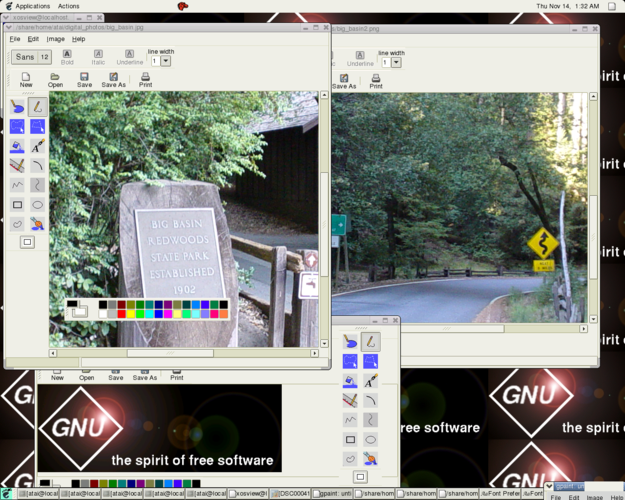
Gpaint provides the basic drawing tools you expect from a paint program – pencil, line, rectangle, ellipse, fill and text – all in a tiny, straightforward interface. It has been part of the GNU Project for many years, so it’s mature enough to run on virtually any Linux distribution without fuss. The program is maintained, though development is modest, making it a reliable fallback for quick edits.
The editor targets users who need a no‑frills canvas for quick sketches, annotations, or simple image tweaks. If you’re accustomed to Windows Paint’s drag‑and‑drop simplicity, Gpaint feels familiar: the toolbar is minimal, dialogs are plain, and the UI follows the classic desktop layout. It isn’t aimed at power users; instead, it fills the niche of a lightweight, instantly usable drawing tool.
Compared with Windows Paint, Gpaint lacks some of the newer polish (like built‑in shape snapping or advanced color palettes), but it matches the core experience: click, draw, save. Because it’s native Linux software, it integrates with your file manager and respects desktop themes, giving a cohesive feel on any distro.
Ideal para: Quick, uncomplicated image edits or sketches when you need a Paint‑like tool on Linux.
Funciones clave de Gpaint
- Basic drawing tools: pencil, line, rectangle, ellipse
- Fill bucket with transparent option
- Simple text insertion with font selection
- Undo/redo support
- Clipboard integration for copy‑paste
- Supports common raster formats (PNG, JPEG, BMP, GIF)
- Customizable color palette
- Lightweight, runs on low‑end hardware
Ventajas
- Very small footprint and fast startup
- Intuitive UI for users familiar with Windows Paint
- Fully free and open‑source
- Works on all major Linux desktops
Inconvenientes
- Limited advanced features (no layers, filters)
- Interface looks dated compared to modern editors
- Development activity is low
Programas de Windows que sustituye Gpaint
 Windows Paint
Consejos para usuarios de Windows
Gpaint reads and writes PNG, JPEG, BMP and GIF, so you can open files created in Windows Paint without conversion. Keyboard shortcuts are similar – Ctrl+Z for undo, Ctrl+S to save – but some shortcuts differ (e.g., Ctrl+E for the fill tool). Get used to the Linux file dialog and the fact that Gpaint doesn’t auto‑save, so remember to save frequently.
Gpaint: preguntas frecuentes
Can Gpaint open .bmp files created in Windows Paint?
Yes, Gpaint supports BMP, PNG, JPEG and GIF, so BMP files open without conversion.
Is there a way to add layers in Gpaint?
No, Gpaint is a flat raster editor and does not support layers.
How do I install Gpaint on Ubuntu?
Install it from the official repositories with sudo apt install gpaint.
Does Gpaint have a dark theme?
It follows your desktop theme; if you use a dark GTK theme, Gpaint will appear dark.
Actualizado el