

Linux · Gráficos
Mapivi
Mapivi is a lightweight image viewer and organizer for Linux.
- Licencia
- GPL-3.0
- Última versión
- 097
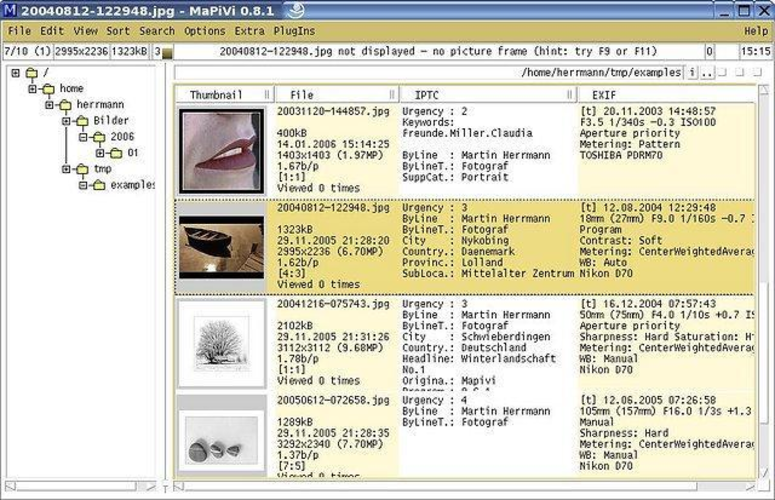
¿Qué es Mapivi?
Mapivi is a small, efficient program that lets you view and sort photos without the overhead of a full‑featured gallery. It was first released in 2013 and has been maintained in the Debian and Ubuntu repositories ever since.
The tool is aimed at users who want a quick way to browse images and create simple collections. It works well for photographers who need to tag and group photos but don’t require advanced editing.
Compared with ACDSee on Windows, Mapivi is noticeably lighter and faster, but it lacks many of the advanced cataloging and editing features that ACDSee offers.
Ideal para: Users who need a quick, no‑frills image viewer and organizer on Linux.
Funciones clave de Mapivi
- Fast image preview
- Tagging and rating
- Folder browsing
- Keyboard shortcuts
- Export to ZIP
- Supports JPEG, PNG, TIFF, BMP
Ventajas
- Very fast and low memory usage
- Easy to install via apt
- Built‑in tagging system
- Keyboard‑friendly
Inconvenientes
- No advanced editing tools
- Limited metadata editing
- No RAW support
- No cloud sync
Programas de Windows que sustituye Mapivi
 ACDSee
Cómo instalar Mapivi en Linux
sudo apt install mapivisudo apt install mapiviConsejos para usuarios de Windows
If you’re coming from ACDSee, you’ll find Mapivi’s file format support limited to common raster types; it does not handle RAW files. Keyboard shortcuts are similar to other Linux viewers: Ctrl+O to open, Ctrl+N to create a new collection, and arrow keys to navigate. Workflow is simpler: open a folder, tag images, then export or move them to another location. There is no built‑in editor, so you’ll need another tool for image adjustments.
Mapivi: preguntas frecuentes
Does Mapivi support RAW image files?
No, Mapivi only handles standard raster formats like JPEG, PNG, TIFF, and BMP.
Can I tag images in Mapivi?
Yes, you can assign tags and ratings to images for easy searching.
Is Mapivi available on Fedora?
It is not in the default Fedora repos; you can install it via a Debian package or compile from source.
Can I export a collection to a ZIP file?
Yes, Mapivi provides an export option that bundles selected images into a ZIP archive.
Actualizado el