
 PiperLinux
vs
Logitech G HubWindows
PiperLinux
vs
Logitech G HubWindows
Piper como alternativa Linux a Logitech G Hub
Actualizado el
Nuestra opinión
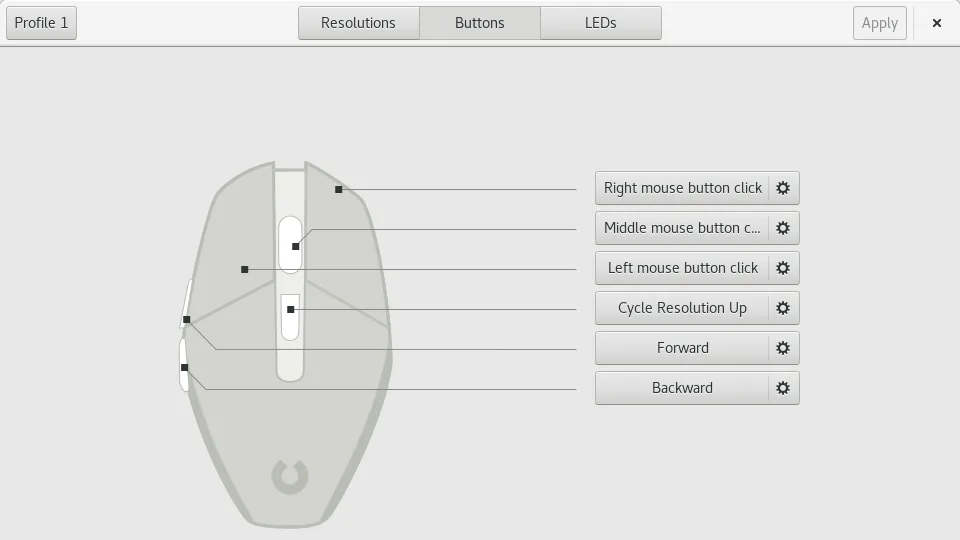
Piper can replace Logitech G Hub for users who own compatible Logitech gaming mice that are supported by ratbagd. It lets you set DPI, create profiles, map buttons, change RGB lighting, and export/import settings. It works on both X11 and Wayland and is free. However, it lacks macro recording, firmware updates, and support for non‑mouse devices, so it is best suited for gamers who only need basic mouse configuration and are comfortable using a Linux daemon.
- Licencia
- GPL-2.0-or-later
- Precio
- Gratis
- Última versión
- 0.8 (24 de septiembre de 2024)
- Valoración
- —
Lo que funciona igual
- Both allow per‑profile DPI settings
- Both support multiple profiles
- Both provide RGB lighting control
- Both let you map buttons to actions
- Both can export configuration files
Lo que cambia
- Piper cannot record or play macros
- Piper does not handle firmware updates
- Piper only supports mice (no keyboards or headsets)
- Piper requires ratbagd daemon to be running
- Piper lacks a built‑in firmware update tool
Abrir tus archivos de Logitech G Hub
Piper does not natively open Logitech G Hub configuration files. You would need to manually recreate settings or export from G Hub to a generic format (if available) and then import into Piper. No direct conversion tool is provided.
Pasar de Logitech G Hub a Piper, paso a paso
- Install ratbagd and make sure it is running.
- Download Piper from Flathub or your distro’s package manager.
- Open Piper and connect to your Logitech mouse.
- Create new profiles in Piper and set DPI, button mapping, and RGB colors to match your G Hub setup.
- Export the Piper configuration as a JSON file for backup.
Funciones clave de Piper
- Ajustar DPI por perfil
- Crear y eliminar perfiles
- Asignar acciones a cada botón
- Configurar colores RGB del LED
- Exportar e importar archivos de configuración
- Soporta varios ratones a la vez
- Funciona en Wayland y X11
Cómo instalar Piper en Linux
flatpak install flathub org.freedesktop.PiperPreguntas frecuentes
Does Piper support all Logitech gaming mice?
Only mice that ratbagd supports are available. Check the ratbagd device list to confirm compatibility.
Can I use Piper on Wayland?
Yes, Piper runs on both Wayland and X11, provided ratbagd is active.
Is there a way to update firmware with Piper?
No, Piper does not include firmware update functionality; you must use the official Logitech tools or other firmware utilities.
Otras 5 alternativas a Logitech G Hub
 OpenRGBOpenRGB te permite controlar la iluminación RGB en Linux sin aplicaciones de los fabricantes.Código abiertoGratisFlatpakOpenRGB vs Logitech G Hub
 SolaarSolaar es una herramienta para Linux que gestiona teclados, ratones y trackpads Logitech, encargándose del…Código abiertoGratisFlatpakSolaar vs Logitech G Hublibratbaglibratbag es una biblioteca y herramienta CLI para Linux que gestiona perfiles de ratones gaming…Código abiertoGratislibratbag vs Logitech G HubKeydKeyd es un daemon liviano para remapear teclas en Linux, similar en propósito a AutoHotkey en Windows.Código abiertoGratisKeyd vs Logitech G HubInput RemapperInput Remapper te permite asignar entradas de teclado y ratón a otras acciones en Linux, reemplazando la…Código abiertoGratisInput Remapper vs Logitech G Hub