
 Qalculate! (GTK UI)Linux
vs
Microsoft Math SolverWindows
Qalculate! (GTK UI) como alternativa Linux a Microsoft Math Solver
Actualizado el
Nuestra opinión
Qalculate! is a strong alternative for users who need symbolic math, unit conversion, and high-precision calculations on Linux. It handles algebra, calculus, and plotting effectively, covering the core computational needs of Microsoft Math Solver. However, it lacks the specific camera-based input and the guided, pedagogical step-by-step breakdowns that make Math Solver popular for students. If you primarily need to solve equations and see results with clear logic, Qalculate! works well. If you rely heavily on scanning handwritten work or need simplified explanations for learning, you will miss that specific workflow.
- Licencia
- GPL-2.0+
- Precio
- Gratis
- Última versión
- 5.13.0 (5 de octubre de 2026)
- Valoración
- —
Lo que funciona igual
- Solves algebraic equations and calculus problems symbolically
- Provides clear, structured output for mathematical results
- Supports plotting of functions and geometric concepts
- Handles a wide range of mathematical domains including geometry
Lo que cambia
- No built-in camera or OCR input for scanning handwritten problems
- Lacks the specific 'step-by-step' pedagogical explanation mode found in Math Solver
- Interface is a traditional calculator layout rather than a problem-solving workspace
- Focus is on calculation precision and unit conversion rather than educational guidance
Abrir tus archivos de Microsoft Math Solver
Microsoft Math Solver does not use a standard, widely documented file format for saving complex problem sessions that Qalculate! can natively open. Qalculate! primarily works with text input and its own internal state. If you have saved problems in Math Solver, you will likely need to manually re-enter the equations into Qalculate! or export them as plain text images/PDFs from Math Solver and reference them alongside your Qalculate! session. There is no direct import mechanism for Math Solver project files.
Pasar de Microsoft Math Solver a Qalculate! (GTK UI), paso a paso
- Install Qalculate! via your distribution's package manager or Flathub
- Familiarize yourself with the symbolic calculation syntax in the input field
- Re-enter your common algebraic and calculus problems to test the output format
- Configure the precision settings if you need specific decimal or fraction outputs
- Use the built-in plotting tool to visualize functions instead of external graphing tools
Funciones clave de Qalculate! (GTK UI)
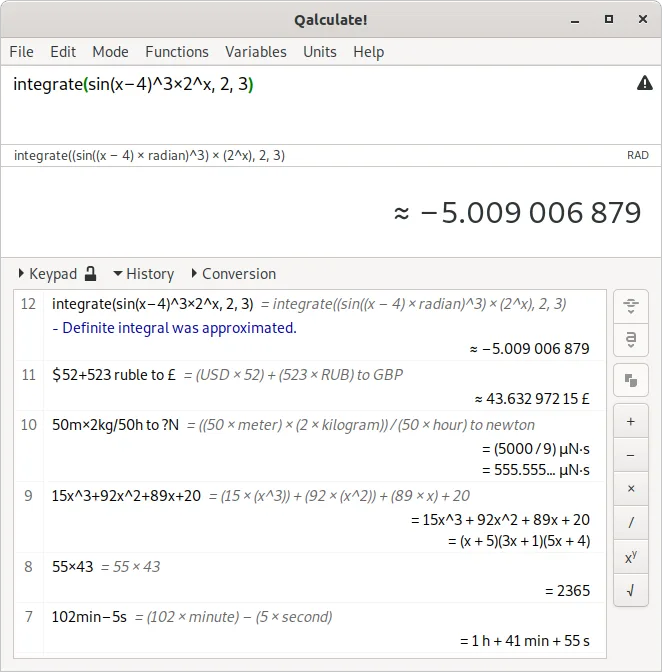
- Cálculos simbólicos, incluidas integrales y ecuaciones
- Amplia biblioteca de cálculos y conversión de unidades
- Precisión arbitraria y propagación de incertidumbre
- Soporte para aritmética de intervalos
- Capacidades de trazado de gráficas integradas
- Gran biblioteca de funciones personalizables
- Base de datos de constantes físicas
- Compatibilidad multiplataforma
Cómo instalar Qalculate! (GTK UI) en Linux
flatpak install flathub io.github.QalculatePreguntas frecuentes
Can Qalculate! take a photo of a math problem and solve it?
No, Qalculate! does not have built-in camera or OCR capabilities. You must type the equation manually into the input field.
Does Qalculate! show the steps to solve an equation?
It provides the final symbolic solution and can evaluate intermediate steps if you break the problem down, but it does not generate a guided, educational step-by-step tutorial like Microsoft Math Solver.
Is Qalculate! good for geometry problems?
Yes, it handles geometric calculations and can plot 2D and 3D functions, making it suitable for visualizing geometric relationships and solving related equations.
Otras 3 alternativas a Microsoft Math Solver
 GeoGebraSoftware de matemáticas dinámicas para resolver ecuaciones, graficar funciones y explorar geometría 2D y 3D.GratisFlatpakGeoGebra vs Microsoft Math SolverSageMathAn open-source computer algebra system (CAS) that combines Python, SageMath, and many other mathematics…Código abiertoGratisSageMath vs Microsoft Math Solver
 GNU OctaveGNU Octave es un entorno gratuito y de código abierto para computación numérica, compatible en gran medida…Código abiertoGratisFlatpakGNU Octave vs Microsoft Math Solver