
 ShotwellLinux
vs
XnViewWindows
ShotwellLinux
vs
XnViewWindows
Shotwell como alternativa Linux a XnView
Actualizado el
Nuestra opinión
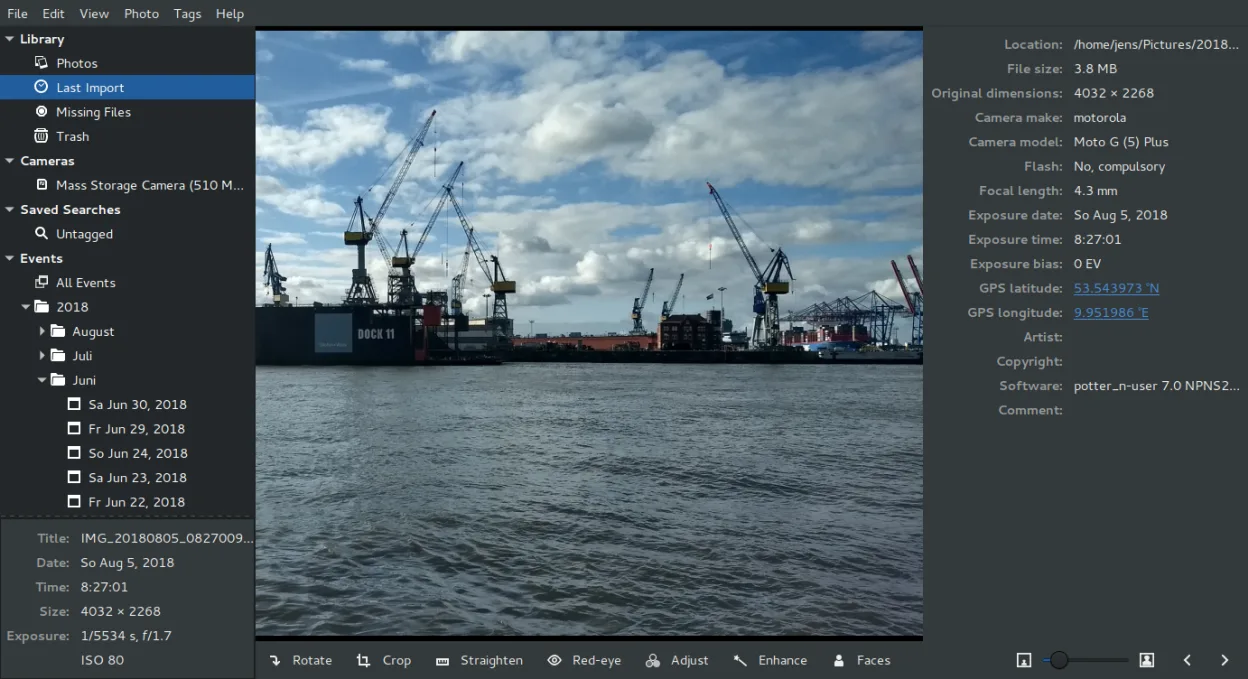
Shotwell is a partial replacement for XnView, but it targets a different user. If you need to view 500+ formats or perform heavy batch conversions, Shotwell will fail you. It is best for GNOME users who primarily manage personal photo libraries, need basic non-destructive edits, and want simple organization by tags or dates. It lacks the breadth of file support and batch processing power that defines XnView. Choose Shotwell if your workflow is centered on importing from cameras and light editing; stick with XnView if you handle diverse file types or require bulk metadata changes.
- Licencia
- LGPL-2.1+
- Precio
- Gratis
- Última versión
- 33.0 (13 de septiembre de 2026)
- Valoración
- —
Lo que funciona igual
- Both support basic image editing like cropping and resizing
- Both allow organizing images into collections or folders
- Both handle common formats like JPEG, PNG, and TIFF
- Both are available on Linux and other platforms
Lo que cambia
- Shotwell lacks support for the 500+ formats XnView handles
- Shotwell has no batch conversion or renaming capabilities
- XnView offers detailed EXIF/IPTC/XMP editing; Shotwell is limited
- Shotwell is tightly integrated with GNOME, while XnView is desktop-agnostic
Abrir tus archivos de XnView
Shotwell opens standard raster and RAW formats (JPEG, PNG, TIFF, CR2, NEF, etc.) that XnView also supports. It does not open proprietary or obscure formats that XnView might handle. Since Shotwell uses its own internal database for organization, it does not read XnView's catalog files. You must import the actual image files into Shotwell to use them. Exporting from Shotwell produces standard image files compatible with XnView, but it cannot export XnView-specific project or batch settings.
Pasar de XnView a Shotwell, paso a paso
- Install Shotwell via your distribution's package manager or Flathub
- Launch Shotwell and create a new photo library
- Use the Import function to add your existing image folders
- Review imported images and apply tags or ratings as needed
- Perform basic edits like cropping or color adjustments if required
- Export edited images if you need to save changes to disk
Funciones clave de Shotwell
- Importar fotos desde cámara o disco
- Organizar por fecha, etiquetas, valoraciones
- Recorte, eliminación de ojos rojos, color, enderezado no destructivos
- Soporte para RAW, JPEG, PNG, TIFF
- Subir a Flickr, Google Photos, etc.
- Interfaz rápida y ligera
- Integrado con el gestor de archivos de GNOME
Cómo instalar Shotwell en Linux
flatpak install flathub org.gnome.Shotwellsudo apt install shotwellsudo apt install shotwellsudo dnf install shotwellsudo pacman -S shotwellsudo zypper install shotwellPreguntas frecuentes
Can Shotwell replace XnView for batch renaming?
No. Shotwell does not have a batch renaming tool. You must use a command-line tool like 'rename' or 'mmv' for this task.
Does Shotwell support WebP or HEIC?
Support depends on your system's libraries. It natively supports JPEG, PNG, TIFF, and RAW. WebP and HEIC support may be present but are not guaranteed across all distributions without extra packages.
Is Shotwell still actively developed?
Yes, the status is active. The latest release mentioned is version 33.0, indicating ongoing maintenance and updates.
Otras 5 alternativas a XnView
 darktabledarktable es un editor de fotos gratuito y de código abierto que gestiona archivos raw y ofrece un flujo de…Código abiertoGratisFlatpakdarktable vs XnView
 GIMPGIMP es un editor de gráficos rasterizados gratuito y de código abierto para edición fotográfica, pintura…Código abiertoGratisFlatpakGIMP vs XnView
 KritaKrita es un programa de pintura digital e ilustración de código abierto con todas las funciones.Código abiertoGratisFlatpakKrita vs XnView
 digiKamdigiKam es un gestor de fotos de KDE integral para organizar, etiquetar y editar fotos digitales con un…Código abiertoGratisFlatpakdigiKam vs XnView