
 SMPlayerLinux
vs
MPC-HCWindows
SMPlayer como alternativa Linux a MPC-HC
Actualizado el
Nuestra opinión
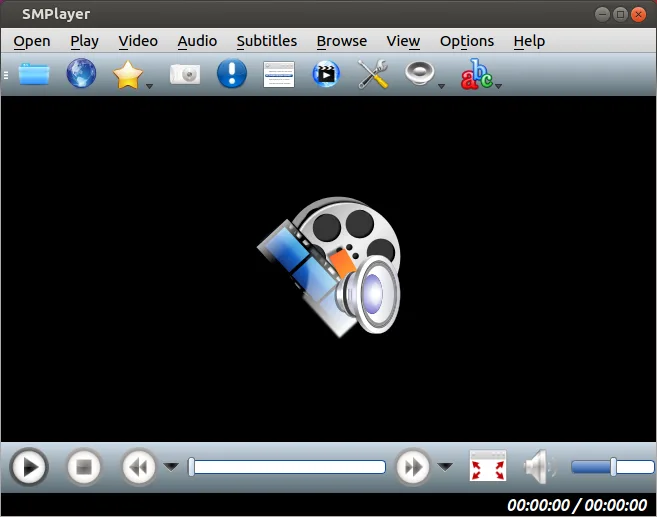
SMPlayer is a solid replacement for MPC‑HC for most users. It plays the same wide range of video and audio formats, uses low memory and CPU, remembers per‑file settings, and handles subtitles and external audio streams. The main advantage is the built‑in codecs and YouTube support, eliminating the need for external codec packs. It is ideal for users who want a lightweight player with a few extra features, but it lacks the very small footprint and some advanced playback controls that hardcore MPC‑HC users might rely on.
- Licencia
- GPL-2.0-or-later
- Precio
- Gratis
- Última versión
- 25.6.0 (8 de junio de 2025)
- Valoración
- —
Lo que funciona igual
- Both support a wide array of common video and audio formats
- Both are lightweight and use modest CPU and memory
- Both remember playback position and settings per file
- Both allow subtitle tracks and external audio streams
- Both are open‑source and free
Lo que cambia
- SMPlayer ships with built‑in codecs; MPC‑HC relies on external codec packs
- SMPlayer can play YouTube videos and cast to devices; MPC‑HC does not
- SMPlayer is available as a Flatpak and via native package managers; MPC‑HC is a Windows installer
- SMPlayer’s interface is more modern but may lack some of MPC‑HC’s advanced playback controls
- SMPlayer may use slightly more memory than the minimal MPC‑HC build
Abrir tus archivos de MPC-HC
SMPlayer can open almost any video file that MPC‑HC can play, including common containers like MP4, MKV, AVI, and audio formats such as MP3, AAC, FLAC. It does not import MPC‑HC project files or playlists directly, so any custom playlist files (.m3u, .m3u8) must be opened manually. Exporting is not required as SMPlayer plays files directly.
Pasar de MPC-HC a SMPlayer, paso a paso
- Install SMPlayer from your distribution’s package manager or Flathub.
- Open the video or audio file you normally play with MPC‑HC to verify format support.
- If you use external subtitle files, place them in the same folder or use SMPlayer’s subtitle search feature.
- Adjust playback settings (volume, speed, video output) and save them; SMPlayer will remember them per file.
- Replace MPC‑HC shortcuts or desktop entries with SMPlayer’s if you prefer quick access.
- Test any custom playlists by opening them in SMPlayer to ensure compatibility.
Funciones clave de SMPlayer
- Códecs integrados para prácticamente todos los formatos de video y audio
- Recuerda la posición de reproducción y la configuración de cada archivo
- Permite reproducir videos directamente desde YouTube
- Búsqueda y descarga automática de subtítulos
- Envía medios a dispositivos externos como smartphones y tablets
- No requiere paquetes de códecs externos
- Disponible a través de Flathub y gestores de paquetes nativos
Cómo instalar SMPlayer en Linux
flatpak install flathub info.smplayer.SMPlayersudo apt install smplayersudo apt install smplayersudo dnf install smplayersudo pacman -S smplayersudo zypper install smplayerPreguntas frecuentes
Does SMPlayer need additional codecs to play most videos?
No. SMPlayer includes built‑in codecs for virtually all common video and audio formats, so you don’t need to install separate codec packs.
Can I play YouTube videos with SMPlayer?
Yes. SMPlayer can stream videos directly from YouTube using its built‑in downloader.
Is SMPlayer lightweight enough for low‑end systems?
SMPlayer is designed to be lightweight; it uses modest CPU and memory, comparable to MPC‑HC, making it suitable for older hardware.
Otras 4 alternativas a MPC-HC
 VLC media playerVLC es un reproductor multimedia gratuito y de código abierto que funciona en Linux y maneja prácticamente…Código abiertoGratisFlatpakVLC media player vs MPC-HC
 mpvmpv es un reproductor multimedia gratuito, de código abierto y multiplataforma que reproduce casi cualquier…Código abiertoGratisFlatpakmpv vs MPC-HC
 CelluloidCelluloid es un reproductor multimedia ligero para Linux que utiliza el motor mpv y GTK para ofrecer una…Código abiertoGratisFlatpakCelluloid vs MPC-HC
 HarunaHaruna es un reproductor multimedia de código abierto con licencia GPL que soporta reproducción local y en…Código abiertoGratisFlatpakHaruna vs MPC-HC