
 SylpheedLinux
vs
SylpheedLinux
vs
 Microsoft OutlookWindows
Sylpheed como alternativa Linux a Microsoft Outlook
Actualizado el
Nuestra opinión
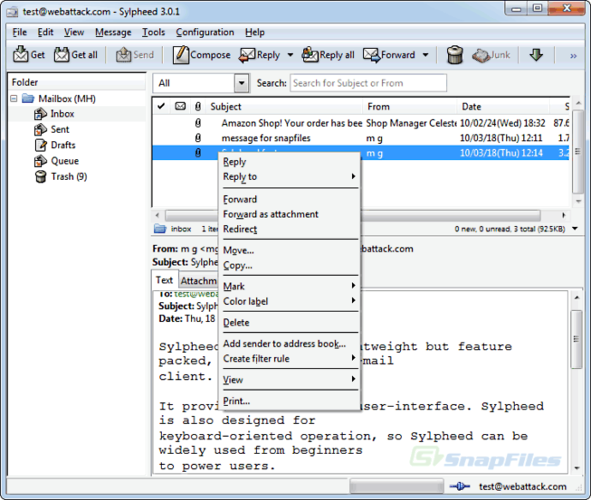
Sylpheed is a solid replacement for Outlook if your needs are strictly email-centric. It handles IMAP, POP3, and SMTP well and offers a lightweight, responsive interface. However, it is not a full personal information manager. It lacks a native calendar, task list, or meeting scheduler. If you rely on Outlook for scheduling and contact management, Sylpheed alone will leave significant gaps. It is best suited for users who primarily send and receive mail and use separate tools like Thunderbird or Evolution for their PIM needs.
- Licencia
- GPL-2.0-or-later
- Precio
- Gratis
- Última versión
- 3.7.0
- Valoración
- —
Lo que funciona igual
- Supports multiple email accounts via IMAP, POP3, and SMTP
- Includes a built-in address book for managing contacts
- Allows rule-based filtering and sorting of incoming mail
- Provides a graphical interface for reading and composing messages
Lo que cambia
- No integrated calendar, task manager, or meeting scheduling features
- Does not support Microsoft Exchange ActiveSync or MAPI protocols natively
- Uses MH maildir storage instead of Outlook's proprietary PST format
- Lacks the deep integration with Microsoft 365 services and Office suite
Abrir tus archivos de Microsoft Outlook
Sylpheed does not natively open or export Microsoft Outlook PST files. You can import individual EML files, but bulk migration from PST requires third-party conversion tools. Since Sylpheed uses MH format, you cannot directly open a PST archive. For EML files, you can typically drag and drop them into the client, but complex folder structures or embedded attachments within PSTs may not transfer perfectly without external conversion scripts.
Pasar de Microsoft Outlook a Sylpheed, paso a paso
- Export your contacts from Outlook as a CSV file
- Import the CSV file into Sylpheed's built-in address book
- Configure your email accounts in Sylpheed using your IMAP/POP3 and SMTP settings
- Set up any necessary filtering rules to match your previous Outlook organization
- Test sending and receiving emails to verify server connectivity
Funciones clave de Sylpheed
- Almacenamiento de buzones MH
- Interfaz gráfica GTK+
- Soporte para SMTP, POP3, IMAP y NNTP
- Libreta de direcciones integrada con búsqueda LDAP
- Filtrado y procesamiento de correo basado en reglas
- Múltiples cuentas y jerarquía de carpetas
- Corrección ortográfica mediante Enchant
- Archivos de configuración portátiles
Cómo instalar Sylpheed en Linux
sudo apt install sylpheedsudo apt install sylpheedsudo dnf install sylpheedPreguntas frecuentes
Can Sylpheed sync with Microsoft Exchange?
No, Sylpheed does not support Exchange ActiveSync or MAPI. You would need to use a separate client like Thunderbird with the EAS plugin or Evolution for Exchange support.
Does Sylpheed have a calendar feature?
No, Sylpheed is an email and news client only. It does not include a calendar, task list, or contact scheduler. You must use a separate PIM application for those functions.
Is Sylpheed available on all Linux distributions?
Yes, it is packaged in major distributions including Debian, Ubuntu, and Fedora. You can install it via your system's standard package manager.
Otras 3 alternativas a Microsoft Outlook
 Evolution MailEvolution es el gestor integrado de correo, calendario, contactos y tareas de GNOME.Código abiertoGratisFlatpakEvolution Mail vs Microsoft Outlook
 Mozilla ThunderbirdMozilla Thunderbird es un cliente gratuito y de código abierto de correo electrónico, calendario y noticias…Código abiertoGratisMozilla Thunderbird vs Microsoft Outlook
 KMailKMail es el cliente de correo completo de KDE, parte de la suite Kontact, que admite IMAP, POP3 y buzones…Código abiertoGratisKMail vs Microsoft Outlook