
 Xournal++Linux
vs
Adobe Acrobat ReaderWindows
Xournal++Linux
vs
Adobe Acrobat ReaderWindows
Xournal++ como alternativa Linux a Adobe Acrobat Reader
Actualizado el
Nuestra opinión
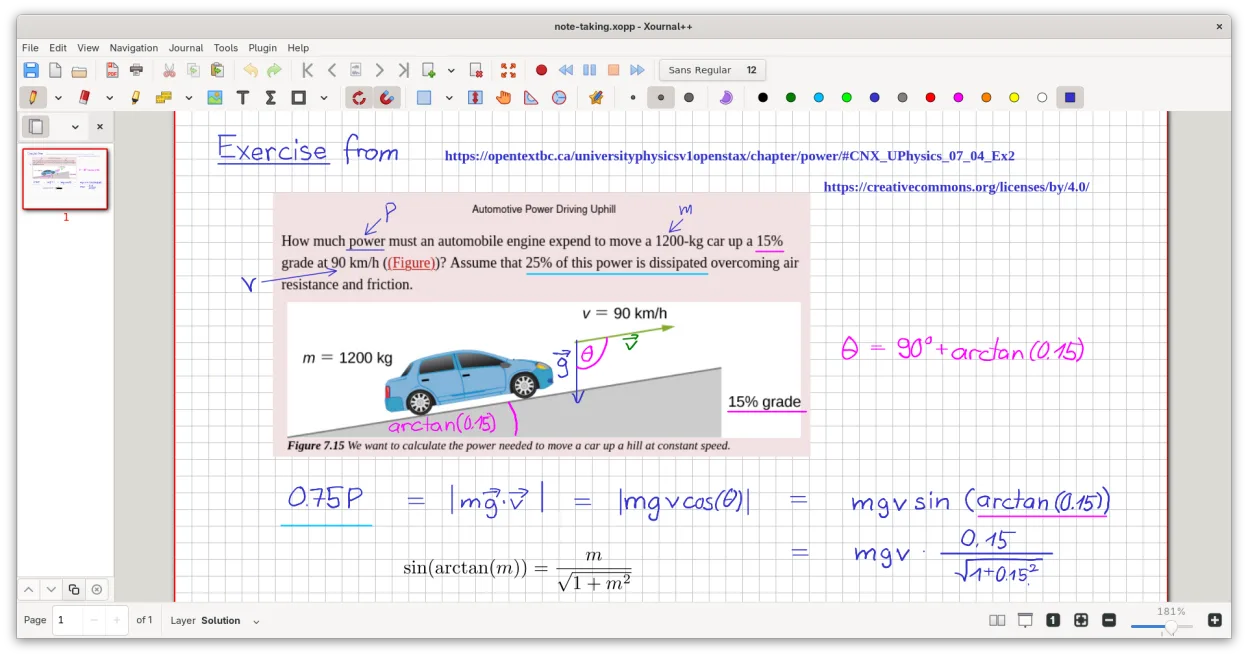
Xournal++ is a strong replacement if you prioritize annotation, handwriting, and visual markup over complex form handling or digital signing. It excels at highlighting, drawing, and adding text to PDFs with better stylus support than Acrobat. However, it is not a direct one-to-one swap for users who rely heavily on filling interactive PDF forms or creating legally binding digital signatures. For readers who mainly consume and mark up documents, it is a solid, lightweight choice. For heavy form users, look for a different tool.
- Licencia
- GPL-2.0
- Precio
- Gratis
- Última versión
- 1.3.8 (25 de septiembre de 2026)
- Valoración
- —
Lo que funciona igual
- Opens and displays PDF documents with high-quality rendering
- Allows users to highlight, underline, and strike through text
- Supports adding text boxes and images to pages
- Provides navigation via bookmarks and page previews
- Enables printing of annotated documents
Lo que cambia
- Lacks robust support for filling interactive PDF forms
- No native digital signature creation or verification tools
- Focuses on freehand annotation rather than structured document editing
- Does not offer advanced PDF management like merging or splitting in the same way
- Requires LaTeX installation for math formula rendering
Abrir tus archivos de Adobe Acrobat Reader
Xournal++ opens standard PDF files directly. When you save your work, it typically exports to PDF, preserving your annotations on top of the original content. It does not edit the underlying PDF structure, so complex form fields may not be preserved or editable in the exported file. If you need to keep interactive forms functional, you may need to use a different tool for that specific task.
Pasar de Adobe Acrobat Reader a Xournal++, paso a paso
- Install Xournal++ from your distro repository or Flathub
- Open your existing PDF files directly in the application
- Configure your stylus or tablet settings in the preferences if needed
- Use the sidebar to navigate bookmarks and manage layers
- Export your annotated work to PDF when finished
- Test a few sample documents to ensure annotations appear correctly
Funciones clave de Xournal++
- Soporte de lápiz óptico sensible a la presión para tablets Wacom, Huion y XP-Pen
- Anotar, resaltar y tachar texto sobre archivos PDF
- Exportar notas a PDF, PNG y SVG vía GUI o línea de comandos
- Herramientas de dibujo que incluyen bolígrafo, resaltador, formas y soporte LaTeX
- Estabilización de entrada para escritura más fluida
- Barra de herramientas personalizable y asignación de botones del lápiz
- Barra lateral con vistas previas de página, marcadores PDF y gestión de capas
Cómo instalar Xournal++ en Linux
flatpak install flathub com.github.xournalpp.xournalppsudo apt install xournalppsudo apt install xournalppsudo dnf install xournalppsudo pacman -S xournalppsudo zypper install xournalppPreguntas frecuentes
Can I fill out PDF forms in Xournal++?
No, Xournal++ is not designed for filling interactive PDF forms. It is better suited for annotating static content. If you need to fill forms, use a dedicated PDF viewer or editor.
Does Xournal++ support digital signatures?
It does not have built-in tools for creating or verifying digital signatures. You can draw a signature image, but it will not be a legally binding digital signature.
Is Xournal++ good for reading large PDFs?
Yes, it handles large PDFs well and provides smooth navigation. However, if you only read and never annotate, a lighter viewer like Evince or Okular might be faster.
Otras 4 alternativas a Adobe Acrobat Reader
 OkularOkular es un visor de documentos universal para KDE que maneja PDF, EPUB y cómics con soporte de anotaciones.Código abiertoGratisFlatpakOkular vs Adobe Acrobat Reader
 EvinceEvince es el visor de documentos estándar de GNOME para PDF, PostScript y archivos de cómics, ofreciendo…Código abiertoGratisFlatpakEvince vs Adobe Acrobat Reader
 Master PDF EditorUn editor PDF propietario para Linux que permite editar texto, formularios y firmas digitales con una…FlatpakMaster PDF Editor vs Adobe Acrobat ReaderAtrilAtril es un visor de documentos ligero para el escritorio MATE que maneja PDFs y otros formatos con una…Código abiertoGratisAtril vs Adobe Acrobat Reader