
 ZettlrLinux
vs
NotionWindows
ZettlrLinux
vs
NotionWindows
Zettlr como alternativa Linux a Notion
Actualizado el
Nuestra opinión
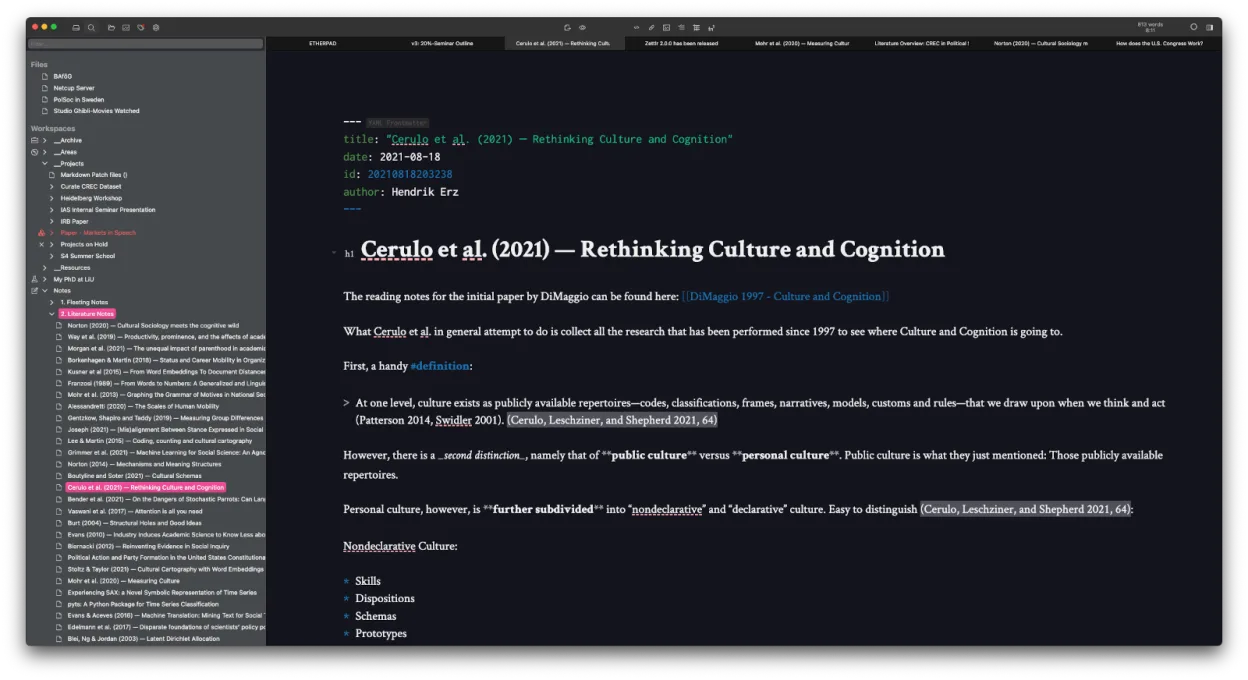
Zettlr is a good replacement for Notion if your focus is on writing, structured notes, and offline work with Markdown. It excels for researchers, writers, or knowledge workers who value plain-text storage, citation support, and Zettelkasten-style linking. However, it lacks Notion’s database views, real-time collaboration, and web-based accessibility. If you rely heavily on dynamic tables, kanban boards, or team workflows, Zettlr won’t match that. But for local, fast, and flexible note management with strong export and linking, it’s a solid choice—especially if you prioritize data ownership and simplicity over cloud features.
- Licencia
- GPL-3.0-or-later
- Precio
- Gratis
- Última versión
- 4.9.0 (25 de octubre de 2026)
- Valoración
- —
Lo que funciona igual
- Supports flexible note-taking with Markdown and internal linking
- Allows tagging and organizing notes for knowledge management
- Enables backlinking between notes using Zettelkasten principles
- Offers task management via checklists and TODO markers in Markdown
- Supports export to multiple formats including PDF and HTML
Lo que cambia
- No built-in database or table views like Notion’s inline databases or kanban boards
- No real-time collaboration or multi-user editing
- No web app or mobile sync—desktop-only with local file storage
- Lacks Notion’s rich block-based editor (e.g. embeds, toggles, inline databases)
- No native templates or shared workspaces
Abrir tus archivos de Notion
Zettlr cannot directly open Notion exports or databases. If you export pages from Notion as Markdown or HTML, Zettlr can import and work with those files. However, Notion’s database structures, relations, and properties won’t carry over. You’ll need to reorganize content manually. For long-term portability, Zettlr stores notes as plain Markdown files, which are future-proof and widely compatible. Use Notion’s export tools first, then clean up formatting as needed in Zettlr.
Pasar de Notion a Zettlr, paso a paso
- Export your Notion pages as Markdown or HTML (use Notion’s export feature)
- Organize exported files into folders matching your workspace structure
- Open the folder in Zettlr to import your notes as a project
- Replace Notion-style links with Zettlr-compatible internal links or IDs
- Use tags and custom IDs in Zettlr to recreate backlinks and connections
- Set up citation libraries if using Zotero or BibTeX for references
Funciones clave de Zettlr
- Edición de Markdown con vista previa en vivo
- Enlazado y etiquetado estilo Zettelkasten
- Soporte para citas vía CSL-JSON, BibTeX, Zotero, JabRef
- Modo oscuro y múltiples temas, CSS personalizado
- Búsqueda por mapa de calor para descubrir notas rápidamente
- Almacenamiento basado en archivos – sin base de datos propietaria
- Exportación a PDF, HTML y otros formatos
- Multiplataforma (Linux, Windows, macOS)
Cómo instalar Zettlr en Linux
flatpak install flathub com.zettlr.Zettlrsudo pacman -S zettlrPreguntas frecuentes
Can Zettlr sync with the cloud like Notion?
Zettlr doesn’t have built-in sync, but you can store your notes folder in a cloud service like Nextcloud, Dropbox, or Syncthing for manual syncing across devices.
Does Zettlr support two-way linking like Notion?
It supports manual backlinking via file IDs and internal links, but not automatic two-way link graphs. You can track references by naming conventions or using tags.
Can I use Zettlr for project management like in Notion?
You can manage tasks with TODO lists in Markdown and organize projects in folders, but Zettlr lacks Gantt charts, assignees, or progress tracking found in Notion.
Otras 5 alternativas a Notion
 ObsidianObsidian es una aplicación de base de conocimientos basada en markdown que almacena las notas como archivos…FlatpakObsidian vs Notion
 LogseqLogseq es una herramienta local primero para bases de conocimiento no lineales que almacena notas como…Código abiertoGratisFlatpakLogseq vs Notion
 JoplinJoplin es una aplicación de código abierto y multiplataforma para tomar notas y tareas que almacena los datos…Código abiertoGratisFlatpakJoplin vs Notion
 Standard NotesStandard Notes es una aplicación de notas multiplataforma con cifrado de extremo a extremo que se sincroniza…Código abiertoGratisFlatpakStandard Notes vs Notion
 Trilium NotesTrilium Notes es una aplicación de toma de notas jerárquica y autoalojada para construir bases de…Código abiertoGratisFlatpakTrilium Notes vs Notion