
 HandBrakeLinux
vs
WinX DVD RipperWindows
HandBrake, alternative Linux à WinX DVD Ripper
Mis à jour le
Notre avis
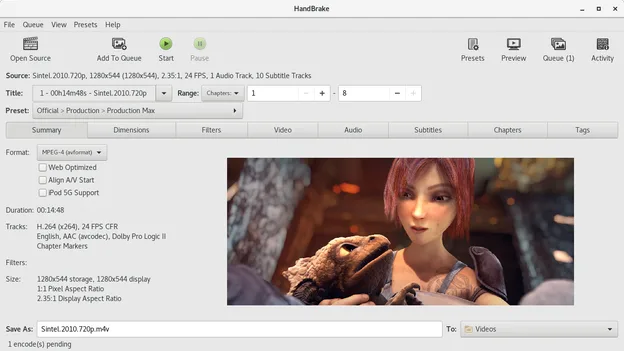
HandBrake is not a direct replacement for WinX DVD Ripper if you need to read encrypted DVDs, as it cannot bypass copy protection. It excels at converting already-decoded video into MP4 or MKV with good quality and speed, supports subtitles and audio track selection, and handles batch jobs well. However, users relying on ripping commercial DVDs will need additional tools like libdvdcss. For personal backups of unencrypted media or files you already own, HandBrake works great on Linux and is a solid choice for both beginners and advanced users.
- Licence
- GPL-2.0-only
- Prix
- Gratuit
- Dernière version
- 1.11.2 (7 juin 2026)
- Note
- —
Ce qui fonctionne pareil
- Converts video to common formats like MP4 and MKV
- Supports custom bitrate, resolution, and codec settings
- Handles subtitles and multiple audio tracks
- Offers batch encoding with queue management
- Provides a simple GUI suitable for beginners
Ce qui change
- HandBrake cannot read encrypted DVDs by default; WinX DVD Ripper can
- WinX includes built-in hardware acceleration for faster ripping; HandBrake relies on system codecs
- HandBrake does not natively support ISO or folder-based DVD image input without prior decryption
- WinX has more automated presets for DVD ripping; HandBrake requires more manual setup
- HandBrake is open source; WinX is proprietary
Ouvrir vos fichiers WinX DVD Ripper
HandBrake can open most video files created by WinX DVD Ripper, especially if they are in MP4 or MKV format. Since both tools use FFmpeg as a backend, compatibility with common codecs like H.264 and AAC is strong. However, if WinX outputs proprietary formats or uses non-standard containers, HandBrake may not support them. There's no known issue with importing standard exports from WinX, but HandBrake won't regenerate files with copy protection or DRM.
Passer de WinX DVD Ripper à HandBrake, étape par étape
- Install HandBrake from your distribution's repository or Flathub
- Use a tool like MakeMKV or libdvdcss to decrypt DVDs before processing
- Load the decrypted file or folder into HandBrake
- Choose an output preset (e.g., Fast 1080p30) and adjust audio/subtitle tracks
- Add to queue and start encoding
- Use batch mode for multiple titles
Fonctionnalités clés de HandBrake
- Prise en charge de plus de 200 formats d’entrée via FFmpeg
- Large éventail de préréglages de sortie pour les appareils
- Possibilité de définir le débit, la résolution et les paramètres de codec
- Filtres avancés (désentrelacement, réduction du bruit, recadrage)
- Encodage par lots avec gestion de la file d’attente
- Raccourcis clavier pour une navigation rapide
- Exportation vers plusieurs conteneurs (MP4, MKV, WebM)
- Gestion intégrée des sous‑titres
Installer HandBrake sous Linux
flatpak install flathub fr.handbrake.ghbsudo apt install handbrakesudo apt install handbrakesudo pacman -S handbrakeQuestions fréquentes
Can HandBrake rip DVDs like WinX DVD Ripper?
Not directly. HandBrake can't decrypt commercial DVDs. You need to first decrypt the DVD using tools like MakeMKV or dvdbackup, then process it in HandBrake.
Does HandBrake support hardware acceleration?
Yes, HandBrake supports hardware encoders like Intel Quick Sync, NVIDIA NVENC, and AMD VCE if available in your system and properly configured.
Can I preserve subtitles and multiple audio tracks?
Yes. HandBrake allows you to select and include multiple audio tracks and subtitles, including SRT and PGS, in MP4 or MKV outputs.
4 autres alternatives à WinX DVD Ripper
 VLCVLC est un lecteur multimédia gratuit et open source qui gère pratiquement tous les formats audio ou vidéo.Open sourceGratuitFlatpakVLC ou WinX DVD Ripper
 MakeMKVMakeMKV converts DVDs and Blu-rays to MKV files or streams them decrypted over the network.FlatpakMakeMKV ou WinX DVD RipperFFmpegFFmpeg est un kit d'outils en ligne de commande puissant pour convertir, diffuser et traiter des fichiers…Open sourceGratuitFFmpeg ou WinX DVD Ripper
 K9CopyK9Copy est un utilitaire KDE pour sauvegarder et compresser des DVD sous Linux.Open sourceGratuitAbandonnéK9Copy ou WinX DVD Ripper