
Windows · Programmation
Meilleures alternatives Linux à JetBrains IntelliJ IDEA
IntelliJ IDEA is a JVM-focused IDE for Java and Kotlin, with a free Community edition and a paid Ultimate version.
Mis à jour le
En bref
La meilleure alternative Linux à JetBrains IntelliJ IDEA est NetBeans. Autres bonnes options : VS Code.
2 alternatives Linux à JetBrains IntelliJ IDEA
-
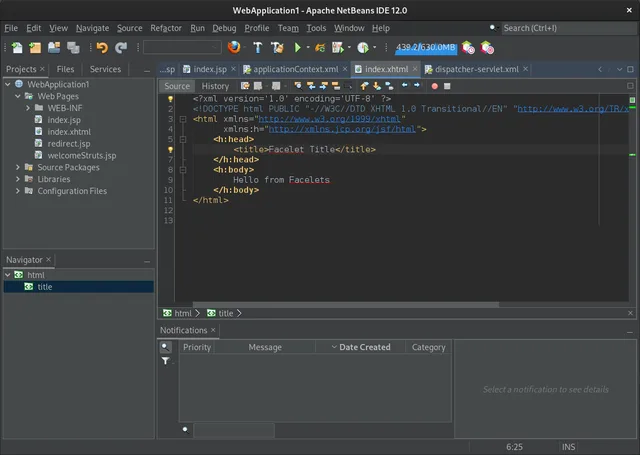
NetBeans est un IDE open source d'Apache qui prend en charge Java, JavaScript, PHP, C/C++ et bien plus encore.
NetBeans is a solid, free alternative for pure Java and Kotlin development, especially if you value a lightweight, modular IDE without subscription fees. It handles Maven, Gradle, and Git well. However, it lacks the deep Kotlin-specific features and advanced refactoring tools found in IntelliJ IDEA…
Couverture fonctionnelle75% -
Un éditeur de code léger et extensible prenant en charge de nombreux langages, basé sur Electron et un noyau open source.
VS Code is a capable alternative for lightweight Java and Kotlin work, but it is not a direct 1:1 replacement for IntelliJ IDEA. It lacks the deep, out-of-the-box JVM integration that makes IDEA powerful for large enterprise projects. If you rely heavily on advanced refactoring, built-in profilers…
Couverture fonctionnelle65%

Qu’est-ce que JetBrains IntelliJ IDEA ?
Developers use IntelliJ IDEA to write, debug, and manage applications in Java, Kotlin, Groovy, and other JVM languages. It is the standard tool for enterprise Java development, offering deep code analysis, refactoring tools, and framework support. Teams rely on it for large-scale projects where productivity and code quality are critical.
JetBrains offers two main versions. The Community Edition is free and open-source under the Apache 2.0 license, suitable for pure JVM work. The Ultimate Edition is a paid subscription that adds support for web technologies, databases, and mobile development. Both versions can be used for commercial projects without additional licensing fees.
While IntelliJ IDEA runs natively on Linux, many developers seek alternatives due to resource consumption or specific workflow preferences. Some prefer lighter-weight editors, while others want to avoid subscription costs. Additionally, users may switch to tools that better integrate with their existing CI/CD pipelines or cloud-based development environments.
Ce que doit savoir faire un remplaçant de JetBrains IntelliJ IDEA
- Native support for Java and Kotlin
- Integrated debugger and profiler
- Smart code completion and refactoring
- Version control integration (Git)
- Build system support (Maven, Gradle)
- Plugin ecosystem for extensions
Peut-on utiliser JetBrains IntelliJ IDEA sous Linux ?
IntelliJ IDEA is a native Linux application. You can download the .tar.gz archive directly from JetBrains and extract it to run the IDE. It does not require Wine or Proton. The application is fully supported on major distributions like Ubuntu, Fedora, and Arch. There is no web-based version that replicates the full IDE functionality, though JetBrains Gateway allows remote development.
Quelle alternative choisir ?
If you need a full-featured, open-source IDE specifically for Java, NetBeans is a solid choice as it is maintained by the Eclipse Foundation. For lightweight coding or polyglot development, VS Code is excellent, especially with the Java Extension Pack. Bluejay is less common for general Java development but may suit specific niche workflows or users preferring a different interface paradigm.
Migrer vos fichiers et habitudes JetBrains IntelliJ IDEA
Migrating from IntelliJ IDEA involves transferring your project files, which are standard Java/Kotlin source code and build files (pom.xml, build.gradle). You will need to reconfigure your IDE settings, such as JDK paths and code style. Plugins installed in IntelliJ will not transfer directly to NetBeans or VS Code; you must find equivalent extensions in their respective marketplaces. Your Git history remains intact as it is stored in the project directory.
Comparatif côte à côte
JetBrains IntelliJ IDEA : questions fréquentes
Is the Community Edition enough for most Java developers?
Yes, if you are working primarily with JVM languages and do not need built-in support for web frameworks, databases, or mobile development. It includes core IDE features, debugger, and version control integration.
Can I use IntelliJ IDEA for free on Linux?
Yes, the Community Edition is free and open-source. The Ultimate Edition requires a paid subscription, though JetBrains offers free licenses for students, teachers, and open-source maintainers.
Does IntelliJ IDEA work well on low-end hardware?
It is resource-intensive. While it can run on modest hardware, you may experience lag with large projects. NetBeans and VS Code are generally lighter on system resources.
Can I import my IntelliJ project into VS Code?
Yes, you can open the project folder directly in VS Code. You will need to install Java extensions and configure your build tools (Maven/Gradle) to get full IDE features like debugging and code navigation.
JetBrains IntelliJ IDEA est-il important pour vous ?
Vous connaissez une meilleure alternative ? Proposer une alternative