
Windows · Outils système
Meilleures alternatives Linux à Macrium Reflect
A Windows disk imaging and backup tool for creating, restoring, and cloning system images.
Mis à jour le
En bref
La meilleure alternative Linux à Macrium Reflect est Clonezilla. Autres bonnes options : Timeshift, GParted.
3 alternatives Linux à Macrium Reflect
-
Clonezilla est un outil gratuit et open source de création d'images et de clonage de disques pour Linux.
Clonezilla is a strong replacement for Macrium Reflect if you prioritize cost and open-source transparency over convenience. It handles disk imaging, cloning, and bare-metal restoration effectively, with native support for ext4 and btrfs. However, it lacks a graphical interface and built-in…
Couverture fonctionnelle75% -
Timeshift est un utilitaire de restauration système pour Linux qui crée des instantanés Btrfs ou des sauvegardes rsync pour revenir à un état antérieur du système d'exploitation.
Timeshift can replace Macrium Reflect for users who need basic system restore and snapshot functionality on Linux. It covers full system snapshots, incremental backups, and bootable restores, but it does not provide disk cloning or support for Windows‑specific file systems. Linux users who want a…
Couverture fonctionnelle60% -
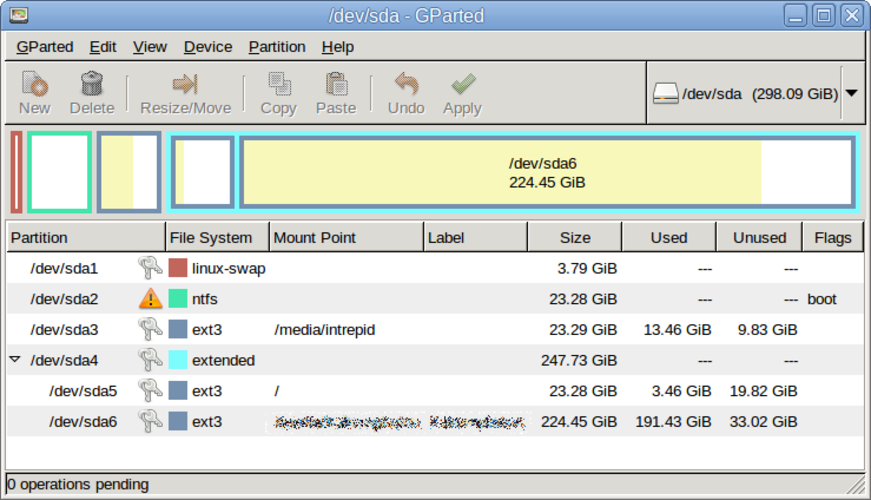
GParted est un éditeur graphique de partitions gratuit et open source, conçu pour créer, redimensionner, déplacer et copier des partitions de disque et des systèmes de fichiers.
GParted is not a drop‑in replacement for Macrium Reflect. It can copy and resize partitions, but it lacks full disk imaging, scheduled backups, boot‑loader handling, and the ability to restore images to bare metal. It is useful for users who only need partition manipulation or quick copy of a…
Couverture fonctionnelle30%

Qu’est-ce que Macrium Reflect ?
Macrium Reflect is a disk imaging and backup utility designed for both home users and enterprises. It allows users to create full or incremental images of their system drives, clone disks to new hardware, and restore backups in case of data loss or hardware failure. It is widely used for prepping new drives or recovering from OS crashes.
The software operates on a freemium model. A free version is available for basic imaging tasks, while paid editions offer advanced features like incremental backups, cloud storage integration, and enterprise management tools. The free version is often sufficient for personal use, but businesses typically require the paid tiers for support and advanced scheduling.
People look for Linux alternatives because they are migrating away from Windows or need to back up Linux systems. Macrium Reflect does not run natively on Linux, so users need tools that can handle Linux file systems, partitions, and boot configurations. They seek reliable, open-source solutions that integrate well with the Linux ecosystem.
Ce que doit savoir faire un remplaçant de Macrium Reflect
- Create full disk or partition images
- Restore system images to bare metal
- Clone disks to new hardware
- Support for Linux file systems (ext4, btrfs)
- Schedule automated backups
- Handle boot loader and MBR/EFI partition
Peut-on utiliser Macrium Reflect sous Linux ?
Macrium Reflect is a Windows-only application. There is no native Linux version, and it does not run via Wine, Proton, or Bottles. You cannot use it to back up a Linux system directly. If you have a Windows partition on a dual-boot setup, you must boot into Windows to use Macrium Reflect for that specific drive.
Quelle alternative choisir ?
For most users needing a simple, reliable backup solution, Timeshift is the best choice, especially for system snapshots on Linux. If you need to clone a drive or create a bootable image for disaster recovery, Clonezilla is the standard tool, though it has a steeper learning curve. GParted is not a backup tool but is useful for resizing partitions before cloning or imaging. Choose Timeshift for daily automated backups and Clonezilla for full system migrations.
Migrer vos fichiers et habitudes Macrium Reflect
You cannot directly convert Macrium Reflect image files (.mrimg) to a Linux-compatible format. You must restore the image to a Windows system or use a Windows environment to extract the data. For future backups, use Linux-native tools like Timeshift or Clonezilla. Ensure your backup media is formatted in a file system Linux can read, such as ext4 or NTFS, to maintain compatibility across systems.
Comparatif côte à côte
| Application | Licence | Flatpak | Dernière version | Couverture fonctionnelle | Note |
|---|---|---|---|---|---|
| Clonezilla | GPL-2.0 | — | 3.35.2 | 75% | — |
| Timeshift | GPL-3.0 | — | 26.09.0 | 60% | — |
| GParted | GPL-3.0 | — | 1.8.1 | 30% | — |
Macrium Reflect : questions fréquentes
Can I use Macrium Reflect on a Linux partition?
No. Macrium Reflect only works when running on Windows. It cannot image or restore Linux partitions from a Linux environment.
Is Clonezilla difficult to use?
Clonezilla is a command-line and graphical tool that requires some technical knowledge. It is powerful but less intuitive than Timeshift for regular users.
Does Timeshift work on all Linux distributions?
Timeshift works on most major distributions, including Ubuntu, Mint, and Fedora. It relies on rsync or BTRFS snapshots, so it is best suited for systems using those file systems.
Can I restore a Macrium image to a Linux system?
Not directly. You would need to restore the image to a Windows drive and then transfer the data, or use the image to recover a Windows dual-boot setup.
Macrium Reflect est-il important pour vous ?
Vous connaissez une meilleure alternative ? Proposer une alternative