
 NatronLinux
vs
Adobe Premiere ElementsWindows
NatronLinux
vs
Adobe Premiere ElementsWindows
Natron, alternative Linux à Adobe Premiere Elements
Mis à jour le
Notre avis
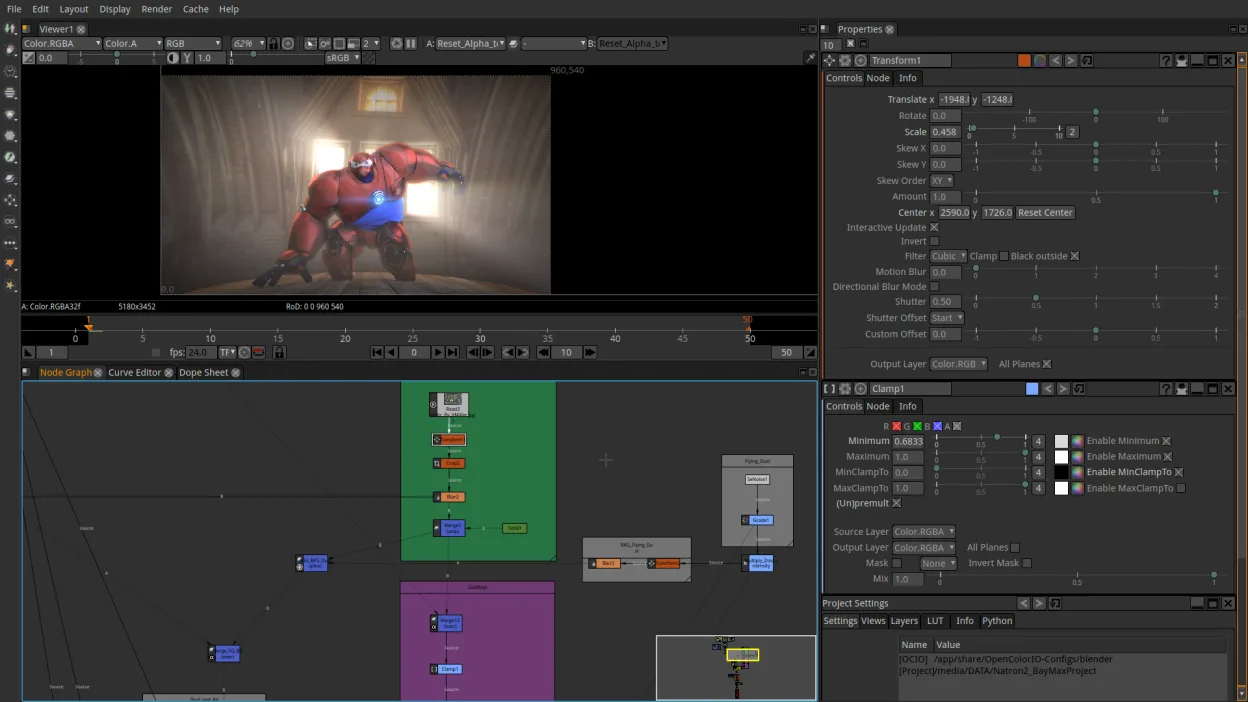
Natron is not a direct replacement for Adobe Premiere Elements. It is a node‑based compositing tool aimed at VFX and motion graphics, not a consumer‑grade timeline editor. It can import and export common video formats, but lacks the simple cut‑trim‑join workflow, built‑in transitions, and user‑friendly interface that Premiere Elements users rely on. If you need advanced compositing, color grading, or scripting, Natron is useful, but for everyday video editing, a dedicated timeline editor like Shotcut or Kdenlive is more appropriate.
- Licence
- GPL-2.0-or-later
- Prix
- Gratuit
- Dernière version
- 2.5.0 (26 novembre 2022)
- Note
- —
Ce qui fonctionne pareil
- Imports and exports MP4, MOV, AVI
- Supports basic keyframing and timeline editing
- Allows audio track manipulation
- Can export to social‑media‑ready formats
- Runs natively on Linux
Ce qui change
- No built‑in transition library or preset effects
- No simple cut/trim/join UI, requires node setup
- Lacks user‑friendly drag‑and‑drop timeline
- No automatic project templates or guided workflow
- No integrated media library or project organization
Ouvrir vos fichiers Adobe Premiere Elements
Natron can open raw video files that Premiere Elements can import, but it does not read Premiere Elements project files (.prproj). Exporting from Natron produces standard video files that Premiere Elements can import, but any project structure or effects will be lost.
Passer de Adobe Premiere Elements à Natron, étape par étape
- Export your Premiere Elements project to a standard video format (MP4 or MOV).
- Open the exported file in Natron by dragging it onto the node editor.
- Recreate any necessary edits using Natron’s node workflow or timeline.
- Add audio tracks or adjust volume within Natron.
- Export the final video from Natron to a format suitable for sharing.
- If you need to preserve project structure, consider using a native Linux editor instead.
Fonctionnalités clés de Natron
- Moteur de composition basé sur des nœuds
- Support du scripting Python
- Support natif des plugins OpenFX
- Outils d’étalonnage couleur
- Édition de timeline et d’images‑clé
- Export vers les formats vidéo courants
Installer Natron sous Linux
flatpak install flathub fr.natron.NatronQuestions fréquentes
Can Natron read Premiere Elements project files?
No, Natron cannot import .prproj files. It only works with standard media files.
Is Natron suitable for quick edits?
No, Natron is designed for complex compositing; quick edits are better handled by Shotcut or Kdenlive.
Does Natron support multiple audio tracks?
Yes, Natron allows multiple audio tracks and basic mixing within the timeline.
4 autres alternatives à Adobe Premiere Elements
 KdenliveKdenlive est un éditeur vidéo non linéaire gratuit et riche en fonctionnalités, construit sur le framework…Open sourceGratuitFlatpakKdenlive ou Adobe Premiere Elements
 ShotcutShotcut est un éditeur vidéo gratuit et open source pour Linux, prenant en charge une large gamme de formats…Open sourceGratuitFlatpakShotcut ou Adobe Premiere Elements
 OpenShotOpenShot est un éditeur vidéo non linéaire gratuit et open source pour Linux et d'autres plateformes…Open sourceGratuitFlatpakOpenShot ou Adobe Premiere Elements
 BlenderBlender est une suite 3D libre et open-source pour la modélisation, l’animation, le rendu et le montage vidéo.Open sourceGratuitFlatpakBlender ou Adobe Premiere Elements