Nextcloud Desktop ClientLinux
vs
OneDriveWindows
Nextcloud Desktop ClientLinux
vs
OneDriveWindows
Nextcloud Desktop Client, alternative Linux à OneDrive
Mis à jour le
Notre avis
Nextcloud Desktop Client is a strong replacement for OneDrive if you are willing to self-host or use a third-party Nextcloud instance. It handles two-way sync, version history, and sharing links just like OneDrive. However, it is not a drop-in replacement for Microsoft 365 users relying on Office integration. If you already have a Nextcloud server, it offers equal or better privacy and control. If you need Microsoft’s specific ecosystem features, this will feel like a step back in convenience but a step up in ownership.
- Licence
- GPL-2.0+
- Prix
- Gratuit
- Dernière version
- 35.0.0 (12 octobre 2026)
- Note
- —
Ce qui fonctionne pareil
- Two-way file synchronization between local folders and the cloud server
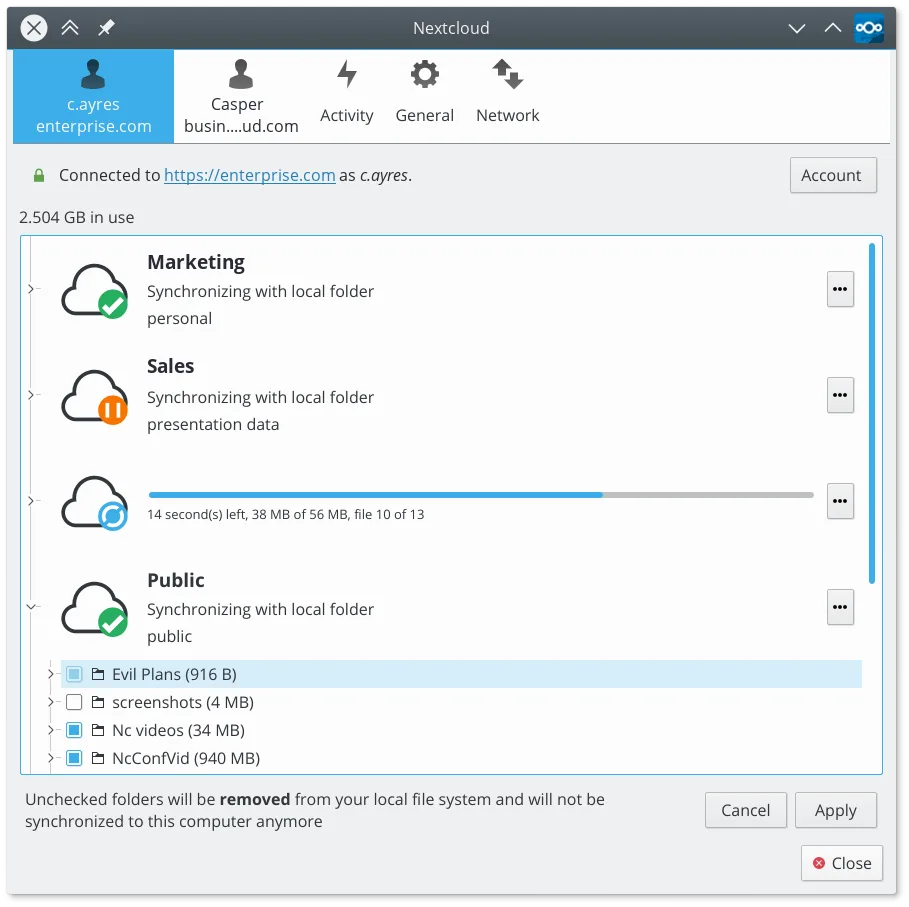
- Selective sync allowing users to choose which folders to download locally
- File versioning and the ability to restore previous versions or deleted files
- Sharing links with permission controls for read-only or edit access
- Cross-platform access via desktop clients and a web interface
Ce qui change
- Requires a Nextcloud server (self-hosted or hosted service) rather than using Microsoft’s infrastructure
- Lacks deep integration with Microsoft 365 applications like Word and Excel
- No native integration with Windows-specific features like the Recycle Bin or system tray behavior identical to OneDrive
- Setup is more complex as it involves configuring a server rather than just signing into a Microsoft account
Ouvrir vos fichiers OneDrive
Nextcloud stores files in standard formats, so documents, spreadsheets, and images from OneDrive will open without issue. You do not need to convert files; you simply sync them to your Nextcloud instance. If you use Microsoft-specific file types like .docx or .xlsx, they will remain compatible with LibreOffice, OnlyOffice, or other Linux office suites. There is no proprietary lock-in, so file compatibility is complete for standard office documents and media files.
Passer de OneDrive à Nextcloud Desktop Client, étape par étape
- Set up a Nextcloud server on your own hardware or subscribe to a hosting provider.
- Install the Nextcloud Desktop Client on your Linux machine via your package manager or Flathub.
- Log in to the client using your Nextcloud server URL and credentials.
- Select which folders to sync locally using the selective sync options in the client settings.
- Upload your existing files from your old OneDrive backup to the Nextcloud web interface or via the local sync folder.
- Verify that version history and sharing links work as expected before deleting your OneDrive data.
Fonctionnalités clés de Nextcloud Desktop Client
- Synchronisation bidirectionnelle des fichiers entre les dossiers locaux et le serveur
- Prise en charge du versionnage des fichiers et de la récupération des fichiers supprimés
- Intégration avec le serveur Nextcloud pour le partage et la collaboration
- Disponible en Flatpak et en paquets natifs pour les principales distributions
- Fonctionne avec tout backend compatible Nextcloud, y compris les instances auto-hébergées
- Fonctionnement en arrière-plan avec une utilisation minimale des ressources
- Prise en charge des fichiers volumineux et des opérations de synchronisation à haut volume
Installer Nextcloud Desktop Client sous Linux
flatpak install flathub com.nextcloud.desktopclient.nextcloudsudo apt install nextcloud-desktopsudo apt install nextcloud-desktopsudo dnf install nextcloud-clientsudo pacman -S nextcloud-clientsudo zypper install nextcloud-desktopQuestions fréquentes
Can I use Nextcloud without my own server?
Yes, many companies and individuals offer hosted Nextcloud services. You can sign up for one of these providers to get a ready-to-use server, avoiding the need for self-hosting.
Does Nextcloud work with Microsoft Office files?
Yes, it stores standard file formats like .docx, .xlsx, and .pptx. You can open these with LibreOffice, OnlyOffice, or other compatible applications on Linux.
Is the sync speed comparable to OneDrive?
Sync speed depends on your internet connection and server performance. A well-configured self-hosted server on a fast connection can match or exceed OneDrive speeds, but a slow hosted service may lag.