
 PiTiViLinux
vs
KdenliveWindows
PiTiVi, alternative Linux à Kdenlive
Mis à jour le
Notre avis
PiTiVi can serve as a replacement for Kdenlive for users who need a straightforward, GNOME‑integrated editor and are comfortable with a more modest feature set. It handles multi‑track editing, keyframes, and common formats, making it suitable for hobbyists, educators, or anyone whose workflow doesn’t rely on the deeper effects library and advanced color tools that Kdenlive provides. Power users who depend on extensive codec options, complex audio mixing, or professional‑grade color grading will likely find PiTiVi lacking, but for basic to intermediate projects it is a solid, stable choice.
- Licence
- LGPL-2.0+
- Prix
- Gratuit
- Dernière version
- 2023.03 (26 mars 2023)
- Note
- —
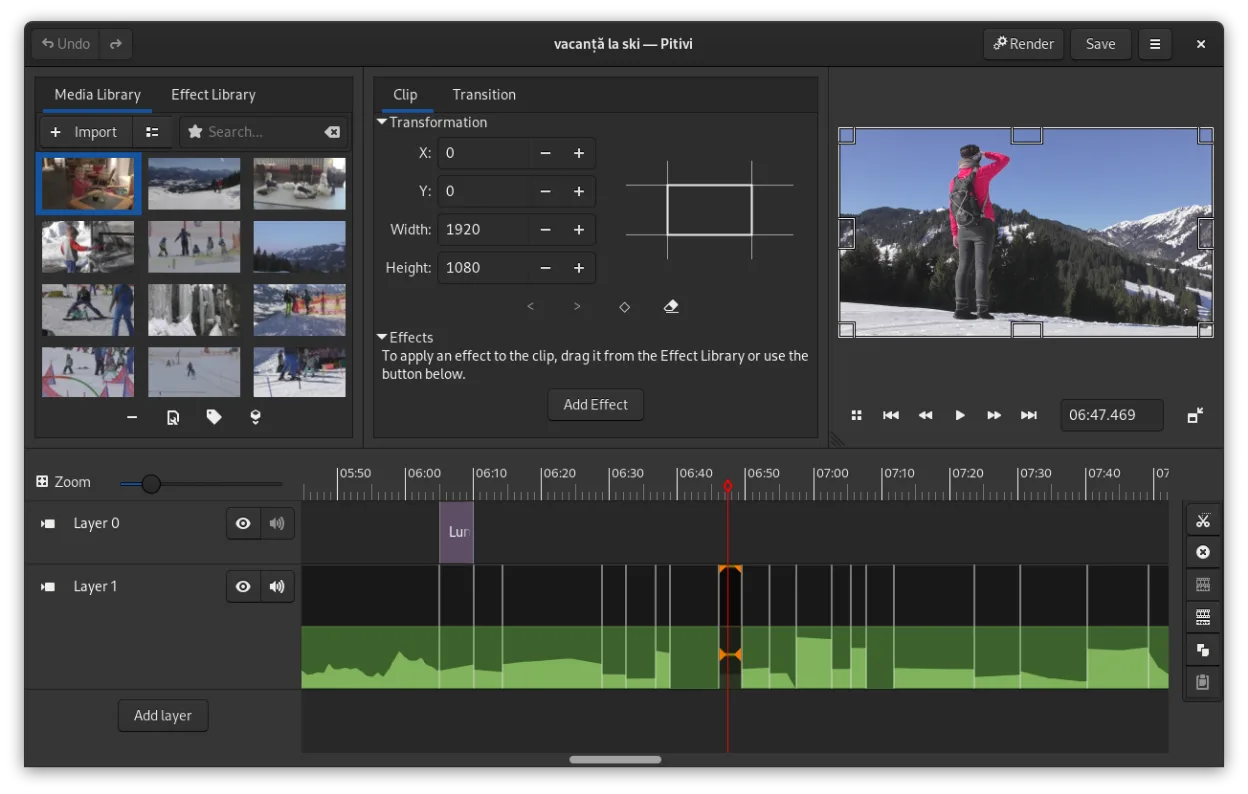
Ce qui fonctionne pareil
- Non‑linear multi‑track editing
- Keyframe animation for effects and filters
- Support for any format GStreamer can decode (covers MP4, MKV, MOV, etc.)
- Crossfades and SMPTE‑style transitions
- Detachable UI panels for multi‑monitor setups
Ce qui change
- PiTiVi lacks the extensive built‑in effects library and advanced color correction tools found in Kdenlive
- Audio mixing in PiTiVi is simpler; no multi‑track audio ducking or advanced waveform editing
- Export presets are fewer and less granular than Kdenlive’s codec‑specific profiles
- Kdenlive offers proxy editing and timeline rendering optimizations that PiTiVi does not provide
- Kdenlive’s community provides more third‑party effect packs and tutorials
Ouvrir vos fichiers Kdenlive
PiTiVi cannot directly open Kdenlive project files (.kdenlive) because the two editors use different project formats. You can import the same source media into PiTiVi and rebuild the timeline manually, but there is no built‑in conversion tool. Exporting a finished video from Kdenlive in a common container (e.g., MP4) and then reopening that file in PiTiVi works without issue.
Passer de Kdenlive à PiTiVi, étape par étape
- Install PiTiVi from your distribution’s repository or Flathub.
- Gather all source clips used in your Kdenlive project and place them in a single folder.
- Open PiTiVi and create a new project with the desired resolution and frame rate.
- Import the media files, then recreate the track layout and cuts using PiTiVi’s ripple/roll editing.
- Re‑apply effects and transitions using PiTiVi’s keyframe‑able filters.
- Export the final video using the appropriate preset.
Fonctionnalités clés de PiTiVi
- Montage non linéaire avec une timeline indépendante du taux de rafraîchissement
- Prise en charge de tout format géré par GStreamer
- Animation de keyframes pour effets et filtres
- Montage en ripple et roll pour des ajustements rapides de la timeline
- Ratios d’aspect, taux de rafraîchissement et préréglages de rendu personnalisés
- Fondus et transitions conformes au standard SMPTE
- Panneaux d’interface détachables pour configurations multi‑moniteurs
- Flux de travail non modal centré sur le curseur
Installer PiTiVi sous Linux
flatpak install flathub org.pitivi.Pitivisudo apt install pitivisudo apt install pitivisudo dnf install pitivisudo pacman -S pitivisudo zypper install pitiviQuestions fréquentes
Can I use Kdenlive’s proxy files in PiTiVi?
No. PiTiVi does not understand Kdenlive’s proxy file system, so you must work with the original media or generate new proxies within PiTiVi.
Does PiTiVi support hardware‑accelerated encoding?
PiTiVi relies on GStreamer plugins; hardware acceleration is available only if the underlying GStreamer elements and drivers are installed and configured.
Is PiTiVi suitable for 4K video editing?
It can handle 4K clips, but without proxy editing the performance may be slower than Kdenlive on the same hardware.
4 autres alternatives à Kdenlive
 ShotcutShotcut est un éditeur vidéo gratuit et open source pour Linux, prenant en charge une large gamme de formats…Open sourceGratuitFlatpakShotcut ou Kdenlive
 OpenShotOpenShot est un éditeur vidéo non linéaire gratuit et open source pour Linux et d'autres plateformes…Open sourceGratuitFlatpakOpenShot ou Kdenlive
 FlowbladeFlowblade est un éditeur vidéo non linéaire multitrack rapide et stable pour Linux, adapté aussi bien aux…Open sourceGratuitFlatpakFlowblade ou Kdenlive
 OliveOlive est un éditeur vidéo non linéaire gratuit et open source pour Linux.Open sourceGratuitFlatpakOlive ou Kdenlive