
 PiTiViLinux
vs
Final Cut ProWindows
PiTiViLinux
vs
Final Cut ProWindows
PiTiVi, alternative Linux à Final Cut Pro
Mis à jour le
Notre avis
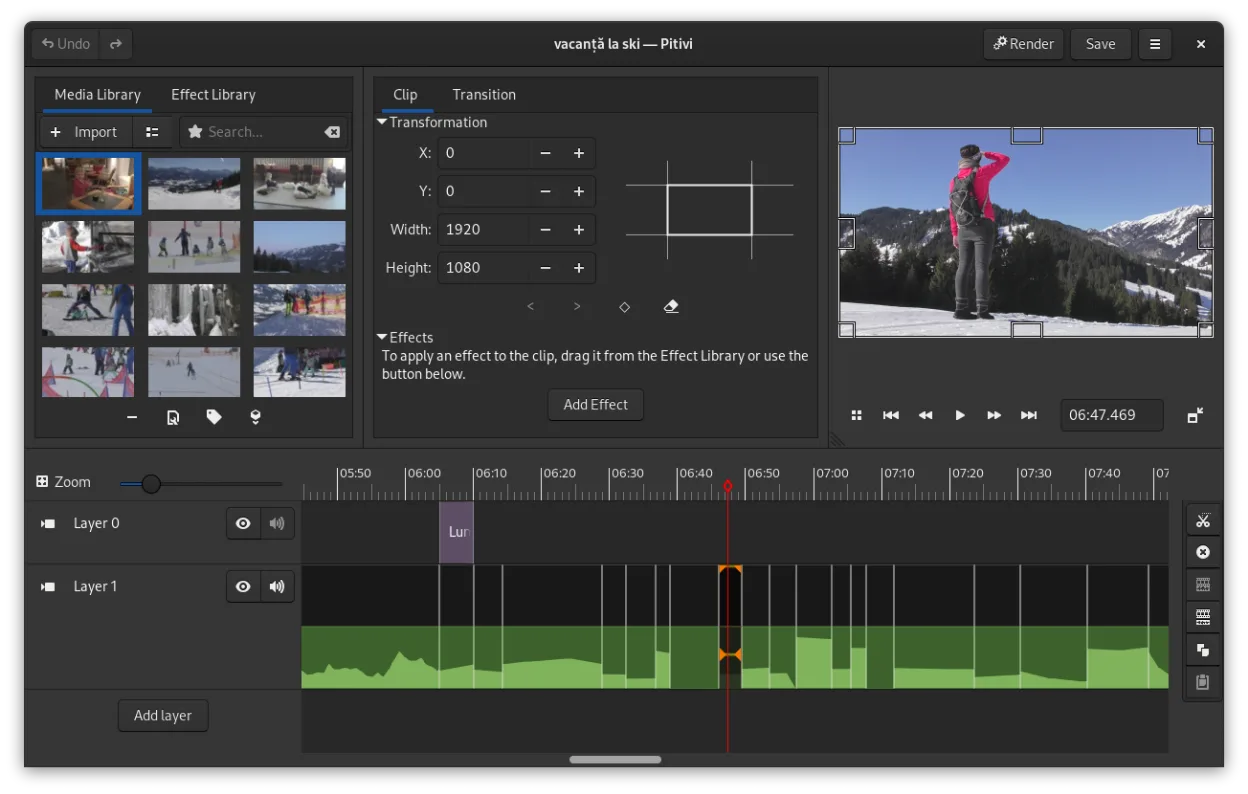
PiTiVi is a solid, native Linux replacement for Final Cut Pro if you prioritize open-source tools and GNOME integration. It handles core non-linear editing, multi-track timelines, and GStreamer-supported codecs well. However, it lacks Final Cut Pro’s polished color grading suite, dedicated multi-cam synchronization, and optimized high-resolution workflows. It is best suited for hobbyists and mid-level editors who do not rely on advanced color science or complex multi-cam setups. For professional broadcast or film work requiring pixel-perfect color matching, you may find it limiting.
- Licence
- LGPL-2.0+
- Prix
- Gratuit
- Dernière version
- 2023.03 (26 mars 2023)
- Note
- —
Ce qui fonctionne pareil
- Non-linear timeline editing with multiple video and audio tracks
- Support for a wide range of codecs via the GStreamer framework
- Keyframe animation for effects and filters
- Ripple and roll editing tools for efficient clip management
- Crossfades and standard video transitions
Ce qui change
- Lacks dedicated multi-cam editing and synchronization features
- Color grading tools are less advanced and granular than Final Cut Pro’s
- No native support for Final Cut Pro project files (.fcp7/.fcp10)
- Performance with high-resolution (4K/8K) footage may be less optimized
- Smaller ecosystem of third-party plugins compared to Final Cut Pro
Ouvrir vos fichiers Final Cut Pro
PiTiVi cannot open Final Cut Pro project files (.fcp7 or .fcp10) directly. You must export your media from Final Cut Pro as individual video and audio files in a common format (like ProRes or H.264) and then import them into PiTiVi. Exporting from PiTiVi produces standard video files (MP4, MKV, etc.) that play anywhere, but you cannot save a project that Final Cut Pro can edit.
Passer de Final Cut Pro à PiTiVi, étape par étape
- Export all media assets from Final Cut Pro as high-quality individual files
- Install PiTiVi via your package manager or Flathub
- Create a new project in PiTiVi with matching resolution and framerate
- Import your exported media files into the PiTiVi bin
- Rebuild your timeline by dragging clips and re-applying basic effects
- Render the final video using a suitable preset
Fonctionnalités clés de PiTiVi
- Montage non linéaire avec une timeline indépendante du taux de rafraîchissement
- Prise en charge de tout format géré par GStreamer
- Animation de keyframes pour effets et filtres
- Montage en ripple et roll pour des ajustements rapides de la timeline
- Ratios d’aspect, taux de rafraîchissement et préréglages de rendu personnalisés
- Fondus et transitions conformes au standard SMPTE
- Panneaux d’interface détachables pour configurations multi‑moniteurs
- Flux de travail non modal centré sur le curseur
Installer PiTiVi sous Linux
flatpak install flathub org.pitivi.Pitivisudo apt install pitivisudo apt install pitivisudo dnf install pitivisudo pacman -S pitivisudo zypper install pitiviQuestions fréquentes
Can PiTiVi handle 4K video?
Yes, PiTiVi can handle 4K video if your hardware supports it. Performance depends on your CPU and GPU, but it is generally usable for editing, though rendering may be slower than on optimized commercial software.
Does PiTiVi support color grading?
PiTiVi includes basic color correction and grading filters with keyframe support. However, it lacks the advanced, node-based color grading tools found in Final Cut Pro or DaVinci Resolve.
Is PiTiVi suitable for professional broadcast work?
It can be used for professional work, especially for web or digital distribution. However, for broadcast television or film, you may need more robust color management and multi-cam features, which PiTiVi does not fully provide.
4 autres alternatives à Final Cut Pro
 KdenliveKdenlive est un éditeur vidéo non linéaire gratuit et riche en fonctionnalités, construit sur le framework…Open sourceGratuitFlatpakKdenlive ou Final Cut Pro
 ShotcutShotcut est un éditeur vidéo gratuit et open source pour Linux, prenant en charge une large gamme de formats…Open sourceGratuitFlatpakShotcut ou Final Cut Pro
 FlowbladeFlowblade est un éditeur vidéo non linéaire multitrack rapide et stable pour Linux, adapté aussi bien aux…Open sourceGratuitFlatpakFlowblade ou Final Cut Pro
 OpenShotOpenShot est un éditeur vidéo non linéaire gratuit et open source pour Linux et d'autres plateformes…Open sourceGratuitFlatpakOpenShot ou Final Cut Pro