
 PiTiViLinux
vs
PiTiViLinux
vs
 Ulead VideoStudioWindows
PiTiVi, alternative Linux à Ulead VideoStudio
Mis à jour le
Notre avis
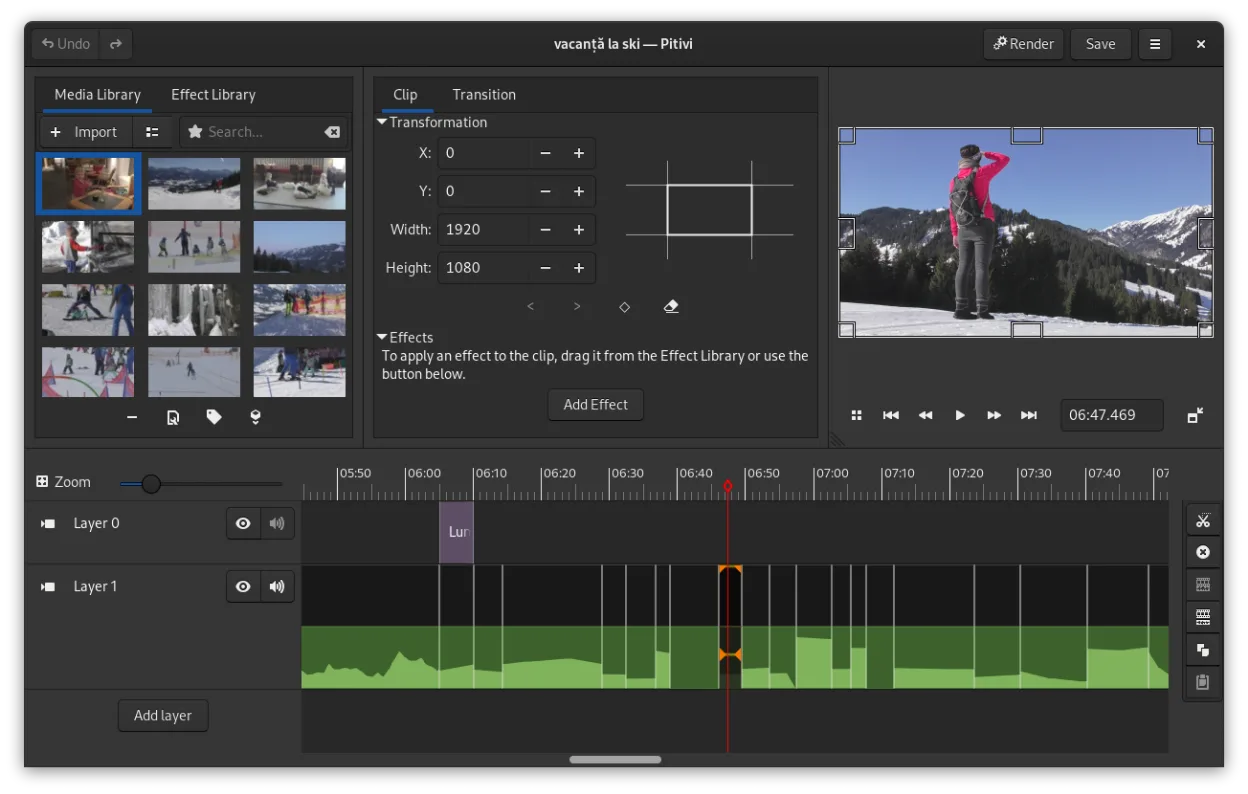
PiTiVi can serve as a practical replacement for Ulead (Corel) VideoStudio for hobbyists and semi‑professionals who need a straightforward timeline editor on Linux. It covers the essential editing workflow—cutting, trimming, transitions, titles and basic audio mixing—and handles the same common formats via GStreamer. Power users looking for deep effect libraries or tight integration with Windows‑only codecs may find it lacking, but for most everyday video projects PiTiVi offers a solid, free alternative on the Linux desktop.
- Licence
- LGPL-2.0+
- Prix
- Gratuit
- Dernière version
- 2023.03 (26 mars 2023)
- Note
- —
Ce qui fonctionne pareil
- Timeline‑based non‑linear editing
- Basic transitions and crossfades
- Title/text overlay capability
- Audio track mixing and volume control
- Export to common formats such as MP4, AVI, MOV
Ce qui change
- No native support for VideoStudio’s proprietary project files (.vsp)
- Limited library of advanced effects and motion graphics compared to VideoStudio’s paid add‑ons
- May require additional GStreamer plugins for some proprietary codecs (e.g., certain H.264 profiles)
- Less polished UI for complex multi‑track audio routing
- No built‑in video stabilization or built‑in 4K‑specific presets out of the box
Ouvrir vos fichiers Ulead VideoStudio
PiTiVi can open any video or audio file that GStreamer can decode, which includes the formats VideoStudio typically exports (MP4, AVI, MOV). However, it cannot read VideoStudio’s native project files (.vsp or .vsx). You would need to export your Windows project to a standard video format first, then import that into PiTiVi for further editing. Direct project‑file import is not supported and no reliable converter is known.
Passer de Ulead VideoStudio à PiTiVi, étape par étape
- Export your finished VideoStudio project to a standard video file (e.g., MP4) on Windows
- Copy the exported video and any source clips to your Linux machine
- Install PiTiVi via your distro package manager or Flathub
- Open the exported video in PiTiVi and re‑create any needed titles or transitions
- Adjust audio levels and export the final edit in your desired format
Fonctionnalités clés de PiTiVi
- Montage non linéaire avec une timeline indépendante du taux de rafraîchissement
- Prise en charge de tout format géré par GStreamer
- Animation de keyframes pour effets et filtres
- Montage en ripple et roll pour des ajustements rapides de la timeline
- Ratios d’aspect, taux de rafraîchissement et préréglages de rendu personnalisés
- Fondus et transitions conformes au standard SMPTE
- Panneaux d’interface détachables pour configurations multi‑moniteurs
- Flux de travail non modal centré sur le curseur
Installer PiTiVi sous Linux
flatpak install flathub org.pitivi.Pitivisudo apt install pitivisudo apt install pitivisudo dnf install pitivisudo pacman -S pitivisudo zypper install pitiviQuestions fréquentes
Can PiTiVi import VideoStudio project files?
No, PiTiVi does not understand VideoStudio’s proprietary .vsp/.vsx files; you must export to a common video format first.
Will PiTiVi handle 4K footage?
Yes, as long as the required GStreamer codecs are installed, PiTiVi can edit and export 4K video, though performance depends on your hardware.
Is there a steep learning curve moving from VideoStudio to PiTiVi?
The interface is different but the basic concepts—timeline, trimming, transitions—are similar, so most users adapt quickly with a short hands‑on trial.
4 autres alternatives à Ulead VideoStudio
 OpenShotOpenShot est un éditeur vidéo non linéaire gratuit et open source pour Linux et d'autres plateformes…Open sourceGratuitFlatpakOpenShot ou Ulead VideoStudio
 AvidemuxAvidemux est un éditeur vidéo gratuit et open‑source pour le découpage, le filtrage et l’encodage simples.Open sourceGratuitFlatpakAvidemux ou Ulead VideoStudio
 CinelerraCinelerra est un éditeur vidéo non linéaire et un compositeur open source de niveau professionnel conçu pour…Open sourceGratuitCinelerra ou Ulead VideoStudio
 KinoKino est un éditeur vidéo DV GTK+ abandonné pour Linux, conçu pour une capture simple et un montage de base.Open sourceGratuitAbandonnéKino ou Ulead VideoStudio