
 Quod LibetLinux
vs
foobar2000 MobileWindows
Quod Libet, alternative Linux à foobar2000 Mobile
Mis à jour le
Notre avis
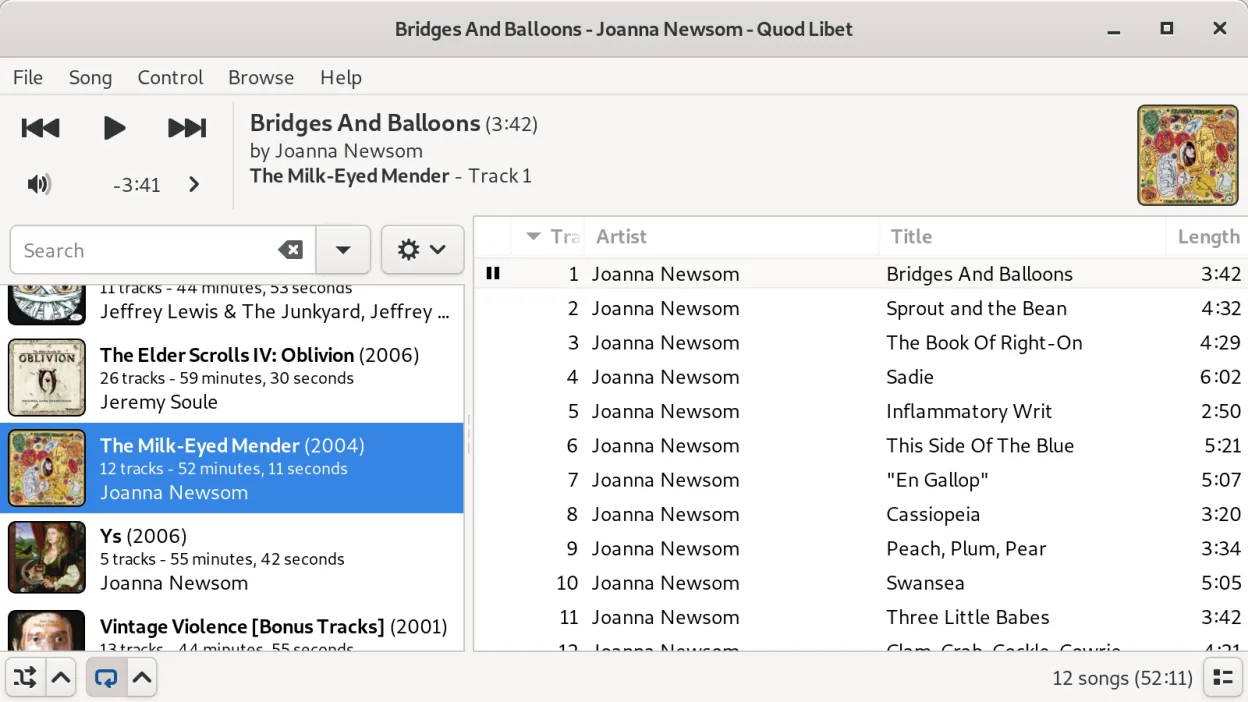
Quod Libet is a solid replacement for foobar2000 Mobile users who primarily value advanced tag editing, flexible library views, and lightweight performance on Linux. It handles lossless formats well and supports powerful search and filtering, matching foobar2000's core strengths. While it lacks a mobile interface, it's ideal for desktop-centric users who want fine control over their music library without heavy resource use. Plugin support extends functionality, but those dependent on Android syncing or exact foobar2000 layouts may need workarounds.
- Licence
- GPL-2.0-or-later
- Prix
- Gratuit
- Dernière version
- 4.7.1 (31 mai 2025)
- Note
- —
Ce qui fonctionne pareil
- Both support high-quality playback of FLAC and other lossless formats with low CPU overhead
- Advanced tag editing with regex and batch operations is available in both
- Customizable layouts and multiple library views allow tailored organization
- Extensive plugin systems enable added features like podcasts and radio
- Efficient search across metadata, filenames, and lyrics
Ce qui change
- Quod Libet is desktop-only; no Android app equivalent to foobar2000 Mobile
- Interface is GTK-based and less customizable in visual design than foobar2000
- No direct synchronization with mobile devices built-in
- Keyboard shortcuts are customizable but not identical
- Lacks built-in replaygain scanning, though external tools can fill this gap
Ouvrir vos fichiers foobar2000 Mobile
Quod Libet reads most audio file formats used in foobar2000 Mobile, including FLAC, MP3, AAC, and Ogg, so your music library will transfer directly. It does not use the same playlist or configuration files (like .fpl or foobar2000's database), so you'll need to reimport playlists or convert them manually. M3U playlists are supported, so exporting from foobar2000 Mobile in that format ensures compatibility. Tagged metadata is preserved since both read standard ID3, Vorbis, and APE tags.
Passer de foobar2000 Mobile à Quod Libet, étape par étape
- Export playlists from foobar2000 Mobile as M3U files
- Copy your music library to the Linux system, preserving folder structure
- Install Quod Libet via your distribution's package manager or Flathub
- Import music folder into Quod Libet; it will read existing tags automatically
- Import M3U playlists through the 'Playlist' menu
- Enable desired plugins in Edit > Preferences > Plugins
Fonctionnalités clés de Quod Libet
- Vues multiples de la bibliothèque (liste, album, arborescence, listes de lecture intelligentes)
- Édition avancée des balises avec prise en charge des expressions régulières
- Recherche dans les balises, les noms de fichiers et les paroles
- Radio Internet et flux de podcasts
- Prise en charge large des codecs, y compris Ogg, FLAC, MP3, AAC, MOD, MIDI
- Raccourcis clavier personnalisables
- Système de plugins pour les extensions
- Multiplateforme (Linux, macOS, Windows via le code source)
Installer Quod Libet sous Linux
flatpak install flathub io.github.quodlibet.QuodLibetsudo apt install quodlibetsudo apt install quodlibetsudo dnf install quodlibetsudo pacman -S quodlibetQuestions fréquentes
Can I use Quod Libet on Windows or macOS if I switch later?
Yes, Quod Libet runs on Linux, macOS, and Windows, though it's most commonly used on Linux. You can compile it or use community packages on other platforms.
Does Quod Libet support replaygain?
It doesn't include built-in replaygain scanning, but it respects existing replaygain tags. Use external tools like r128gain or loudgain to add them.
Can I sync music to an Android device with Quod Libet?
Not directly. You’ll need to manually copy files or use a separate sync tool like Syncthing or rsync for device management.
4 autres alternatives à foobar2000 Mobile
 AudaciousUn lecteur audio léger, de type Winamp, pour Linux qui prend en charge les plugins, les skins et de nombreux…Open sourceGratuitFlatpakAudacious ou foobar2000 Mobile
 Clementine Music PlayerClementine est un lecteur de musique multiplateforme qui lit des fichiers locaux, la radio Internet et prend…Open sourceGratuitFlatpakClementine Music Player ou foobar2000 Mobile
 LollypopLollypop est un lecteur de musique léger et moderne pour GNOME qui vous permet de lire, organiser et profiter…Open sourceGratuitFlatpakLollypop ou foobar2000 Mobile
 Strawberry Music PlayerStrawberry est un lecteur de musique et un organisateur de collection gratuit, open source et basé sur Qt…Open sourceGratuitFlatpakStrawberry Music Player ou foobar2000 Mobile