
 SpeedCrunchLinux
vs
SpeedCrunchLinux
vs
 Windows CalculatorWindows
SpeedCrunch, alternative Linux à Windows Calculator
Mis à jour le
Notre avis
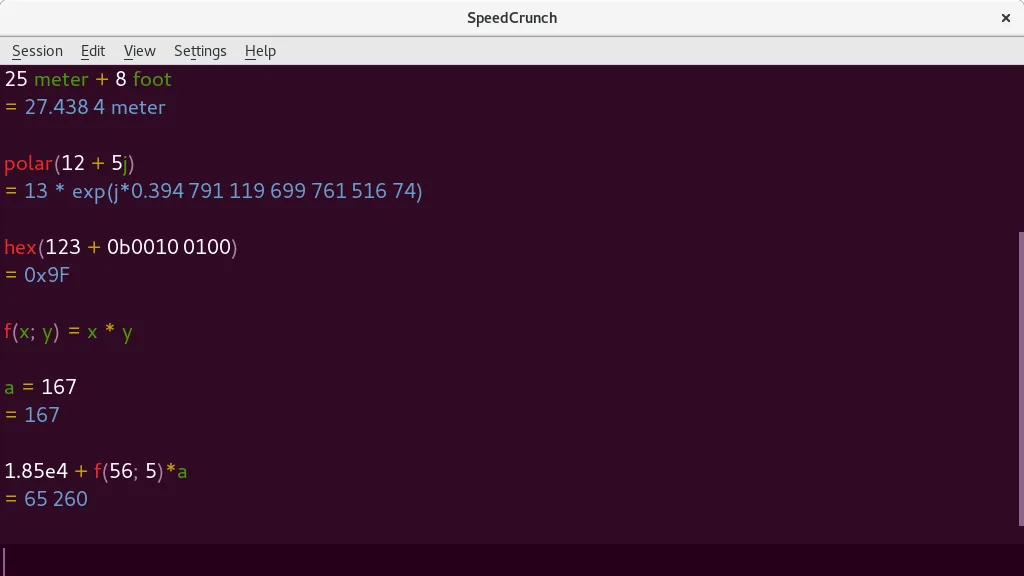
SpeedCrunch is a strong replacement for the scientific and programmer aspects of Windows Calculator, especially for users who prefer keyboard-driven workflows. It handles trigonometry, exponents, and unit conversions well, with high precision that exceeds standard Windows Calculator capabilities. However, it lacks a dedicated graphing mode and date calculation features found in the Windows version. If you rely heavily on visual graphing or specific date arithmetic, you will miss those tools. For pure calculation speed, syntax checking, and complex number support, SpeedCrunch is a superior, more flexible choice for technical users.
- Licence
- GPL-2.0+
- Prix
- Gratuit
- Dernière version
- 0.12 (29 novembre 2016)
- Note
- —
Ce qui fonctionne pareil
- Supports standard arithmetic and scientific functions like trig and exponents
- Includes unit conversion capabilities
- Fully operable via keyboard with hotkey support
- Offers a scrollable history of previous calculations
Ce qui change
Ouvrir vos fichiers Windows Calculator
SpeedCrunch does not natively open or export Windows Calculator history files or specific project formats. It maintains its own internal session history. If you need to preserve calculation logs from Windows Calculator, you would need to manually copy the text or use a third-party converter, as there is no direct import feature for Windows Calculator data.
Passer de Windows Calculator à SpeedCrunch, étape par étape
- Install SpeedCrunch from your distribution's package manager or Flathub
- Familiarize yourself with the keyboard-centric input method, as there are no clickable number pads
- Learn the syntax for unit conversions and complex numbers, which differ from Windows Calculator's button logic
- Set up any frequently used constants or user-defined variables to replace common Windows Calculator shortcuts
- Test your typical scientific workflows to ensure the real-time preview meets your accuracy needs
Fonctionnalités clés de SpeedCrunch
- Calculs de haute précision (jusqu'à 50 décimales)
- Affichage de la saisie avec coloration syntaxique et aperçu en temps réel
- Navigation clavier complète et prise en charge des raccourcis
- Constantes intégrées et plus de 80 fonctions mathématiques
- Prise en charge des nombres complexes et des conversions d'unités
- Variables et fonctions définies par l'utilisateur
- Historique des calculs défilable
- Autocomplétion des fonctions et vérification de la syntaxe
Installer SpeedCrunch sous Linux
flatpak install flathub org.speedcrunch.SpeedCrunchsudo apt install speedcrunchsudo dnf install speedcrunchsudo pacman -S speedcrunchsudo zypper install speedcrunchQuestions fréquentes
Does SpeedCrunch have a graphing calculator mode?
No, SpeedCrunch is a high-precision scientific calculator and does not include a visual graphing interface for plotting functions.
Can I use SpeedCrunch for hex or binary calculations?
Yes, you can perform calculations involving numbers, but it does not have a dedicated 'Programmer' mode with base switching toggles like Windows Calculator. You must input values using standard syntax.
Is SpeedCrunch suitable for basic everyday arithmetic?
It is suitable, but the interface is optimized for complex, keyboard-driven input. For simple addition or subtraction, it may feel less intuitive than a traditional button-based calculator.
2 autres alternatives à Windows Calculator
 KCalcKCalc est le calculateur scientifique de KDE avec fonctions trigonométriques, opérations logiques et pile de…Open sourceGratuitFlatpakKCalc ou Windows Calculator
 gcalctoolLa Calculatrice GNOME est la calculatrice scientifique standard et légère pour l'environnement de bureau…Open sourceGratuitgcalctool ou Windows Calculator