
 Bambu StudioLinux
vs
3D BuilderWindows
Bambu Studio como alternativa Linux ao 3D Builder
Atualizado em
Nossa avaliação
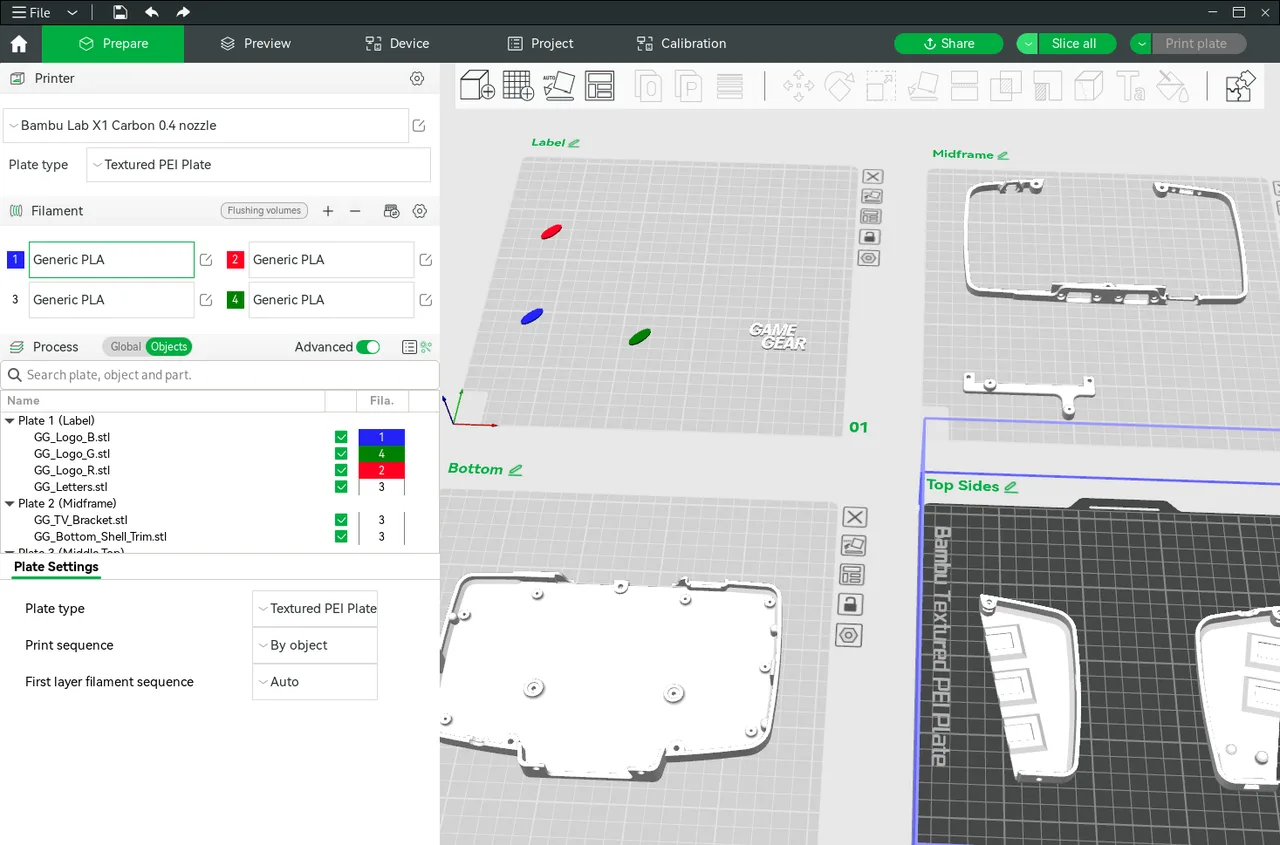
Bambu Studio is a strong replacement for 3D Builder if your primary goal is preparing models for 3D printing. It handles the core slicing and G-code generation tasks that 3D Builder’s limited mesh editing tools often struggle with. However, it is not a direct 1:1 swap for casual mesh manipulation. If you rely heavily on 3D Builder’s simple 'repair' or 'combine' tools for non-printing purposes, you will find Bambu Studio’s interface more complex and focused on print parameters rather than basic geometry editing. It is best suited for users who want to move from casual viewing to serious print preparation.
- Licença
- AGPL-3.0-only
- Preço
- Grátis
- Versão mais recente
- 2.9.1 Public Release (3 de novembro de 2026)
- Avaliação
- —
O que funciona igual
- Supports importing and exporting STL and OBJ files
- Allows basic transformation of models (scale, rotate, position)
- Provides visual preview of the final print layers
- Generates G-code for 3D printers
- Available as a free, open-source application
O que muda
- Lacks the simple, one-click 'repair' tools for non-manifold geometry found in 3D Builder
- Interface is significantly more complex, focusing on print settings rather than basic mesh editing
- Does not support PLY file import/export as a primary workflow
- Requires more setup for non-Bambu printers compared to 3D Builder's generic support
- No direct 'combine' tool for merging meshes without using external plugins or scripts
Abrindo seus arquivos do 3D Builder
Bambu Studio natively supports STL and OBJ files, which are the primary formats used by 3D Builder. You can directly open STL files exported from 3D Builder and slice them. However, Bambu Studio does not natively support PLY or 3MF in the same way 3D Builder does for general viewing. If you have complex 3D Builder projects saved in proprietary formats, you may need to export them as STL first. G-code generated by Bambu Studio is standard and compatible with most printers, but it will not be directly readable by 3D Builder, which is not a slicer.
Trocando o 3D Builder pelo Bambu Studio, passo a passo
- Install Bambu Studio via Flatpak or your distribution's package manager.
- Export your 3D models from 3D Builder as STL or OBJ files.
- Open Bambu Studio and create a new project.
- Import your STL/OBJ files into the workspace.
- Configure your printer profile and material settings.
- Slice the model and export the G-code for your printer.
Principais recursos do Bambu Studio
- Fluxo de trabalho baseado em projetos com templates reutilizáveis
- Algoritmos de fatiamento otimizados para velocidade e qualidade
- Configurações abrangentes de material
- Suporte integrado para impressoras Bambu Lab
- Exportação para G‑code e STL
- Atalhos de teclado personalizáveis
- Distribuição multiplataforma via Flatpak
- Pré‑visualização detalhada de camadas
Como instalar o Bambu Studio no Linux
flatpak install flathub com.bambulab.BambuStudioPerguntas frequentes
Can I repair broken meshes in Bambu Studio like in 3D Builder?
No, Bambu Studio does not have the simple 'repair' button. You will need to use external tools like Meshmixer or Blender to fix non-manifold geometry before importing into Bambu Studio.
Does Bambu Studio work with non-Bambu printers?
Yes, it supports many other FDM printers, but the interface is heavily optimized for Bambu Lab printers. You may need to manually configure profiles for other brands.
Is Bambu Studio suitable for viewing 3D models?
It is primarily a slicer. While you can view models, it is not as user-friendly for casual viewing as 3D Builder or dedicated viewers like MeshLab.
Outras 4 alternativas ao 3D Builder
 BlenderBlender é uma suíte 3D gratuita e de código aberto para modelagem, animação, renderização e edição de vídeo.Código abertoGrátisFlatpakBlender vs 3D Builder
 FreeCADFreeCAD é um modelador 3D CAD paramétrico de código aberto, gratuito, voltado para design, engenharia e…Código abertoGrátisFlatpakFreeCAD vs 3D Builder
 MeshLabFerramenta gratuita e de código aberto para processar, limpar e editar malhas triangulares 3D, ideal para…Código abertoGrátisFlatpakMeshLab vs 3D Builder
 Wings 3DWings 3D é um modelador de subdivisão avançado e de código aberto para Linux.Código abertoGrátisFlatpakWings 3D vs 3D Builder