
 darktableLinux
vs
Microsoft PhotosWindows
darktable como alternativa Linux ao Microsoft Photos
Atualizado em
Nossa avaliação
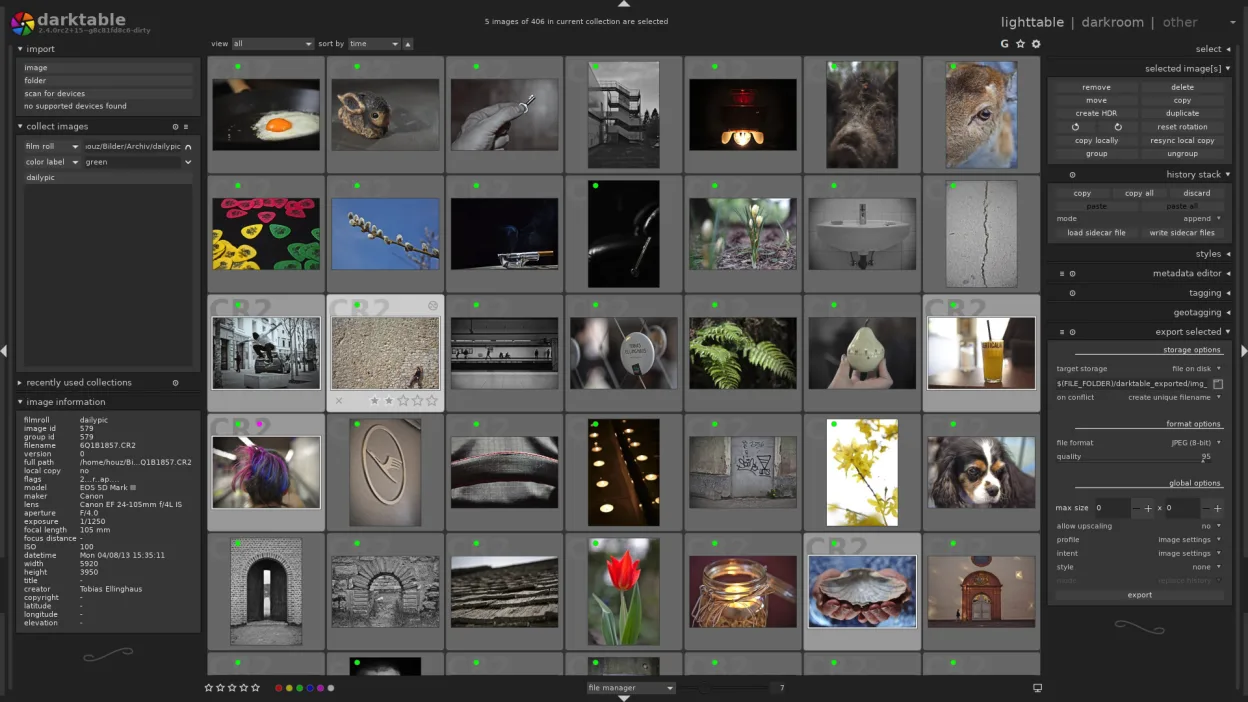
darktable is a capable replacement for Microsoft Photos if you want deeper editing and raw support, but it's overkill for simple viewing. It handles basic edits like crop, rotate, and lighting well, and organizes photos by date and folder. However, its interface is denser and geared toward photographers, not casual users. If you only need to view and lightly edit JPEGs or PNGs, something like GPICView or Nomacs would be faster and simpler. darktable excels when you want more control, not minimalism.
- Licença
- GPL-3.0+
- Preço
- Grátis
- Versão mais recente
- 5.6.2 (4 de outubro de 2026)
- Avaliação
- —
O que funciona igual
- Supports common formats like JPEG and PNG
- Can crop, rotate, and adjust brightness/contrast
- Organizes images by folder and date
- Generates thumbnails quickly for browsing
- Preserves and reads metadata (EXIF, XMP)
O que muda
- darktable has a steeper learning curve and busier interface
- No built-in HEIC support unless your system has the codec
- Lacks the 'quick edit' simplicity of Microsoft Photos
- Heavyweight compared to lightweight viewers
- No facial recognition or AI tagging
Abrindo seus arquivos do Microsoft Photos
darktable opens JPEG, PNG, and many raw formats directly. It can import and edit the same files used in Microsoft Photos without conversion. Exporting to standard formats like JPEG or PNG is straightforward. HEIC support depends on your system having libheif; without it, HEIC files won't open. You can export edits and save sidecar XMP files, keeping originals untouched. All edits are non-destructive and stored in the database or sidecar files.
Trocando o Microsoft Photos pelo darktable, passo a passo
- Install darktable via your package manager or Flatpak
- Import your photo folders using the lighttable mode
- Enable thumbnails and let the library index your files
- Use darkroom mode for edits: adjust exposure, crop, rotate
- Export edited versions to JPEG or PNG as needed
Principais recursos do darktable
- Edição não destrutiva com pilha de histórico
- Modos mesa de luz e quarto escuro
- Processamento RAW de alta precisão
- Visualização de mapa de geotagging
- Suporte a tethering
- Modos de impressão e apresentação de slides
- Extensível via scripts Python
Como instalar o darktable no Linux
flatpak install flathub org.darktable.Darktablesudo apt install darktablesudo apt install darktablesudo dnf install darktablesudo pacman -S darktablesudo zypper install darktablePerguntas frequentes
Can darktable replace Microsoft Photos for simple photo viewing?
Not ideally. Use it if you also edit photos. For pure viewing, try a lightweight viewer like GPICView or Nomacs.
Does darktable support HEIC files from iPhones?
Yes, if your system has libheif installed. On Ubuntu, install the libheif1 package. Otherwise, HEIC won't open.
Is darktable safe for organizing personal photo collections?
Yes. It stores edits in a database or sidecar files, never alters originals by default, and handles metadata correctly.
Outras 4 alternativas ao Microsoft Photos
 ShotwellShotwell é um gerenciador de fotos GNOME para importar, organizar e editar imagens de forma leve.Código abertoGrátisFlatpakShotwell vs Microsoft Photos
 nomacs - Image LoungeNomacs é um visualizador de imagens gratuito e de código aberto que suporta miniaturas, metadados…Código abertoGrátisFlatpaknomacs - Image Lounge vs Microsoft Photos
 GwenViewGwenView é o visualizador de imagens rápido do KDE, com ferramentas básicas de edição e anotação, ideal para…Código abertoGrátisFlatpakGwenView vs Microsoft Photosfehfeh is a lightweight, command-line image viewer for Linux, often used to set wallpapers or browse images…Código abertoGrátisfeh vs Microsoft Photos