
 digiKamLinux
vs
Adobe Lightroom ClassicWindows
digiKamLinux
vs
Adobe Lightroom ClassicWindows
digiKam como alternativa Linux ao Adobe Lightroom Classic
Atualizado em
Nossa avaliação
digiKam is a strong, free replacement for Lightroom Classic if you prioritize organization and non-destructive editing over high-end creative tools. It handles RAW decoding via LibRaw and offers robust tagging, rating, and metadata search capabilities that rival or exceed Lightroom's cataloging features. However, it lacks Lightroom's specialized tone curves, advanced masking, and polished batch export workflows. It suits photographers who need a reliable, local-first library manager and are comfortable with a KDE-based interface, but professionals relying on Lightroom's specific creative presets or cloud syncing will find it limiting.
- Licença
- GPL-2.0+
- Preço
- Grátis
- Versão mais recente
- 9.1.0 (7 de junho de 2026)
- Avaliação
- —
O que funciona igual
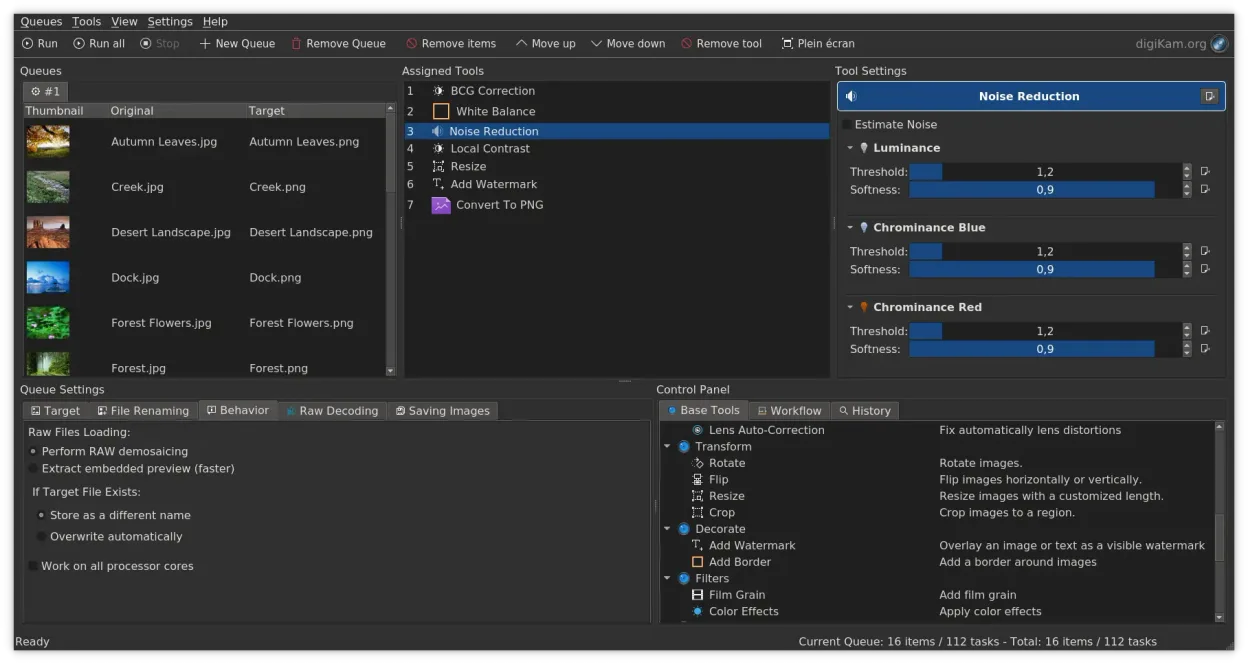
- Non-destructive editing with support for RAW files
- Comprehensive cataloging with tagging, ratings, and labels
- Metadata editing and powerful search across EXIF, IPTC, and XMP
- Import from cameras and external drives with configurable rules
O que muda
- No native cloud synchronization; relies on local storage or manual backup solutions
- Lacks advanced creative tools like detailed tone curves and luminance masking
- Batch processing and export options are less streamlined than Lightroom's dedicated modules
- Interface is KDE-based, which may feel different from Lightroom's unified Adobe ecosystem
Abrindo seus arquivos do Adobe Lightroom Classic
digiKam can open standard RAW and JPEG files directly. It does not natively open Adobe Lightroom Classic .lrcat or .lrdata catalog files. You will need to export your metadata (XMP sidecars or embedded) from Lightroom before importing into digiKam to preserve your edits and tags.
Trocando o Adobe Lightroom Classic pelo digiKam, passo a passo
- Export all metadata from Lightroom as XMP sidecar files or embed them in the original images
- Ensure your photo library is backed up locally, as digiKam does not sync with Adobe Cloud
- Install digiKam via your package manager or Flathub
- Import your photo folders into digiKam, using its import rules to organize files if needed
- Verify that tags, ratings, and edits were correctly read from the XMP files
Principais recursos do digiKam
- Importação direta de câmeras, cartões SD e unidades USB com regras configuráveis
- Sistemas avançados de marcação, classificação e rótulos para organização complexa da biblioteca
- Motor de busca poderoso que suporta critérios de metadados EXIF, IPTC e XMP
- Edição não destrutiva com ajustes de cor, recorte e nitidez
- Suporte nativo a arquivos RAW via LibRaw para decodificação e pré‑visualização
- Catalogação de vídeos e extração de metadados usando back‑ends FFmpeg
- Organização de álbuns com interface de arrastar e soltar
- Disponibilidade multiplataforma para Linux, Windows e macOS
Como instalar o digiKam no Linux
flatpak install flathub org.kde.digikamsudo apt install digikamsudo apt install digikamsudo dnf install digikamsudo pacman -S digikamsudo zypper install digikamPerguntas frequentes
Can digiKam replace Lightroom's cloud backup?
No. digiKam is a local-first application. You must use separate tools like rsync, BorgBackup, or a NAS for backing up your library.
Does digiKam support the same RAW formats as Lightroom?
digiKam uses LibRaw, which supports a wide range of RAW formats. While coverage is extensive, some very new camera models may have delayed support compared to Adobe's proprietary pipeline.
Is digiKam suitable for professional commercial photography?
It is suitable for organization and basic editing. However, if your workflow depends on Lightroom's specific creative features, advanced masking, or seamless Adobe ecosystem integration, you may need to supplement it with other tools.
Outras 4 alternativas ao Adobe Lightroom Classic
 darktabledarktable é um editor de fotos gratuito e de código aberto que gerencia arquivos RAW e oferece um fluxo de…Código abertoGrátisFlatpakdarktable vs Adobe Lightroom Classic
 RawTherapeeRawTherapee é um programa de desenvolvimento de fotos raw de código aberto e multiplataforma.Código abertoGrátisFlatpakRawTherapee vs Adobe Lightroom Classic
 ShotwellShotwell é um gerenciador de fotos GNOME para importar, organizar e editar imagens de forma leve.Código abertoGrátisFlatpakShotwell vs Adobe Lightroom ClassicRawstudioRawstudio is a raw photo workflow tool for Linux that helps organize, edit, and export raw image files from…Código abertoGrátisDescontinuadoRawstudio vs Adobe Lightroom Classic