
 GeanyLinux
vs
Microsoft Visual Studio CodeWindows
GeanyLinux
vs
Microsoft Visual Studio CodeWindows
Geany como alternativa Linux ao Microsoft Visual Studio Code
Atualizado em
Nossa avaliação
Geany is a solid replacement for lightweight coding tasks, but it is not a direct 1:1 swap for heavy Visual Studio Code workflows. It excels at speed and low resource usage, making it ideal for C, Python, or web scripting where you need fast syntax highlighting and basic debugging. However, if you rely on complex extension ecosystems, advanced refactoring, or heavy Git GUI integration, you will feel the loss. Choose Geany if you prefer a simple, responsive editor over a feature-rich platform. For most general-purpose development, it covers the basics well, but power users may find it limiting compared to VS Code’s extensibility.
- Licença
- GPL-2.0+
- Preço
- Grátis
- Versão mais recente
- 2.1.0 (6 de julho de 2025)
- Avaliação
- —
O que funciona igual
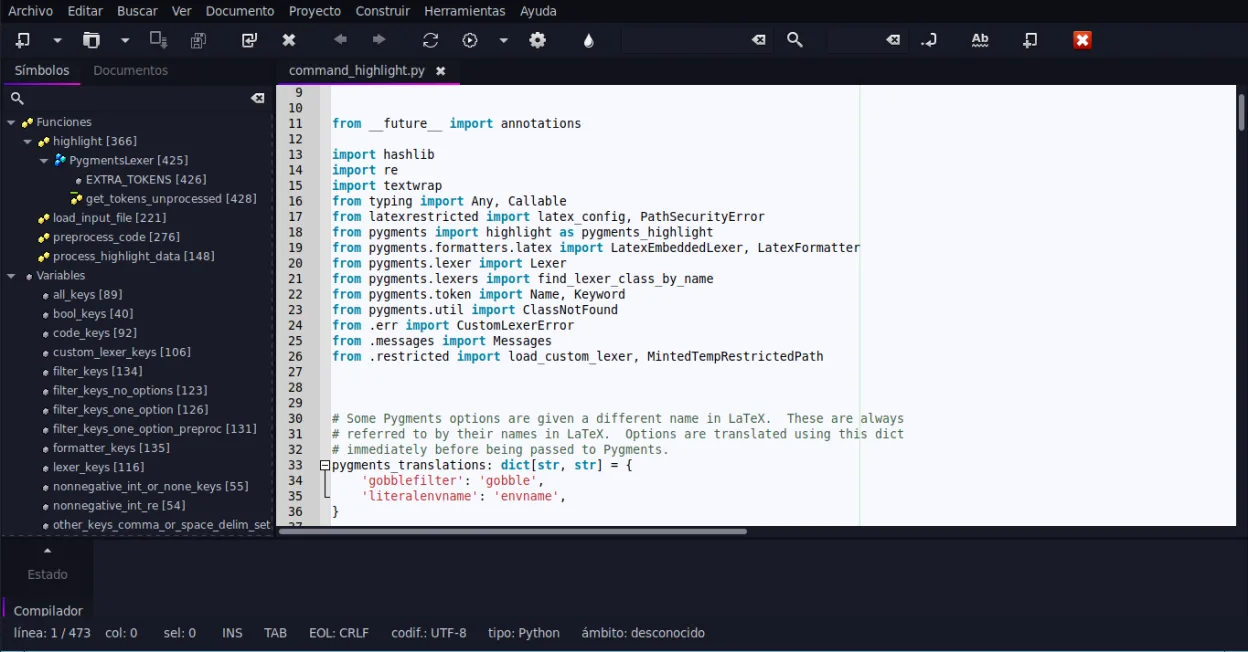
- Supports syntax highlighting for over 30 programming languages
- Includes an integrated terminal emulator
- Provides code completion and auto-completion for common constructs
- Features a plugin system for extending functionality
- Supports code folding and symbol lists for navigation
O que muda
- Lacks a massive, curated extension marketplace comparable to VS Code
- Git integration is typically command-line focused rather than a rich GUI
- Debugging capabilities are generally less integrated and powerful than VS Code’s
- No built-in remote development or containerized workspace support
- Refactoring tools are more basic and language-specific
Abrindo seus arquivos do Microsoft Visual Studio Code
Geany opens standard text files, including source code, without issue. It does not natively open VS Code workspace files (.code-workspace) or settings.json files as project configurations. You will need to manually recreate your project settings, such as compiler flags or interpreter paths, within Geany’s project manager. Since both are text-based editors, your actual code files remain fully compatible and readable.
Trocando o Microsoft Visual Studio Code pelo Geany, passo a passo
- Install Geany via your distribution’s package manager or Flathub
- Create a new Geany project for each VS Code workspace you use
- Configure your compiler and interpreter paths in the project properties
- Enable necessary plugins like Script or VTE for enhanced terminal access
- Map your preferred keyboard shortcuts in the preferences menu
- Test your build and run configurations to ensure they behave as expected
Principais recursos do Geany
- Destaque de sintaxe para mais de 30 linguagens
- Autocompletar de código e conclusão automática de estruturas comuns
- Emulador de terminal integrado
- Gerenciador de plugins com plugins pré-instalados
- Dobra de código e listas de símbolos
- Suporte a preenchimento automático de tags XML/HTML
Como instalar o Geany no Linux
flatpak install flathub org.geany.Geanysudo apt install geanysudo apt install geanysudo dnf install geanysudo pacman -S geanysudo zypper install geanyPerguntas frequentes
Does Geany support LSP (Language Server Protocol)?
Geany does not have native LSP support in the same way VS Code does. It relies on its own completion engines and plugins for specific languages. For advanced LSP-based features, you might need to look at other editors or use external tools.
Can I use the same Git repositories in Geany?
Yes, Git repositories are just folders. You can open the same repository in Geany and use the embedded terminal to run git commands. Geany does not provide a visual Git interface like VS Code’s source control panel.
Is Geany suitable for large-scale enterprise development?
It depends. For small to medium projects, it works well. For large codebases requiring complex refactoring, multi-file search, or heavy debugging, you may find its performance and features lacking compared to dedicated IDEs or VS Code.
Outras 4 alternativas ao Microsoft Visual Studio Code
 Visual Studio CodeUm editor de código leve e extensível que oferece depuração, Git e suporte a muitas linguagens.GrátisFlatpakVisual Studio Code vs Microsoft Visual Studio Code
 Sublime TextSublime Text é um editor de código-fonte leve, rápido, com interface mínima e extensibilidade poderosa.FlatpakSublime Text vs Microsoft Visual Studio Code
 KateKate é um editor de texto rico em recursos, focado em programadores, da KDE, com suporte a mais de 300…Código abertoGrátisFlatpakKate vs Microsoft Visual Studio Code
 VimVim é um editor de texto modal e altamente configurável, ideal para edição eficiente no Linux.Código abertoGrátisFlatpakVim vs Microsoft Visual Studio Code