
 GearyLinux
vs
ThunderbirdWindows
GearyLinux
vs
ThunderbirdWindows
Geary como alternativa Linux ao Thunderbird
Atualizado em
Nossa avaliação
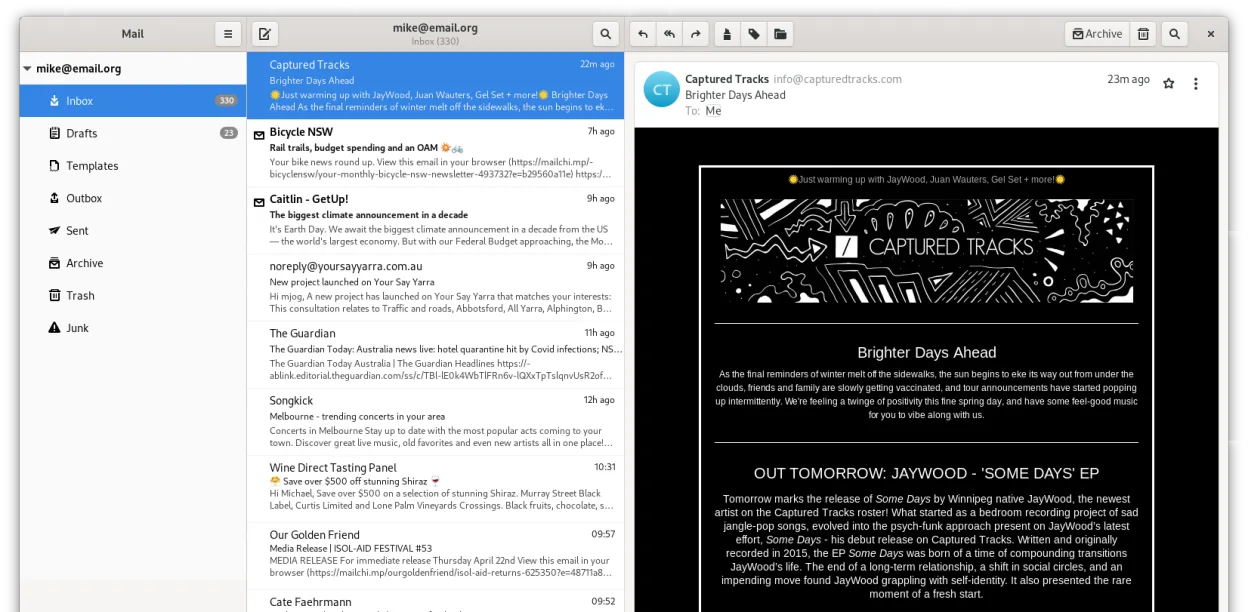
Geary is a solid, lightweight replacement for users who primarily need clean email management on GNOME. It handles IMAP/POP3, multiple accounts, and conversation views well. However, it is not a full drop-in replacement for heavy Thunderbird users. If you rely on Thunderbird’s built-in calendar, contact manager, RSS reader, or chat features, Geary will leave you short. It is best for those who prefer a simple, native-feeling mail client and are willing to use separate apps for calendar and contacts.
- Licença
- LGPL-2.1+
- Preço
- Grátis
- Versão mais recente
- 46.0 (20 de maio de 2024)
- Avaliação
- —
O que funciona igual
- Both support multiple email accounts via IMAP and POP3 protocols.
- Both are free, open-source applications available on major Linux distributions.
- Both offer full-text search capabilities to find specific messages quickly.
- Both support HTML and plain-text message composition.
O que muda
Abrindo seus arquivos do Thunderbird
Geary does not directly import Thunderbird’s mbox or maildir file structures. You cannot simply point Geary at your existing Thunderbird profile folder. However, since both use standard IMAP/POP3 protocols, your email history remains on the server. If you use local storage (POP3), you would need to manually export messages or re-download them, as there is no native 'import from Thunderbird' feature in Geary.
Trocando o Thunderbird pelo Geary, passo a passo
- Back up your Thunderbird profile to ensure no local data is lost.
- Install Geary via your distribution’s package manager or Flathub.
- Launch Geary and add your email accounts using the quick setup wizard.
- Verify that IMAP sync is working by checking recent folders.
- Install separate GNOME applications for Calendar (GNOME Calendar) and Contacts (GNOME Contacts) to replace Thunderbird’s modules.
- Configure desktop notifications in Geary settings to match your previous workflow.
Principais recursos do Geary
- A visualização de conversas agrupa mensagens relacionadas
- Configuração rápida de contas para provedores IMAP
- Busca em texto completo e por palavras-chave
- Editor em HTML e texto simples
- Notificações de desktop para novos e-mails
- Integração e temas do GNOME
- Navegação amigável ao teclado
- Suporte a múltiplas contas
Como instalar o Geary no Linux
flatpak install flathub org.gnome.Gearysudo apt install gearysudo apt install gearysudo dnf install gearysudo pacman -S gearysudo zypper install gearyPerguntas frequentes
Can I use Geary with Gmail or Outlook.com?
Yes, Geary supports standard IMAP servers, including Gmail, Yahoo, and Outlook.com. You may need to enable less secure app passwords or OAuth2 if your provider requires it, though Geary’s OAuth2 support can be less integrated than Thunderbird’s.
Does Geary have a built-in calendar?
No. Geary is strictly an email client. For calendar functionality on GNOME, you should use GNOME Calendar, which can sync with your email account’s CalDAV server if available.
Is Geary suitable for users who need chat or RSS?
No. Geary does not include chat or RSS readers. If these are core parts of your daily workflow, sticking with Thunderbird or using a combination of Geary and separate apps (like Fractal for Matrix or gPodder for RSS) is necessary.
Outras 5 alternativas ao Thunderbird
 MailspringUm cliente de e‑mail desktop rápido e cheio de recursos para Linux com um motor de sincronização em C++ e…Código abertoGrátisFlatpakMailspring vs Thunderbird
 Claws MailClaws Mail é um cliente de e‑mail leve e rápido baseado em GTK para Linux.Código abertoGrátisFlatpakClaws Mail vs Thunderbird
 EvolutionO Evolution é um gerenciador de informações pessoais completo que combina e-mail, calendário, contatos e…Código abertoGrátisFlatpakEvolution vs Thunderbird
 KMailO KMail é o cliente de e-mail completo do KDE, parte da suíte Kontact, com suporte a IMAP, POP3 e caixas…Código abertoGrátisKMail vs Thunderbird
 SylpheedSylpheed é um cliente de e-mail e notícias leve, baseado em GTK, para Linux, Windows e macOS.Código abertoGrátisSylpheed vs Thunderbird