
 gitgLinux
vs
GitWindows
gitgLinux
vs
GitWindows
gitg como alternativa Linux ao Git
Atualizado em
Nossa avaliação
Gitg is a lightweight GUI frontend, not a replacement for the Git command-line tool itself. It covers basic visualization and commit tasks well but lacks advanced features like submodule management or complex merge conflict resolution. For simple repositories where you primarily need to view history and make quick commits, it works fine. However, if your workflow relies heavily on the command line, large repositories, or intricate branching strategies, Gitg will feel limiting. You will still need the actual git CLI installed alongside it for full functionality.
- Licença
- GPL-2.0+
- Preço
- Grátis
- Versão mais recente
- 50 (1 de julho de 2026)
- Avaliação
- —
O que funciona igual
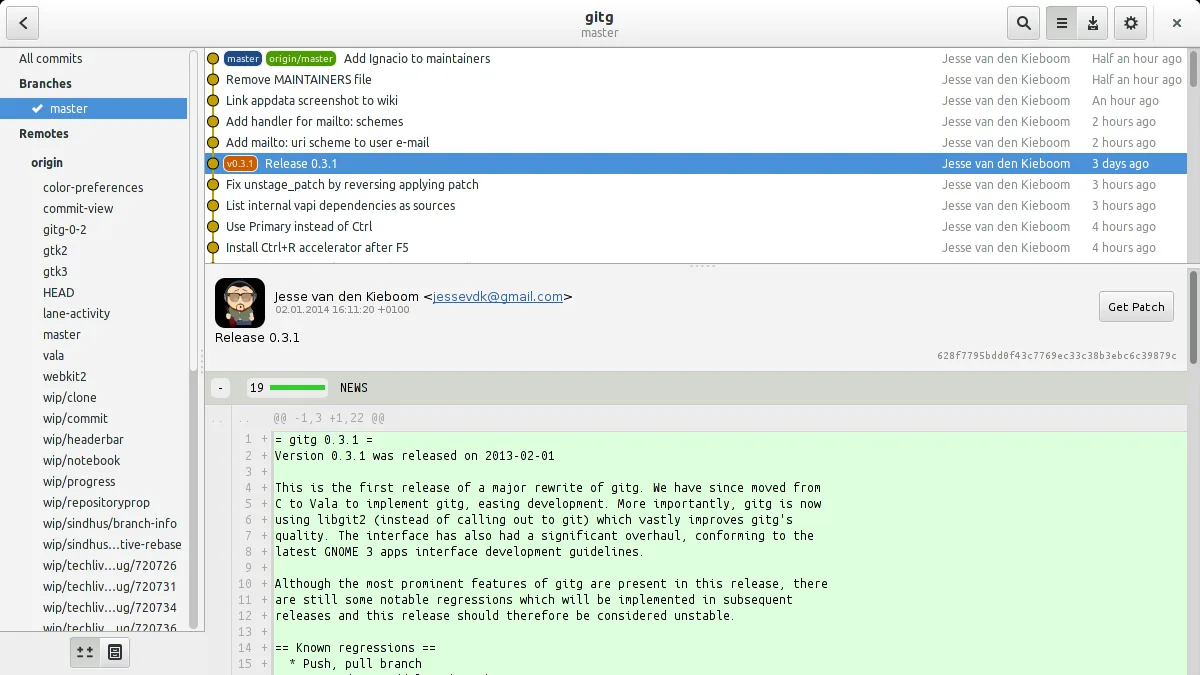
- Visualizes commit history and branch graphs
- Allows cloning local and remote repositories
- Supports viewing diffs and patches
- Manages basic repository operations like commits
O que muda
- Lacks full command-line access to all Git features
- No dedicated merge conflict editor
- Limited support for large repositories and submodules
- Does not replace the git CLI, only wraps it
Abrindo seus arquivos do Git
Gitg operates directly on standard Git repositories, so it opens and writes to the same .git directories used by any Git client. There is no proprietary file format; all data remains in standard Git objects. You can switch between Gitg and the command line without converting files, as both read and write the same underlying structure.
Trocando o Git pelo gitg, passo a passo
- Install the git package to ensure the core CLI is available
- Install gitg from your distribution's repository or Flathub
- Open your existing local Git repositories in Gitg
- Configure your Git user name and email if not already set globally
- Use Gitg for visual history browsing and simple commits
- Fall back to the terminal for advanced operations like rebase or submodule updates
Principais recursos do gitg
- Navegar repositórios locais e remotos
- Clonar repositórios a partir de URLs
- Visualizar histórico de commits e ramos
- Ver diffs e patches
- Commitar alterações em staging
- Desfazer commits
- Pesquisar mensagens de commit
Como instalar o gitg no Linux
flatpak install flathub org.gnome.gitgsudo apt install gitgsudo apt install gitgsudo dnf install gitgsudo pacman -S gitgsudo zypper install gitgPerguntas frequentes
Can I use Gitg without installing the git command-line tool?
No, Gitg is a frontend that relies on the underlying git executable. You must have git installed for Gitg to function.
Does Gitg handle large repositories well?
It is designed to be lightweight, so performance may degrade with very large or complex repositories compared to dedicated tools like GitKraken or the CLI.
Is Gitg suitable for managing submodules?
Gitg has limited support for submodules. For complex submodule workflows, you will likely need to use the git command line directly.
Outras 4 alternativas ao Git
 GitKrakenGitKraken é um cliente Git multiplataforma com rastreamento de issues integrado e edição de código.FlatpakGitKraken vs Git
 Git ColaGit Cola é um cliente gráfico Git leve e rico em recursos para Linux.Código abertoGrátisFlatpakGit Cola vs Git
 Sublime MergeSublime Merge is a proprietary Git client with a fast, keyboard‑centric UI.FlatpakSublime Merge vs Git