
 GPartedLinux
vs
Macrium ReflectWindows
GPartedLinux
vs
Macrium ReflectWindows
GParted como alternativa Linux ao Macrium Reflect
Atualizado em
Nossa avaliação
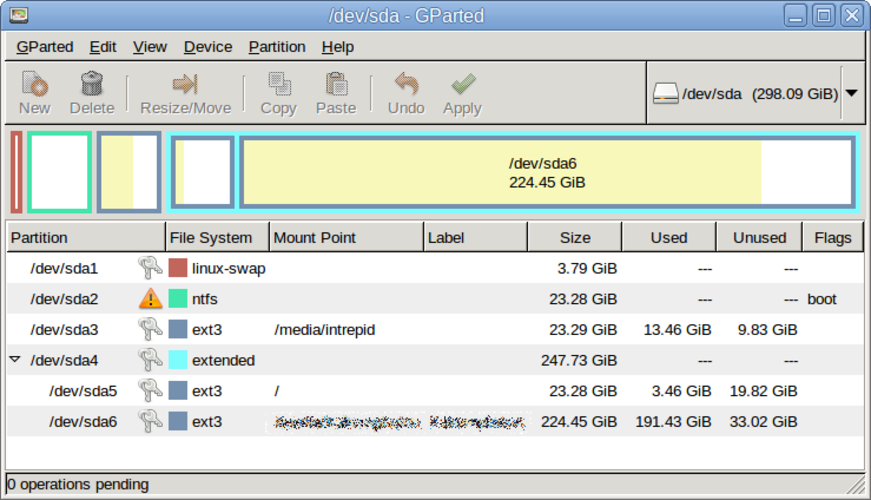
GParted is not a drop‑in replacement for Macrium Reflect. It can copy and resize partitions, but it lacks full disk imaging, scheduled backups, boot‑loader handling, and the ability to restore images to bare metal. It is useful for users who only need partition manipulation or quick copy of a single partition, such as system administrators or advanced Linux users who prefer live‑USB editing.
Cobertura de recursos
- Licença
- GPL-3.0
- Preço
- Grátis
- Versão mais recente
- 1.8.1
- Avaliação
- —
O que funciona igual
- Both can copy disk partitions
- Both support ext4 and other Linux file systems
- Both run on Linux
- Both have GUI interfaces
O que muda
- GParted does not create full disk or partition images; it only copies partitions
- No scheduling or automated backups in GParted
- No boot‑loader or MBR/EFI handling in GParted
- No image restore to bare metal in GParted
- GParted lacks support for creating incremental or differential backups
Abrindo seus arquivos do Macrium Reflect
There is no documented way to open or import Macrium Reflect image files (.mrimg) in GParted. The two formats are incompatible; you would need to use Macrium Reflect on Windows or a compatible tool that can read its image format.
Trocando o Macrium Reflect pelo GParted, passo a passo
- 1. Back up your data with Macrium Reflect on Windows. 2. Export the image to a standard format (e.g., ISO or raw) if possible. 3. Boot a GParted live USB on the target Linux machine. 4. Use GParted to create the necessary partitions. 5. Restore the exported image using a tool like dd or partclone. 6. Reinstall the boot loader (GRUB or systemd‑boot) on the new system.
- faq
- :
- Array — Array — Array
Principais recursos do GParted
- Interface gráfica (front-end) GTK para o GNU Parted
- Suporte para redimensionar, mover, copiar e excluir partições
- Agnóstico de sistema de arquivos: ext4, NTFS, FAT32, XFS, Btrfs, etc.
- Suporte a pendrive bootável (Live-USB) para edição pré-inicialização
- Desfazer/refazer para operações de partição
- Verificação de checksum para integridade de dados
- Modo em lote via linha de comando para scripts
Como instalar o GParted no Linux
Ubuntu / Mint
sudo apt install gpartedDebian
sudo apt install gpartedFedora
sudo dnf install gpartedArch / Manjaro
sudo pacman -S gpartedopenSUSE
sudo zypper install gpartedOutras 2 alternativas ao Macrium Reflect
ClonezillaClonezilla é uma ferramenta gratuita e de código aberto para criação de imagens e clonagem de discos para…Código abertoGrátisClonezilla vs Macrium ReflectTimeshiftTimeshift é uma utilitário de restauração de sistema para Linux que cria snapshots Btrfs ou backups rsync…Código abertoGrátisTimeshift vs Macrium Reflect
Avalie o GParted
Seja o primeiro a avaliar
É um bom substituto do Macrium Reflect?
8