
 KylixLinux
vs
KylixLinux
vs
 Inprise DelphiWindows
Kylix como alternativa Linux ao Inprise Delphi
Atualizado em
Nossa avaliação
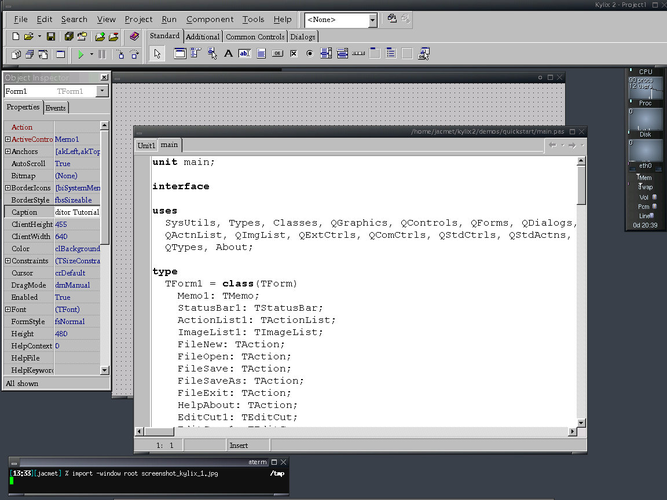
Kylix can serve as a drop‑in replacement for Inprise Delphi if you need a native Linux environment and are comfortable with an older, discontinued tool. It offers the same Object Pascal compiler, visual form designer and VCL‑style component set that Delphi users expect, so existing Delphi code often compiles with little change. However, because development stopped around 2005, you won’t get modern language features, current IDE comforts, or official support. For hobbyists or teams maintaining legacy Delphi code that must run on Linux, Kylix is usable; for new projects or anyone needing up‑to‑date tooling, a modern alternative like Lazarus or Embarcadero’s cross‑platform Delphi is a better choice.
- Licença
- —
- Preço
- paid
- Versão mais recente
- —
- Avaliação
- 5/5 (1)
O que funciona igual
- Object Pascal language support
- Visual form designer with drag‑and‑drop components
- Integrated debugger
- VCL‑like component library for UI and database access
- Project and package management
O que muda
- No longer maintained – no bug fixes or security updates
- Lacks modern language extensions introduced after Delphi 2005
- No built‑in cross‑platform deployment to Windows/macOS – Linux‑only output
- IDE runs on Windows but targets Linux, unlike Delphi’s native Windows IDE
- Package ecosystem is frozen; many third‑party components are unavailable
Abrindo seus arquivos do Inprise Delphi
Kylix can open Delphi .dpr project files and .pas source units because it shares the same project format used by Delphi 7 and earlier. However, any newer Delphi language features or components introduced after Kylix’s last release will not be recognized, so you may need to adjust the code manually. Exporting to newer Delphi versions is possible, but you may lose compatibility with components that no longer exist in Kylix.
Trocando o Inprise Delphi pelo Kylix, passo a passo
- Install Kylix on a supported Linux distribution (typically Fedora 9 or similar) or run the Windows installer in a VM if needed
- Copy your existing .dpr, .pas, .dfm files into a new Kylix workspace
- Open the project in Kylix, resolve any missing units or components by replacing them with equivalents from the Kylix component set
- Recompile the application; fix any compiler errors caused by unsupported language features
- Run the built executable on Linux and test UI and database functionality
Principais recursos do Kylix
- Compilador Object Pascal para Linux
- Designer de formulários visual com componentes de arrastar e soltar
- Depurador integrado
- Biblioteca de componentes semelhante à VCL
- Gerenciamento de projetos e pacotes
- Ferramentas de compilação via linha de comando
Perguntas frequentes
Can I use modern Delphi components with Kylix?
No. Kylix only includes the component set that shipped with it; newer third‑party or Embarcadero components are not compatible without source code changes.
Is Kylix still receiving updates?
No. Borland discontinued Kylix in the mid‑2000s, so there are no official updates or security patches.
What free alternative should I consider instead of Kylix?
Lazarus with the Free Pascal compiler is actively maintained, compatible with most Delphi code, and provides a similar visual designer on Linux.