

Linux · Escritório
Planner
GNOME Planner is a free, lightweight project management tool for GNOME desktops, aimed at simple scheduling tasks.
- Licença
- GPL-3.0
- Versão mais recente
- —
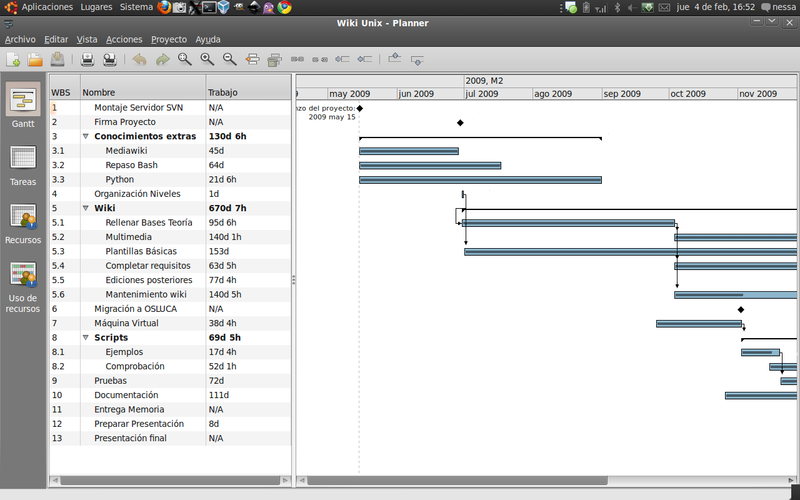
O que é o Planner?
GNOME Planner was first released in the early 2010s as part of the GNOME project. It was designed to give users a straightforward way to create Gantt charts and track project milestones without the complexity of larger suites. Over the years it saw sporadic updates, but the development pace slowed and the last stable release dates back several years.
The target audience is small teams or individual users who need basic project planning. It offers a clean, drag‑and‑drop interface, task lists, and simple resource allocation. Users coming from FastTrack Schedule or Microsoft Project will notice the lack of advanced features like cost tracking, resource leveling, or detailed reporting.
Compared to its Windows counterparts, Planner feels more like a personal organizer than a full‑blown enterprise tool. It runs natively on GNOME, integrates with the desktop, and has a minimal learning curve, but it lacks the depth and polish of the commercial software it aims to replace.
Ideal para: Small teams or solo users needing basic Gantt‑chart planning without the overhead of enterprise features.
Principais recursos do Planner
- Create and edit Gantt charts
- Drag‑and‑drop task scheduling
- Simple resource allocation
- Milestone tracking
- Export to CSV
- Keyboard shortcuts for common actions
- Integration with GNOME desktop
Prós
- Free and open source
- Lightweight and fast
- Easy to learn
- Good for small projects
- Native GNOME integration
Contras
- No advanced cost or resource management
- Limited reporting options
- No project templates
- No active development
- Export options limited
Programas do Windows que o Planner substitui
 FastTrack Schedule
Dicas para quem vem do Windows
Files are saved in a simple XML format that can be opened with any text editor; there is no native import for MS Project files, so you may need to export from the Windows tool to CSV and then import into Planner. Keyboard shortcuts differ: use Ctrl+N for new project, Ctrl+S to save, and arrow keys to move tasks. Workflow is linear; you’ll need to manually set dependencies instead of using drag‑and‑drop linking.
Planner: perguntas frequentes
Is GNOME Planner still maintained?
The last stable release was several years ago and there are no recent commits; the project is effectively discontinued.
Can I import Microsoft Project files into Planner?
No native import; you’ll need to export from MS Project to CSV and then import the CSV into Planner.
What file format does Planner use?
Planner stores projects in an XML file with a .planner extension, which can be edited manually if needed.
Is Planner free?
Yes, Planner is free and distributed under the GPL license.
Atualizado em