
 PlannerLinux
vs
Microsoft To DoWindows
Planner como alternativa Linux ao Microsoft To Do
Atualizado em
Nossa avaliação
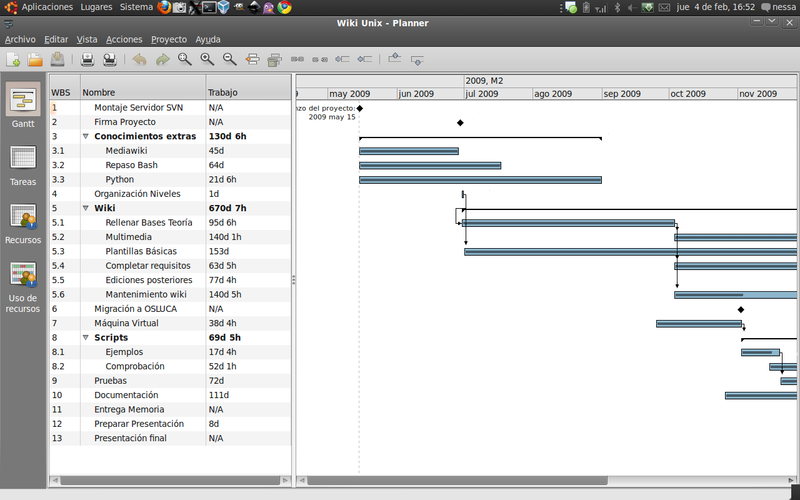
Planner is a poor replacement for Microsoft To Do. While both manage tasks, Planner is a discontinued GNOME app focused on Gantt charts and project scheduling, not personal daily task lists. It lacks cloud sync, reminders, and subtasks, which are core to To Do. Use it only if you need local, offline Gantt-style planning on GNOME and don't care about cross-device sync. For most users, it fails to replicate the simple, synced checklist experience of To Do.
- Licença
- GPL-3.0
- Preço
- Grátis
- Versão mais recente
- —
- Avaliação
- —
O que funciona igual
- Create and manage task lists
- Mark tasks as complete
- Set due dates or milestones
- Local offline access to data
- Keyboard shortcuts for navigation
O que muda
- No cloud sync across devices
- No reminders or notifications
- No support for subtasks or nested lists
- Focus on Gantt charts and resources rather than simple checklists
- Discontinued status means no future updates or security patches
Abrindo seus arquivos do Microsoft To Do
Planner does not natively open Microsoft To Do files, as To Do uses a proprietary cloud-based format rather than a standard local file. You can export tasks from To Do as CSV, which Planner may import if it supports CSV ingestion, but this is a manual, one-way process. There is no direct file compatibility or automatic sync mechanism between the two.
Trocando o Microsoft To Do pelo Planner, passo a passo
- Export your tasks from Microsoft To Do as a CSV file
- Install GNOME Planner on your Linux system
- Open Planner and check if it supports importing CSV files
- Map your CSV columns to Planner's task fields
- Manually adjust any missing due dates or priorities
- Test the workflow to ensure it meets your needs
Principais recursos do Planner
- Create and edit Gantt charts
- Drag‑and‑drop task scheduling
- Simple resource allocation
- Milestone tracking
- Export to CSV
- Keyboard shortcuts for common actions
- Integration with GNOME desktop
Perguntas frequentes
Can Planner sync with my phone?
No, Planner is a local desktop application. It does not offer cloud sync or mobile apps, so your tasks will only exist on the machine where you use it.
Is Planner still being developed?
No, GNOME Planner is discontinued. It is no longer maintained, which means you should not expect bug fixes, security updates, or new features.
Does Planner support subtasks?
No, Planner does not support nested lists or subtasks. It is designed for flat lists of tasks with Gantt chart visualization, not hierarchical task breakdowns.
Outras 5 alternativas ao Microsoft To Do
 TodoistTodoist is a task manager and habit tracker with cross-platform sync, used for personal and team productivity.FlatpakTodoist vs Microsoft To DoTaskwarriorTaskwarrior é um gerenciador de tarefas baseado em linha de comando para Linux, com recursos avançados de…Código abertoGrátisTaskwarrior vs Microsoft To DoGnome PlannerUm gerenciador de tarefas minimalista e local-first para o GNOME, focado em simplicidade e uso offline.Código abertoGrátisGnome Planner vs Microsoft To Do
 JoplinJoplin é um aplicativo de anotações e tarefas de código aberto e multiplataforma que armazena dados em…Código abertoGrátisFlatpakJoplin vs Microsoft To DoKOrganizerKOrganizer is a calendar and task manager part of the KDE suite, designed to replace tools like Asana on…Código abertoGrátisKOrganizer vs Microsoft To Do