
Windows · Acessórios
Melhores alternativas Linux ao Microsoft Calculator
Microsoft Calculator is a Windows app with standard, scientific, programmer, date, and graphing modes.
Atualizado em
Resposta rápida
A melhor alternativa Linux ao Microsoft Calculator é o GNOME Calculator. Outras boas opções: KCalc, Qalculate! (GTK UI), SpeedCrunch.
5 alternativas Linux ao Microsoft Calculator
-
GNOME Calculator is the default, lightweight scientific calculator for the GNOME desktop environment, offering standard and advanced calculation modes.
GNOME Calculator is a solid replacement for basic and scientific tasks, covering arithmetic, trigonometry, and unit conversions well. However, it lacks the dedicated programmer mode (hex/binary logic) and graphing capabilities found in Microsoft Calculator. If you rely heavily on date calculations…
Cobertura de recursos75% -

KCalc é a calculadora científica do KDE com funções trigonométricas, operações lógicas e pilha de resultados.
KCalc is a solid replacement for Windows Calculator if you primarily need scientific and basic arithmetic functions. It handles trigonometry, logic, and statistics well, with a useful results stack. However, it lacks dedicated programmer mode for hex/binary/octal, date calculations, and graphing…
Cobertura de recursos65% -
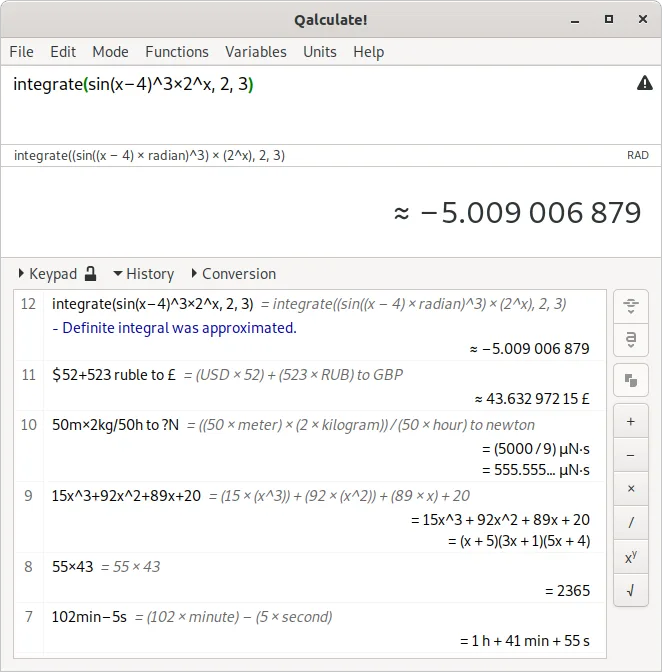
Uma calculadora de desktop poderosa e versátil, com matemática simbólica, conversão de unidades e capacidades de precisão arbitrária.
Qalculate! (GTK UI) is a strong replacement for Microsoft Calculator, especially for users who go beyond basic arithmetic. It covers all core modes: scientific, programmer, date calculation, and graphing — often with more depth. The interface is keyboard-friendly and highly functional. While…
Cobertura de recursos95% -
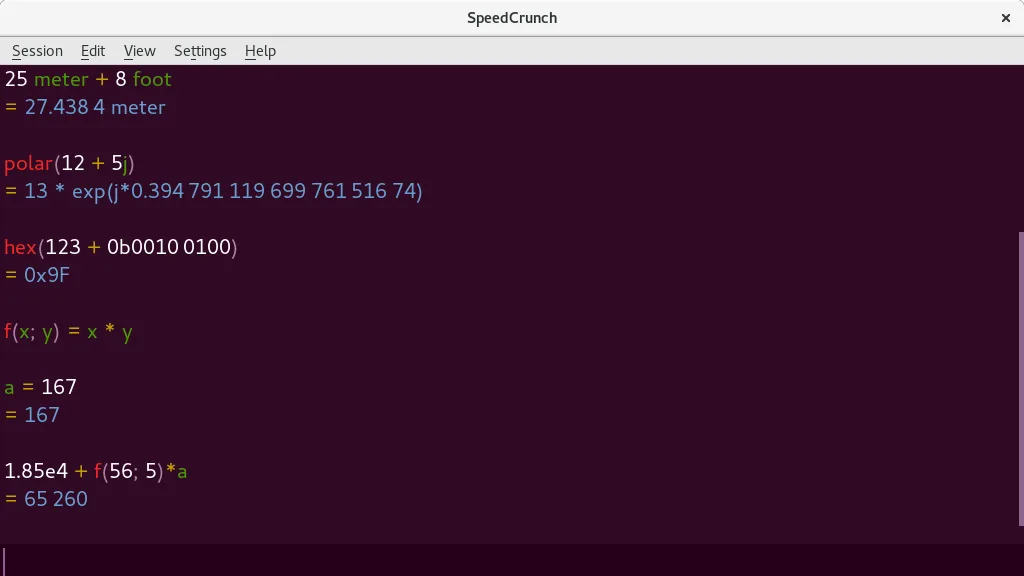
SpeedCrunch é uma calculadora científica de alta precisão com interface responsiva baseada em teclado e avaliação em tempo real.
SpeedCrunch is a strong replacement for Microsoft Calculator if you primarily use scientific, programmer, or basic arithmetic modes and prefer keyboard input. It excels in precision, real-time feedback, and expression clarity with syntax highlighting. However, it lacks graphing and date calculation…
Cobertura de recursos85% -
Galculator is a lightweight, GTK‑based calculator for Linux that supports basic, scientific, and programming modes.
Galculator is a solid, lightweight replacement for the standard and scientific modes of Microsoft Calculator. It handles basic arithmetic, trigonometry, and programmer base conversions well, with a clean GTK interface that feels native to Linux desktops. However, it lacks graphing and date…
Cobertura de recursos75%



O que é o Microsoft Calculator?
Microsoft Calculator is a simple, free Windows tool that many use for everyday arithmetic, quick scientific calculations, or programming‑related math. The app is bundled with Windows, so there is no separate cost or license to worry about. It runs on all recent Windows versions. Users turn to Linux alternatives when they switch platforms, want a native Linux experience, or need a calculator that integrates better with their desktop environment.
O que um substituto do Microsoft Calculator precisa fazer
- Basic arithmetic
- Scientific functions (exponents, trigonometry)
- Programmer mode (hex, binary, octal)
- Date calculations
- Graphing capability
- Unit conversion
- Keyboard‑friendly interface
Dá para usar o Microsoft Calculator no Linux?
There is no official Microsoft Calculator for Linux. Users can run the Windows binary under Wine, but stability varies and graphing support is limited. No native or web version exists. GNOME Calculator, KCalc, Qalculate!, SpeedCrunch, and Galculator are all native Linux apps that cover the same feature set. If you need a quick Windows‑only version, Wine or a virtual machine is the only option.
Qual alternativa escolher?
For a GNOME‑centric desktop, GNOME Calculator is the most integrated. KCalc works best on KDE or when you want a classic look. Qalculate! offers the richest feature set for power users. SpeedCrunch is ideal for those who need a fast, lightweight, and highly responsive calculator. Galculator is a lightweight GTK app that covers most basic needs.
Levando seus arquivos e hábitos do Microsoft Calculator
There is no data to export from Microsoft Calculator; it stores no user‑specific settings or history. All Linux alternatives use their own configuration files and do not import any Windows data.
Comparação lado a lado
| Aplicativo | Licença | Flatpak | Versão mais recente | Cobertura de recursos | Avaliação |
|---|---|---|---|---|---|
| GNOME Calculator | GPL-3.0 | — | 51.1 | 75% | — |
| KCalc | GPL-2.0+ | ✓ | 26.08.3 | 65% | 5/5 |
| Qalculate! (GTK UI) | GPL-2.0+ | ✓ | 5.13.0 | 95% | — |
| SpeedCrunch | GPL-2.0+ | ✓ | 1.2.0 | 85% | — |
| Galculator | GPL-2.0-or-later | — | 2.1.4 | 75% | — |
Microsoft Calculator: perguntas frequentes
Can I use Microsoft Calculator on Linux via Wine?
Yes, but the experience is inconsistent; graphing may not work and performance can lag.
Which Linux calculator supports graphing?
GNOME Calculator, Qalculate!, and SpeedCrunch all include a graphing mode.
Do these Linux calculators support programmer mode?
KCalc and Qalculate! provide full programmer support; GNOME Calculator offers limited programmer functions.
Are these Linux calculators free?
All listed alternatives are free and open‑source; no paid versions exist.
Qual a importância do Microsoft Calculator para você?
Conhece uma alternativa melhor? Sugerir uma alternativa