
 SpeedCrunchLinux
vs
Microsoft CalculatorWindows
SpeedCrunch como alternativa Linux ao Microsoft Calculator
Atualizado em
Nossa avaliação
SpeedCrunch is a strong replacement for Microsoft Calculator if you primarily use scientific, programmer, or basic arithmetic modes and prefer keyboard input. It excels in precision, real-time feedback, and expression clarity with syntax highlighting. However, it lacks graphing and date calculation features, so users relying on those will need supplementary tools. Its unit conversion is functional but not as extensive as some expect. If you value speed, accuracy, and a clean keyboard-driven interface, SpeedCrunch is excellent—especially for power users and developers.
- Licença
- GPL-2.0+
- Preço
- Grátis
- Versão mais recente
- 1.2.0 (17 de novembro de 2026)
- Avaliação
- —
O que funciona igual
- Both support standard and scientific modes with trigonometry and exponents
- Programmer mode available with hex, binary, and octal support
- Unit conversion is built-in and usable via keyboard
- Fully functional without requiring a mouse
- Real-time evaluation feedback during input
O que muda
- SpeedCrunch has no graphing mode
- Date calculations are not supported
- Microsoft Calculator has a simpler, more visual interface
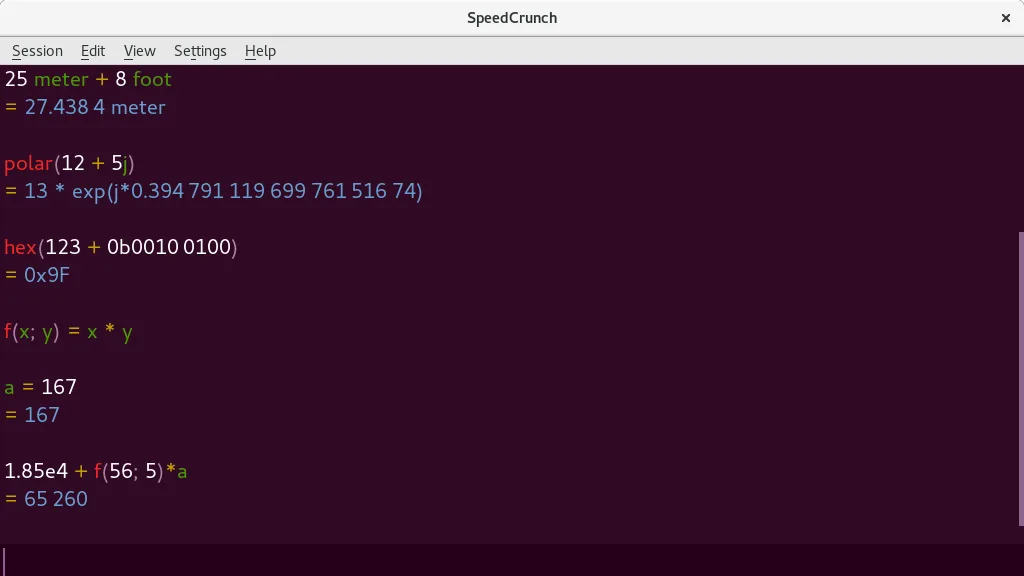
- SpeedCrunch supports user-defined functions and complex numbers, which Microsoft Calculator does not
- SpeedCrunch offers scrollable history and syntax highlighting, not present in Microsoft Calculator
Abrindo seus arquivos do Microsoft Calculator
SpeedCrunch does not import or export files in Microsoft Calculator format. Microsoft Calculator typically doesn’t save calculation sessions, and when it does (e.g., in graphing mode), it uses proprietary formats. SpeedCrunch saves no session files by default but maintains a scrollable history in memory. There is no direct file compatibility, but both are session-based, so manual transcription is unnecessary for typical use.
Trocando o Microsoft Calculator pelo SpeedCrunch, passo a passo
- Install SpeedCrunch via your package manager (e.g., sudo apt install speedcrunch on Ubuntu)
- Launch it and start typing expressions—results update in real time
- Use Ctrl+Space for autocompletion of functions and variables
- Browse the history with up/down arrows or click the sidebar
- Customize unit conversions or define your own functions in Settings > Functions or Units
Principais recursos do SpeedCrunch
- Cálculos de alta precisão (até 50 casas decimais)
- Exibição de entrada com realce de sintaxe e pré‑visualização em tempo real
- Navegação completa pelo teclado e suporte a atalhos
- Constantes embutidas e mais de 80 funções matemáticas
- Suporte a números complexos e conversões de unidades
- Variáveis e funções definidas pelo usuário
- Histórico de cálculos rolável
- Autocompletar funções e verificação de sintaxe
Como instalar o SpeedCrunch no Linux
flatpak install flathub org.speedcrunch.SpeedCrunchsudo apt install speedcrunchsudo dnf install speedcrunchsudo pacman -S speedcrunchsudo zypper install speedcrunchPerguntas frequentes
Can SpeedCrunch graph functions like Microsoft Calculator?
No, SpeedCrunch does not have graphing capabilities. You’ll need a separate tool like gnuplot, Qalculate!, or KAlgebra for plotting.
Is SpeedCrunch safe to use on Linux?
Yes. It’s open-source (GPL-2.0+), actively maintained, and packaged in major distros. Binaries from official repos are trustworthy.
Can I use it without a mouse?
Yes. SpeedCrunch is designed for full keyboard use—typing expressions, navigation, and history recall all work without a mouse.
Outras 4 alternativas ao Microsoft Calculator
 KCalcKCalc é a calculadora científica do KDE com funções trigonométricas, operações lógicas e pilha de resultados.Código abertoGrátisFlatpakKCalc vs Microsoft Calculator
 Qalculate! (GTK UI)Uma calculadora de desktop poderosa e versátil, com matemática simbólica, conversão de unidades e capacidades…Código abertoGrátisFlatpakQalculate! (GTK UI) vs Microsoft CalculatorGalculatorGalculator is a lightweight, GTK‑based calculator for Linux that supports basic, scientific, and programming…Código abertoGrátisGalculator vs Microsoft Calculator