
 NatronLinux
vs
After EffectsWindows
NatronLinux
vs
After EffectsWindows
Natron como alternativa Linux ao After Effects
Atualizado em
Nossa avaliação
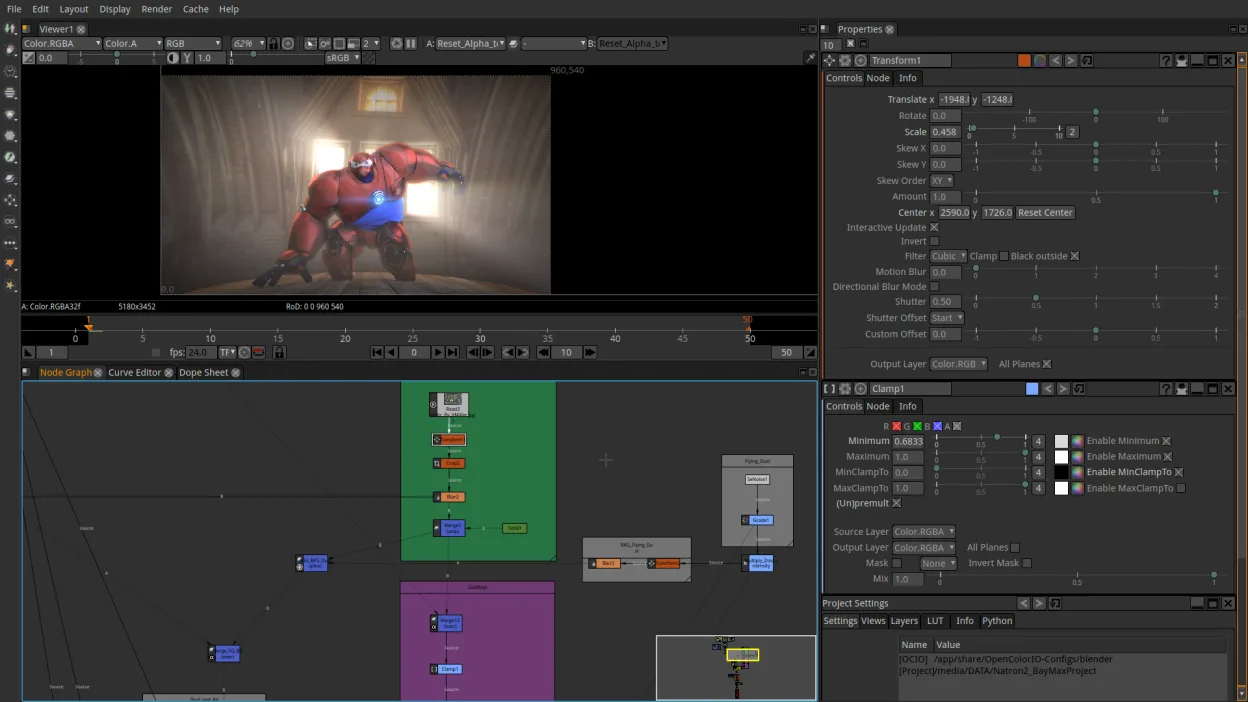
Natron is a solid, free alternative for compositing and VFX work, but it is not a direct 1:1 replacement for After Effects. It excels at node-based compositing, which is actually the workflow used by Nuke and Fusion, rather than the layer-based timeline AE uses. If you are coming from AE for motion graphics, you will face a steep learning curve and may miss specific AE-centric tools. It is best suited for users who want a free, open-source compositor for VFX, green screen keying, and basic animation, and who are willing to adapt to a node graph interface.
- Licença
- GPL-2.0-or-later
- Preço
- Grátis
- Versão mais recente
- 2.5.0 (26 de novembro de 2022)
- Avaliação
- —
O que funciona igual
- Both support multi-layer compositing for VFX and motion graphics.
- Both offer keying tools for green screen removal.
- Both support camera and object tracking features.
- Both allow keyframe animation and timeline editing.
- Both can export to common video formats.
O que muda
- Natron uses a node-based workflow, while After Effects uses a layer-based timeline, which changes how projects are structured and animated.
- After Effects has a massive ecosystem of third-party plugins and scripts; Natron supports OpenFX but has a smaller plugin library.
- Natron lacks the deep integration with Adobe Creative Cloud apps like Premiere Pro and Photoshop that After Effects enjoys.
- After Effects has more advanced 3D camera tracking and stabilization tools out of the box.
- Natron is GPL-licensed and community-driven, whereas After Effects is proprietary and commercially supported.
Abrindo seus arquivos do After Effects
Natron does not natively open .aep (After Effects project) files. You will need to export your work from After Effects as image sequences or video files to bring them into Natron. Conversely, Natron saves its own project format (.npp) and cannot export .aep files. If you are moving from AE to Natron, you will be rebuilding your project structure in the node graph.
Trocando o After Effects pelo Natron, passo a passo
- Install Natron via your package manager or Flathub.
- Export your After Effects project as an image sequence (EXR or PNG) to preserve quality.
- Learn the basics of node-based compositing in Natron's documentation.
- Recreate your layer stack as a node graph in Natron.
- Re-implement keyframes and animations using Natron's timeline and keyframe editor.
- Test your export settings to ensure compatibility with your NLE.
Principais recursos do Natron
- Motor de composição baseado em nós
- Suporte a scripting em Python
- Suporte nativo a plugins OpenFX
- Ferramentas de color grading
- Edição de timeline e keyframes
- Exportação para formatos de vídeo comuns
Como instalar o Natron no Linux
flatpak install flathub fr.natron.NatronPerguntas frequentes
Can I use Natron for motion graphics like After Effects?
Yes, but the workflow is different. Motion graphics in Natron are built using nodes and expressions rather than a layer timeline. It is powerful but requires a different mindset.
Does Natron support Python scripting?
Yes, Natron has Python scripting support, which allows for automation and custom tool development, similar to After Effects' ExtendScript.
Is Natron suitable for beginners?
It can be challenging for beginners used to layer-based software. The node-based interface has a steeper learning curve but offers more flexibility and clarity for complex composites.
Outras 4 alternativas ao After Effects
 BlenderBlender é uma suíte 3D gratuita e de código aberto para modelagem, animação, renderização e edição de vídeo.Código abertoGrátisFlatpakBlender vs After Effects
 KdenliveO Kdenlive é um editor de vídeo não linear gratuito e repleto de recursos, construído sobre o framework MLT.Código abertoGrátisFlatpakKdenlive vs After Effects
 OpenShotOpenShot é um editor de vídeo não linear gratuito, de código aberto, para Linux e outras plataformas…Código abertoGrátisFlatpakOpenShot vs After Effects
 ShotcutShotcut é um editor de vídeo gratuito e de código aberto para Linux, com suporte a uma ampla variedade de…Código abertoGrátisFlatpakShotcut vs After Effects