
 PiperLinux
vs
Razer SynapseWindows
PiperLinux
vs
Razer SynapseWindows
Piper como alternativa Linux ao Razer Synapse
Atualizado em
Nossa avaliação
Piper is a viable replacement for Razer Synapse if you use a supported Razer mouse on Linux and need basic to intermediate customization. It handles DPI, button remapping, LED colors, and profile management through a clean interface. However, it lacks advanced macro scripting, cloud profiles, and full device support—some Razer models aren't recognized. If your mouse is supported and you don’t rely on complex macros or Razer’s ecosystem, Piper works well locally. Users needing full feature parity with Synapse will still face limitations.
- Licença
- GPL-2.0-or-later
- Preço
- Grátis
- Versão mais recente
- 0.8 (24 de setembro de 2024)
- Avaliação
- —
O que funciona igual
- Supports DPI adjustment per profile
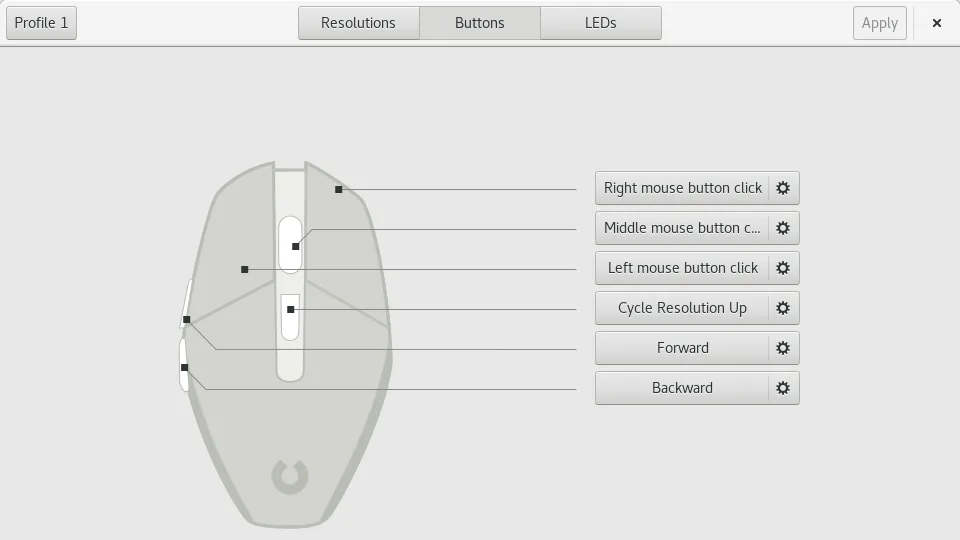
- Allows custom button mapping
- Enables RGB lighting configuration
- Manages multiple profiles locally
- Applies settings without requiring root
O que muda
- No built-in macro recorder—macros must be defined via ratbagd or Piper with limited complexity
- No cloud syncing or Razer account integration
- Limited device support—only Razer mice confirmed compatible with libratbag
- No polling rate adjustment in Piper (handled separately by hid-raptor kernel module if needed)
- No automatic per-application profile switching like in Synapse
Abrindo seus arquivos do Razer Synapse
Piper does not support importing Razer Synapse configuration files. Razer Synapse uses proprietary formats not readable by Piper or ratbagd. Configuration must be recreated manually. Piper can export and import its own JSON-based configuration files, which are portable between systems using the same mouse model and ratbagd version, but these are not compatible with Windows or Synapse.
Trocando o Razer Synapse pelo Piper, passo a passo
- Install ratbagd and Piper (via package manager or Flathub)
- Ensure your Razer mouse is supported by checking the libratbag compatibility list
- Launch Piper after starting ratbagd as root or via systemd
- Recreate DPI, button, and LED settings manually
- Export the configuration in Piper for backup
Principais recursos do Piper
- Ajustar DPI por perfil
- Criar e excluir perfis
- Definir ações por botão
- Configurar cores RGB de LED
- Exportar e importar arquivos de configuração
- Suporta múltiplos mouses simultaneamente
- Funciona em Wayland e X11
Como instalar o Piper no Linux
flatpak install flathub org.freedesktop.PiperPerguntas frequentes
Does Piper work with all Razer mice?
No. Only select Razer mice are supported by libratbag. Check the libratbag GitHub page for a full list. Unsupported models won’t appear in Piper.
Can I set complex macros like in Synapse?
Only simple macros are possible, such as key combinations. Complex macros with delays or sequences aren’t supported in the current ratbagd implementation.
Do settings persist after reboot?
Yes, Piper saves configurations locally through ratbagd. Profiles are restored on plug-in, provided the same daemon and rules are in place.
Outras 3 alternativas ao Razer Synapse
 PolychromaticPolychromatic é um gerenciador de iluminação RGB de código aberto para dispositivos Razer no Linux, usando o…Código abertoGrátisFlatpakPolychromatic vs Razer Synapse