
Windows · Ferramentas do Sistema
Melhores alternativas Linux ao Process Explorer
Process Explorer is a Windows task manager that shows detailed process info, including CPU, memory, handles, and DLLs.
Atualizado em
Resposta rápida
A melhor alternativa Linux ao Process Explorer é o htop. Outras boas opções: Glances, GNOME System Monitor.
3 alternativas Linux ao Process Explorer
-
htop é um visualizador de processos interativo para sistemas semelhantes ao Unix, substituindo o antigo comando top por uma interface mais amigável.
htop is a solid replacement for many Process Explorer tasks, especially for users who need real‑time monitoring, process tree views, and quick kill/renice actions. It works well for system administrators, developers, and power users on Linux who are comfortable with a terminal interface. However…
Cobertura de recursos70% -
Glances é um monitor de sistema multiplataforma, baseado em Python, que exibe estatísticas de CPU, memória, disco, rede e processos em uma interface de terminal ou web.
Glances can replace Process Explorer for users who need a quick, terminal‑based overview of system resources and per‑process statistics. It shows CPU, memory, disk, network, and a sortable process list, and it can filter by name or PID. However, it lacks the deep Windows‑specific details such as…
Cobertura de recursos70% -
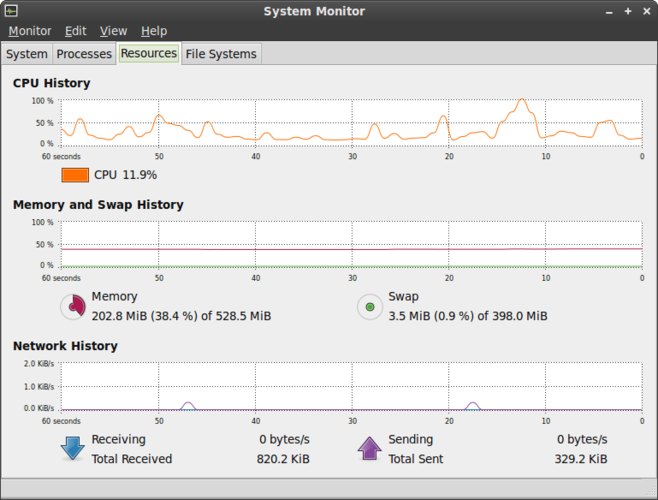
O Monitor de Sistema GNOME é o utilitário padrão do Linux para visualizar processos em execução, uso de CPU, memória e recursos do sistema.
GNOME System Monitor is a decent replacement for basic process and system monitoring on Linux, but falls short for advanced troubleshooting. It covers core functions like viewing CPU, memory, and process hierarchy with real-time updates, making it suitable for casual users and beginners. However…
Cobertura de recursos60%

O que é o Process Explorer?
Process Explorer is a lightweight but powerful task manager used by system administrators, developers, and power users to monitor and troubleshoot running processes on Windows. It extends the basic Task Manager with detailed views of handles, DLLs, and network activity, and is often used as a first step in debugging or diagnosing system problems. Users look for Linux alternatives because they need similar visibility into processes without relying on Windows tools.
The program is freeware; it is distributed under a permissive license and can be downloaded from Microsoft’s SysInternals site without cost. No subscription or paid version exists, making it accessible to anyone.
On Linux, users want a native tool that can display per‑process CPU, memory, threads, open files, and network usage. The goal is to replace Process Explorer’s deep inspection capabilities with a Linux‑friendly interface that works in a terminal or GUI.
O que um substituto do Process Explorer precisa fazer
- Per‑process CPU and memory usage
- Thread and handle (file/socket) listing
- DLL/Shared library view
- Network connection details
- Process tree and parent/child relationships
- Real‑time updates
- Search and filter functionality
Dá para usar o Process Explorer no Linux?
There is no native Linux version of Process Explorer. It can be run under Wine, but stability and performance are variable. No official web or Proton/Bottles support exists.
Qual alternativa escolher?
For a terminal‑only user, htop offers real‑time CPU/memory and process tree views. Glances adds network and disk I/O metrics in a single screen. If a graphical interface is preferred, GNOME System Monitor provides a familiar GUI with process details. nmon is useful for detailed performance analysis over time.
Levando seus arquivos e hábitos do Process Explorer
Process Explorer does not export data in a standard format; you would need to manually record metrics or use scripts that query Windows APIs. Linux alternatives rely on native system calls and provide their own export options (e.g., CSV from htop or Glances). No direct migration path exists.
Comparação lado a lado
| Aplicativo | Licença | Flatpak | Versão mais recente | Cobertura de recursos | Avaliação |
|---|---|---|---|---|---|
| htop | GPL-2.0 | — | 3.5.3 | 70% | — |
| Glances | GPL-3.0 | — | 4.5.8 | 70% | — |
| GNOME System Monitor | GPL-2.0 | — | 51.1 | 60% | 5/5 |
Process Explorer: perguntas frequentes
Can I run Process Explorer on Linux with Wine?
Yes, but it may not show all handles or network sockets correctly, and performance can be inconsistent.
Which Linux tool shows DLLs or shared libraries?
None of the listed tools show shared libraries in the same way; you can use lsof or /proc to inspect loaded libraries.
Is there a free alternative that works in the terminal?
htop and Glances are free, terminal‑based tools that provide most of the needed metrics.
Do these tools support real‑time updates?
All listed tools update continuously, though the refresh rate may vary (e.g., htop defaults to 1‑second intervals).
Qual a importância do Process Explorer para você?
Conhece uma alternativa melhor? Sugerir uma alternativa