
 ShotwellLinux
vs
Adobe Lightroom ClassicWindows
ShotwellLinux
vs
Adobe Lightroom ClassicWindows
Shotwell como alternativa Linux ao Adobe Lightroom Classic
Atualizado em
Nossa avaliação
Shotwell is not a replacement for Adobe Lightroom Classic. It is a lightweight GNOME organizer for casual users who need basic import, tagging, and non-destructive adjustments like crop and color. It lacks the advanced RAW processing, extensive metadata controls, and batch preset workflows Lightroom provides. If you rely on Lightroom for professional cataloging, complex edits, or large-scale batch processing, Shotwell will feel limiting. It suits users who only need to organize family photos and make quick fixes without a steep learning curve or heavy resource usage.
- Licença
- LGPL-2.1+
- Preço
- Grátis
- Versão mais recente
- 33.0 (13 de setembro de 2026)
- Avaliação
- —
O que funciona igual
- Non-destructive editing that preserves original files
- Support for importing and organizing RAW and JPEG images
- Basic color and tone adjustments
- Ability to tag and rate photos for organization
- Export to common formats like JPEG and PNG
O que muda
- Lacks advanced RAW processing engine and detailed histogram controls
- No support for complex batch processing with multiple presets
- Limited metadata editing compared to Lightroom's extensive EXIF/IPTC fields
- No local library database for managing tens of thousands of high-res files efficiently
- Missing professional-grade tools like local adjustments, masks, and HSL sliders
Abrindo seus arquivos do Adobe Lightroom Classic
Shotwell can open standard RAW, JPEG, PNG, and TIFF files that Lightroom Classic uses. However, it does not read Adobe Lightroom Classic catalog files (.lrcat) or its proprietary edit history. Any edits made in Lightroom are not transferred; you must re-apply them in Shotwell. Exported files from Lightroom (like edited JPEGs) open fine in Shotwell, but the non-destructive edit stack is not compatible.
Trocando o Adobe Lightroom Classic pelo Shotwell, passo a passo
- Export your edited photos from Lightroom Classic as JPEG or TIFF files.
- Copy these exported files to a local folder on your Linux system.
- Open Shotwell and use the Import function to add the folder.
- Re-apply any necessary basic edits like crop or color adjustments in Shotwell.
- Re-tag and rate photos in Shotwell to rebuild your organizational structure.
Principais recursos do Shotwell
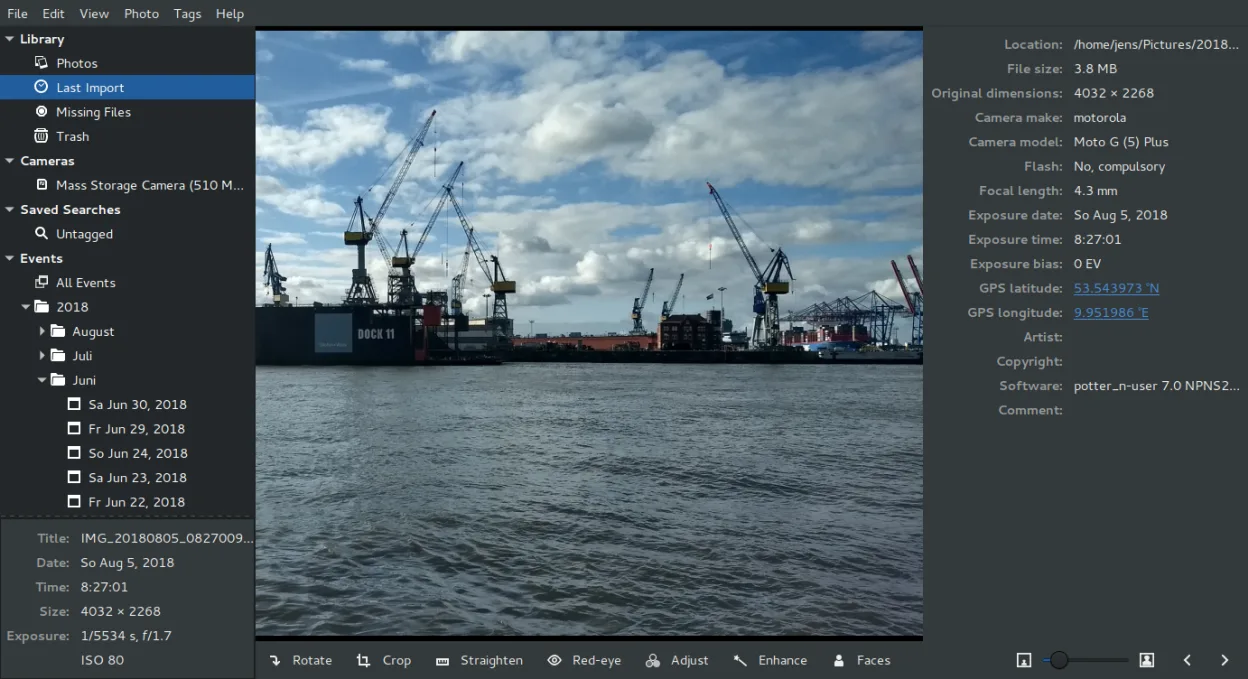
- Importar fotos de câmera ou disco
- Organizar por data, tags, avaliações
- Recorte, remoção de olho vermelho, ajuste de cor, endireitar sem destruição
- Suporte a RAW, JPEG, PNG, TIFF
- Upload para Flickr, Google Fotos, etc.
- Interface rápida e leve
- Integrado ao gerenciador de arquivos GNOME
Como instalar o Shotwell no Linux
flatpak install flathub org.gnome.Shotwellsudo apt install shotwellsudo apt install shotwellsudo dnf install shotwellsudo pacman -S shotwellsudo zypper install shotwellPerguntas frequentes
Can Shotwell handle large RAW files from professional cameras?
Yes, it supports various RAW formats. However, it is not optimized for heavy professional workflows. If you shoot high-megapixel RAW files and need extensive post-processing, Shotwell may feel slow or limited compared to dedicated pro tools.
Does Shotwell sync with cloud storage automatically?
No, it does not have built-in automatic cloud sync. It can upload to services like Flickr or Google Photos manually, but it does not act as a continuous backup solution like Lightroom Cloud or third-party sync tools.
Is Shotwell free to use?
Yes, Shotwell is free and open-source software under the LGPL-2.1+ license. There are no subscription fees or watermarks.
Outras 4 alternativas ao Adobe Lightroom Classic
 darktabledarktable é um editor de fotos gratuito e de código aberto que gerencia arquivos RAW e oferece um fluxo de…Código abertoGrátisFlatpakdarktable vs Adobe Lightroom Classic
 RawTherapeeRawTherapee é um programa de desenvolvimento de fotos raw de código aberto e multiplataforma.Código abertoGrátisFlatpakRawTherapee vs Adobe Lightroom Classic
 digiKamdigiKam é um gerenciador de fotos KDE completo para organizar, marcar e editar fotos digitais com forte…Código abertoGrátisFlatpakdigiKam vs Adobe Lightroom ClassicRawstudioRawstudio é uma ferramenta de fluxo de trabalho para fotos raw no Linux que ajuda a organizar, editar e…Código abertoGrátisDescontinuadoRawstudio vs Adobe Lightroom Classic