
 ShotwellLinux
vs
PhotoScapeWindows
Shotwell como alternativa Linux ao PhotoScape
Atualizado em
Nossa avaliação
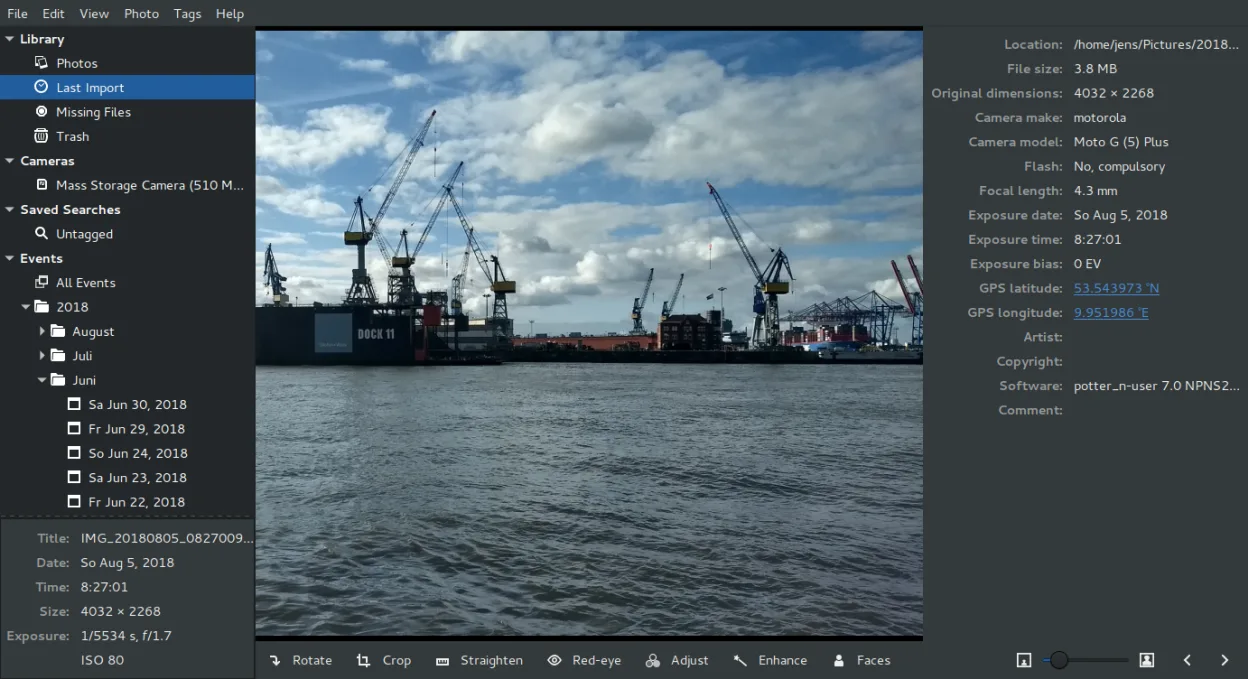
Shotwell can replace PhotoScape for users who mainly need a quick way to view, organise and perform light edits such as cropping, red‑eye removal, colour tweaks and straightening. It excels at managing large libraries and works well in GNOME environments. However, it does not provide the same batch‑rename/resize tools, collage or contact‑sheet generators, nor GIF‑animation creation that many PhotoScape fans rely on. If your workflow is centred on simple edits and library management, Shotwell is a solid alternative; if you need the richer batch and creative features, you will miss them.
- Licença
- LGPL-2.1+
- Preço
- Grátis
- Versão mais recente
- 33.2 (5 de novembro de 2026)
- Avaliação
- —
O que funciona igual
- Basic editing (crop, red‑eye, colour/brightness adjustments)
- Support for common formats (JPEG, PNG, TIFF, RAW)
- Free and open‑source licensing
- Simple, lightweight UI
O que muda
- Shotwell lacks built‑in batch rename/resize functionality
- No collage, contact‑sheet or GIF‑animation creation tools
- PhotoScape offers a dedicated batch processing panel, Shotwell does not
- Shotwell focuses on photo organisation; PhotoScape is more of an all‑in‑one editor
Abrindo seus arquivos do PhotoScape
PhotoScape saves edited images as standard formats (JPEG, PNG, BMP). Shotwell can open and export those without issue. PhotoScape does not use a proprietary project file, so there is no special compatibility concern; any images created in PhotoScape can be imported into Shotwell directly.
Trocando o PhotoScape pelo Shotwell, passo a passo
- Install Shotwell from your distribution’s repository or Flathub.
- Copy your photo folders to a location accessible to Shotwell.
- Open Shotwell and use the Import function to bring in existing images.
- If you used PhotoScape batch scripts, recreate needed batch actions with a command‑line tool like mogrify or imbatch.
- Set up tags or events in Shotwell to mirror any organisational scheme you had in PhotoScape.
Principais recursos do Shotwell
- Importar fotos de câmera ou disco
- Organizar por data, tags, avaliações
- Recorte, remoção de olho vermelho, ajuste de cor, endireitar sem destruição
- Suporte a RAW, JPEG, PNG, TIFF
- Upload para Flickr, Google Fotos, etc.
- Interface rápida e leve
- Integrado ao gerenciador de arquivos GNOME
Como instalar o Shotwell no Linux
flatpak install flathub org.gnome.Shotwellsudo apt install shotwellsudo apt install shotwellsudo dnf install shotwellsudo pacman -S shotwellsudo zypper install shotwellPerguntas frequentes
Can Shotwell create collages like PhotoScape?
No, Shotwell does not have a collage generator; you would need a separate tool such as ImageMagick or a dedicated collage app.
Is there a way to batch‑resize images in Shotwell?
Shotwell does not provide batch resize; use a command‑line utility (e.g., mogrify) or a batch‑oriented GUI like XnConvert.
Does Shotwell support GIF animation creation?
Shotwell cannot assemble GIF animations; you would have to use a tool like gifsicle or an online service after exporting the frames.
Outras 5 alternativas ao PhotoScape
 GIMPGIMP é um editor de gráficos raster gratuito e de código aberto para edição de fotos, pintura digital e…Código abertoGrátisFlatpakGIMP vs PhotoScape
 darktabledarktable é um editor de fotos gratuito e de código aberto que gerencia arquivos RAW e oferece um fluxo de…Código abertoGrátisFlatpakdarktable vs PhotoScape
 KritaKrita é um programa de pintura digital e ilustração de código aberto com recursos completos.Código abertoGrátisFlatpakKrita vs PhotoScape
 gThumb Image ViewergThumb é um visualizador, editor e organizador de imagens integrado ao GNOME para Linux.Código abertoGrátisFlatpakgThumb Image Viewer vs PhotoScape
 nomacs - Image LoungeNomacs é um visualizador de imagens gratuito e de código aberto que suporta miniaturas, metadados…Código abertoGrátisFlatpaknomacs - Image Lounge vs PhotoScape